


- Your cart is currently empty.
Choosing the Best Browser for Your Needs

When you buy a PC with Windows 10, you’ll find that it only comes with Microsoft Edge, the successor to Internet Explorer. That’s why many users download their favourite browser first, before installing antivirus and other software. In this post, we’ll take a closer look at which browser performs best on the operating system mentioned above.
We looked at the most popular browsers at the moment – Microsoft Edge, Mozilla Firefox, Opera and Google Chrome, which has a 53% market share.
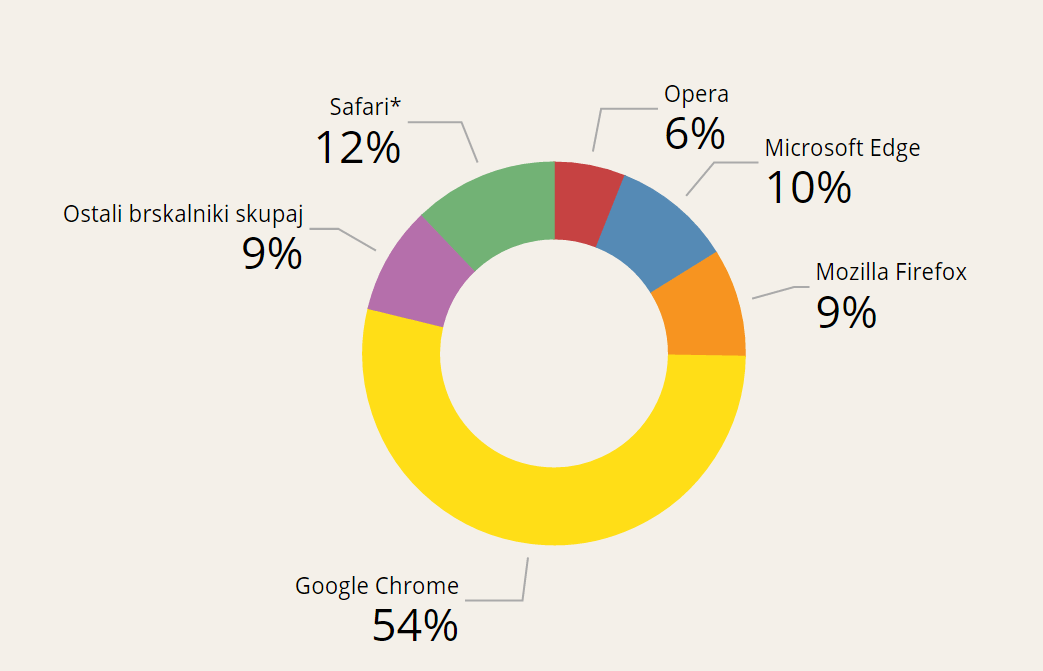
* installed primarily on Apple operating systems.
It’s true that Google Chrome is the most popular, but is it also the best? The quality of a browser is also influenced by its speed, ease of use, security and the extra features it offers. For those who use it on mobile devices, minimising battery consumption is also important.
Battery consumption
Microsoft ran a lab test in June 2016 to show that using their browser will keep you on your computer for the longest time. The following results were published:
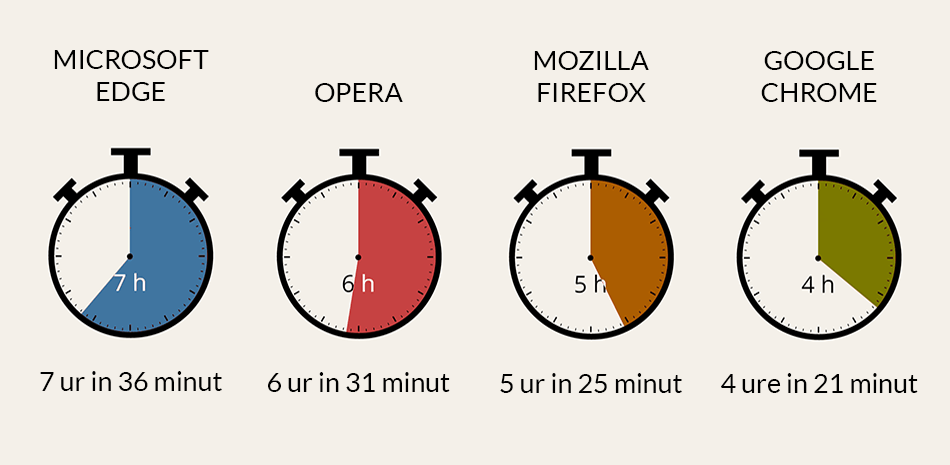
Using the Edge browser, the laptop used for testing lasted the longest. The first to respond to the test were the developers of Opera, who improved the browser’s performance so much that they claimed a 50% improvement in battery life.
Speed
The number of processes required to run the browser and memory usage are the main factors that affect how fast the browser starts up. Browsers that consume more system resources perform worse both on startup and on the speed at which pages load in the browser. Some browsers therefore compress pages, which significantly reduces page load times. Opera performs best, followed by Google Chrome.
Using
A browser should be easy to use, thanks to the features and utilities it offers. Some of the more useful ones include synchronising data, tabs and saved pages between different computers and devices. Among the browsers tested, only Microsoft Edge does not offer this option.
Plug-ins and customisations are also important for effective use, allowing users to personalise the browser to their liking. This is why users often test different browsers to help them choose their favourite.
Security
Data privacy is extremely important on the Internet. The browser you use plays a big part in protecting it. Some browsers offer high protection, while others are not as good at it.
One of the less visible but important security benefits is the separate window for entering the URL of a web page and the search box. Mozilla Firefox has such a user interface. However, if a single window is used (Google Chrome), all search queries are logged. This exposes more of your data to online attackers.
Another feature that is not directly related to security is how you can check in a particular reader which SSL security certificate the website you have visited has installed. There are significant differences between the browsers tested in this respect. It took us 3 seconds to check the certificate in Opera, but three times longer in Google Chrome, because we had to take several steps to get to the information we wanted.
Additional features
Personalisation is an additional advantage when choosing a browser. Opera was the best in this area of the tests, as it allows the easiest editing and management of the front page.
The Reading Mode feature is also very useful, allowing you to hide all content on the page except text. This will allow you to see only the text on the page you have visited, but will disable advertisements and images that are not related to the content.
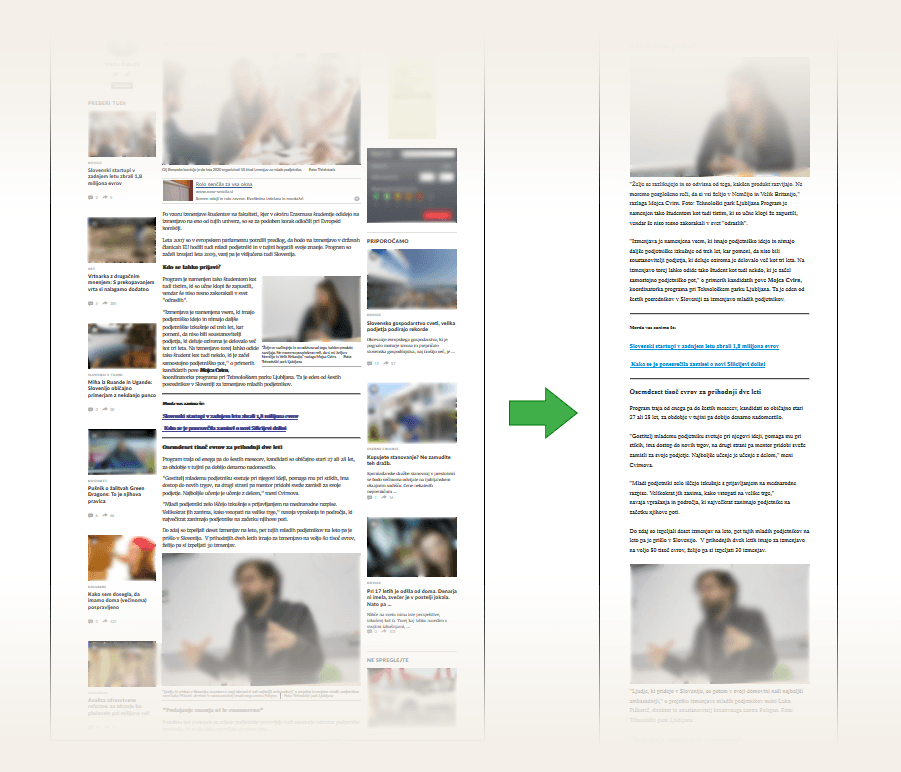
The size of each browser installation is also important. Mozilla Firefox, for example, takes up only 91 MB, compared to Google Chrome, which has an installation file of 406 MB.
The advantages and disadvantages of each browser
We will look at the main features, advantages and disadvantages of each browser and finally compare them with each other.
Mozilla Firefox
It is certainly the most flexible browser of all, and offers the most extras. It’s easy to select search results, with one click to choose between Google, Bing, Wikipedia and other pre-configured search engines. In case your favourite search engine is not among the choices, you can easily add it.
Other benefits:
+ attractive appearance,
+ the highest level of security among the browsers tested,
+ reading function,
+ easy tab organisation,
+ add-ons to protect your personal data while browsing the web,
+ built-in video and voice calling features,
+ lots of developer tools,
+ improved file transfer protection,
+ the ability to preview a topic,
+ easy sharing of content via social networks.
Mozilla Firefox disadvantages:
– Reduced Flash support,
– Unstable on Windows XP,
– Occasionally crashes and closes the browser,
– takes a long time to start the browser,
– browser extensions cannot be customised in hidden browsing mode.
Google Chrome
Google Chrome combined with the Google search engine offers an extremely powerful tool for browsing the web. In addition to its immense popularity, it regularly sets the standard in browsers, and in no area is it significantly behind its competitors.
Other advantages:
+ Extremely fast operation,
+ Minimalist design,
+ many graphic templates are available, which can be installed quickly and easily,
+ extremely stable (very rarely does it malfunction),
+ easy printing of PDF documents, directly from the browser,
+ the first browser to warn users if they are on an unprotected HTTP connection,
+ full synchronisation across devices,
+ easy tabbing,
+ the first browser to come preloaded with Adobe Flash and a PDF document reader,
+ an extremely rich collection of browser extensions,
+ it is possible to customise extensions for Incognito Mode.
Disadvantages of Google Chrome:
– uses the most battery of all the browsers tested,
– Data privacy protection is not the most effective,
– no built-in social sharing,
– the browser needs to be restarted when upgrading,
– Difficult to verify the SSL certificate installed on the website visited.
Microsoft Edge
This is the browser that has seen the most improvements recently, one of which we’ve already mentioned in the Battery consumption section, but other benefits include:
 + fast performance,
+ the browser’s simple and clear appearance,
+ reading function,
+ Cortana digital personal assistant,
+ bookmarking and sharing of individual pages,
+ right-click on a tab to show the last 10 pages opened in that tab,
+ easily add extensions.
Disadvantages of Microsoft Edge:
– Only available on Windows 10,
– Few extensions, compared to Google Chrome and Mozilla Firefox,
– Extension visibility in the toolbar needs to be manually set,
– full-screen website available for video content only,
– right-clicking on an image does not allow it to be set as the background of the screen,
– it cannot be removed from the operating system.
Opera
The Opera browser is known for regularly innovating in the field of web browsers. Recent innovations include built-in ad blocking and the ability to establish a virtual private connection(VPN).
 Other browser benefits:
+ Battery saver,
+ fast performance,
+ Speed Dial function to quickly add and edit your favourite pages,
+ easy tab customisation,
+ Opera Turbo, which slightly speeds up the web pages you visit when you’re on a slow network,
+ reduced data usage,
+ opening video content in a pop-up window,
+ the browser does not close when you close the only tab,
+ no need to restart the browser when installing a new extension,
+ one of the few browsers that still allows security settings for Windows XP,
+ no need to restart the browser when upgrading.
Its disadvantages are:
– it has no reading function,
– lack of social sharing tools,
– only available in 32-bit version,
– limited number of extensions,
– only the background image changes when changing the theme, other elements cannot be changed.
Final rating
In our testing, each of the features (speed, security, usability and features) was given a score from 1 to 10, with 10 being the highest score. The results are as follows:
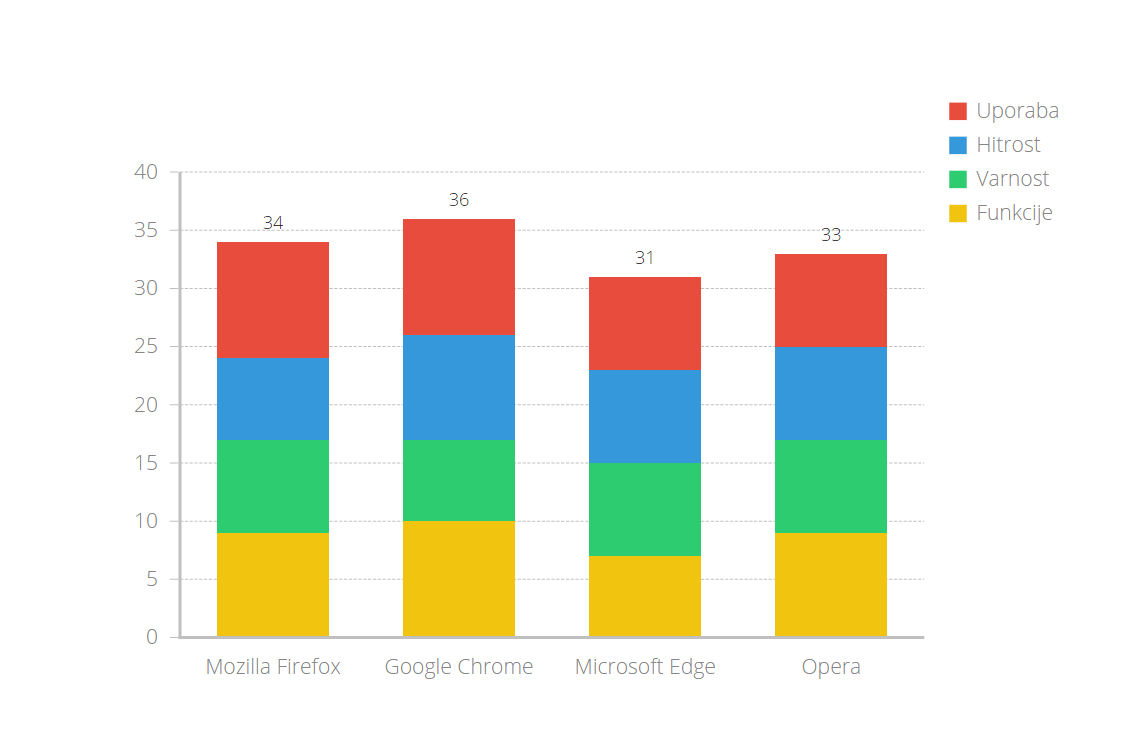 You can see that all the browsers tested performed well. In our opinion, Google Chrome is currently the best browser, but the others are not far behind. Which is your favourite?
COMMENT THE POST
Your comment has been successfully submitted
The comment will be visible on the page when our moderators approve it.