The customer portal my.neoserv.com has been redesigned. If you notice any issues, please let us know.

Cart (0)
  • Your cart is currently empty.

PROFESSIONAL WEBSITE
WITH JUST A FEW CLICKS!

Is it possible? Now it is.

Are you tired of overly
complicated programs
for
website publishing?

Try NEOSERV STUDIO!

With NEOSERV STUDIO, anyone can create a website! Programming or design experience is no longer necessary.

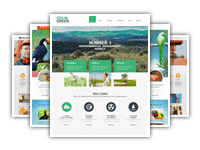
In addition to NEOSERV STUDIO, you also receive 50+ free graphic templates. You simply select the desired template, enter your text content and images, and press publish!
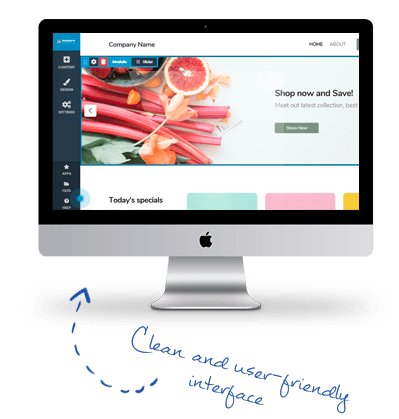
NEOSERV STUDIO interface

...for as low as €0.00!

1

DOMAIN

WEB ADDRESS

2

WEBSITE

WEBSITE EDITOR

3

E-MAIL

E-MAIL ADDRESSES

NEOSERV STUDIO - features
DOMAIN

With NEOSERV, you can choose from 1000+ different domain extensions.

The most popular include .SI, .COM, .NET and .EU, while thematic domains, such as .NINJA, .BAR and .BLOG are also gaining popularity.

NEOSERV STUDIO

With the easy-to-use NEOSERV STUDIO editor, anyone can create their own website.

Editing your site is incredibly simple. And if you ever need help, you'll find clear instructions and our friendly technical support team ready to assist.

E-MAIL

With the user-friendly cPanel control panel, you can create an email address in just one click.

Just a few minutes later you'll already be sending emails from your very own inbox.
Try NEOSERV Studio for free and set up your website today!

...for as low as €0.00!

Graphic templates
50+ PROFESSIONAL GRAPHIC TEMPLATES

Want your website to look professional? With NEOSERV STUDIO you no longer need a designer or any design skills.

Simply choose one of our free templates and add your content — it's that simple. Graphic templates

Page editor
SIMPLE AND USER-FRIENDLY
PAGE EDITING

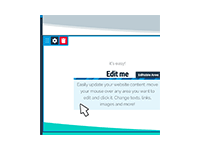
You no longer need programming or HTML knowledge to create a website.

Simply choose a graphic template that you like or that suits your activity. Then you can start entering text.

Adaptability to all devices
FULLY RESPONSIVE
ON ALL DEVICES

All websites that you create in NEOSERV STUDIO are already optimized for phones and tablets!

Why is this important? More than 50% of internet users only use smartphones to view websites.

Frequently Asked Questions

  • What is NEOSERV STUDIO?

    NEOSERV STUDIO is a simple yet powerful editor for creating modern websites. It allows you to quickly build a professional website, company landing page or online store without any technical knowledge. You can choose from numerous design templates and customize them to your preferences – change colors, fonts, images and element layouts.

    The editor works on a drag & drop principle, meaning you can easily add and edit content directly on the page. Pre-designed modules such as contact forms, image galleries, maps, social media buttons and many others are also available.

    With NEOSERV STUDIO, you can publish your website within minutes. The solution is fully beginner-friendly, yet provides enough flexibility for those who want more control over the final look of the site.

  • Can I really create a website for free with NEOSERV STUDIO?

    With the NEOSERV STUDIO website builder, you can create a website completely free of charge.

    The only requirement for using the FREE plan is that you have a domain registered with NEOSERV (e.g., my-company.com). Once the domain is linked to your plan, you can start building your website immediately – with no additional costs.

    The free plan gives you access to an intuitive editor with the ability to set up a single content page. You can choose from many design templates and add images, text and other elements as you like.

    The free plan is intended for anyone who wants to quickly and easily set up a simple website – for a business, personal project or portfolio.

    If you later need additional content pages, you can upgrade at any time to one of the advanced plans, which offer extra features and more space for your website’s growth.

  • How to build a website with NEOSERV STUDIO?

    Building a website with NEOSERV STUDIO is quick and easy, even if it’s your first time working with websites.

    1. Access the editor – After submitting and paying for your order, you will receive login details for the cPanel control panel, where you manage your plan.
    2. Launch the editor – Log in to cPanel and click the NEOSERV Studio icon.
    3. Choose a domain – Select the domain where you want to create the website and click the Install button.
    4. Select a template – Choose a template from the gallery that fits your project and click Install again. Your website will then be published.
    5. Edit content – Once installed, the NEOSERV STUDIO interface opens, allowing you to start designing your site. Enter basic information, add text, images, contact forms and other elements.
  • Can I create a multilingual website with NEOSERV STUDIO?

    With NEOSERV STUDIO, you can easily create a multilingual website.

    The editor allows you to add different language versions, with separate content for each language. Language selector elements (flags in the navigation) allow visitors to switch between languages.

    In addition to manual translation, automatic website translation with Google Translate is possible. Visitors can select their desired language, and the site is translated “live.” This method is faster and easier, but the translated versions are not saved as separate pages and therefore are not indexed by Google.

  • Can I create an online store with NEOSERV STUDIO?

    Although NEOSERV STUDIO is primarily designed for website creation, you can also build an online store with it. Creating an online store requires the PRO or BUSINESS plan.

    The tool allows you to easily add products, categories, set prices, shipping methods, payment options and other functionalities necessary for successful online sales. You can customize your store’s design, add images, product descriptions and adjust page layouts.

    NEOSERV STUDIO is suitable for creating a simple online store. If you plan to set up a larger store with many products and advanced features, we recommend using a dedicated system (e.g., WooCommerce or Magento).

  • Can I create an email account (e.g., info@my-company.com) with NEOSERV STUDIO?

    Yes, creating email accounts with NEOSERV STUDIO is simple.

    Email management is done through the cPanel control panel, where you can create new mailboxes, set passwords, assign storage quotas, manage forwarding and more. The service gives you full control over your email accounts and allows the use of Webmail, accessible from any device with a browser.

    Creating email accounts is not available in the FREE plan.

  • What if I encounter problems while editing my website? Will you help me?

    NEOSERV STUDIO has an extremely user-friendly interface, but you are not left on your own if issues arise.

    We recommend first checking the instructions in the link above. If the problem persists, from the STARTER plan onward, we provide full assistance and support.

    We are available by phone at +386 59 335 000 on weekdays from 8:00 to 18:00, and our technical support is available via email (info@neoserv.com) 365 days a year, 24/7.