The customer portal my.neoserv.com has been redesigned. If you notice any issues, please let us know.

Cart (0)
  • Your cart is currently empty.

EMAIL SERVER

Complete reliability, easy management with email boxes and high availability and security.

Professional environment for secure and uninterrupted communication

The private email server is an isolated space on a VPS server, intended for professional email accounts linked to your domains. In addition to complete control over your email and easy management through the cPanel control panel, the service features advanced anti-SPAM and anti-VIRUS protection to ensure secure and seamless communication.

Our team handles the setup and maintenance of the server and all required software, including advanced security systems. As a client, your only task is to create email accounts, assign them the desired size, set up auto-responders if needed, and similar actions. Naturally, you can always count on our support.

Private email server
Highest level of security
highest
level of security
Easy management
easy
management
Full flexibility
full
flexibility
Maintenance and monitoring
maintenance and
monitoring
Free setup
free
setup
24/7 technical support
24/7
technical support

Systems for security of the email server

The isolated server environment includes security monitoring (24/7) and ensures effective protection against unwanted and malicious email.
Anti-SPAM Protection
Anti-spam protection

SpamAssassin is a powerful filtering system for detecting spam email, integrated into the cPanel control panel. The system automatically reviews incoming mail and based on criteria such as keywords, unusual formats, sender IP addresses, and sending history, assesses whether a particular message is unwanted.

By using SpamAssassin, which allows you to set filter sensitivity levels and add allowed and blocked senders, the amount of unwanted messages is significantly reduced. This improves security and facilitates email management, as it reduces the likelyhood of breaches and phishing attacks.

Anti-VIRUS Protection
Anti-virus protection

ClamAV® is an open-source antivirus system designed for advanced protection of servers and email against malicious software. The antivirus protection scans received and sent email messages and attachments (various formats, including compressed files) for potential viruses, trojans, and other harmful programs.

The virus definition database is updated several times a day, with which ClamAV® ensures protection against the latest threats. Users can perform scans manually or set up automatic scanning, which significantly improves the security and reliability of your private email server environment.

Private email server with 200 GB of space from €68 per month + VAT
Send Inquiry

Easy email management in cPanel

The cPanel control panel allows you to create email mailboxes, set up autoresponders, redirect emails, and much more.
Create email mailboxes
Creating a mailbox

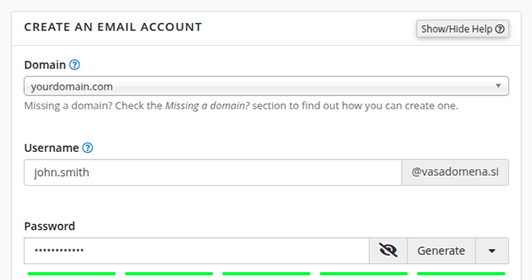
With just a few clicks, create new email mailboxes for different users or departments in your company. Set the name, username, and password for each mailbox and determine the amount of space available. This allows you to easily manage and organize all email communication in one place.

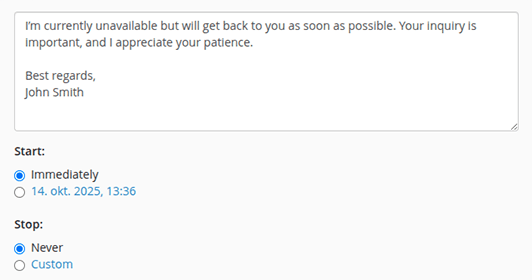
Set up an autoresponder
Autoresponder

Ensure that you respond to received email even when you are absent. Create autoresponders that will send customized messages to everyone who writes to you. Easily prepare the content of the response and, if desired, set the start and end date of the autoresponder.

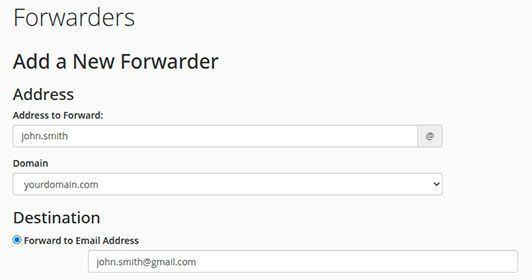
Email forwarding
Email Redirection

Redirect all received email from a specific mailbox to another email address. This will ensure that important messages are never overlooked. You can set up one or more redirections for each mailbox, simplifying your email management.

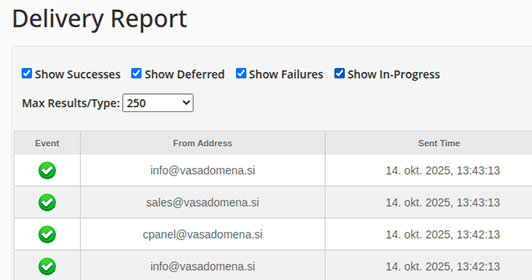
Track Email Delivery
Email Delivery Tracking

Monitor the delivery of your emails and check if they have been successfully sent and delivered. Review the sending history and details about any errors or undelivered messages (e.g., due to the recipient's mailbox being full). Stay up-to-date with the status of your email communication.

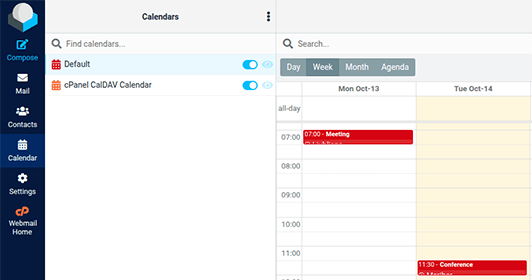
Edit Calendars and Contacts
Roundcube - Calendars and Contacts

Centralize your calendars and contacts for better organization of work commitments. Add, edit, and remove events and contacts to ensure a better overview of meetings, colleagues, and business partners. This will make coordinating your business activities much easier.

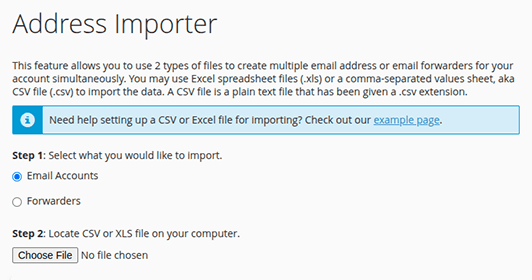
Import Email Mailboxes

Using an Excel spreadsheet (.xls) or CSV file (.csv), import multiple email mailboxes or redirections in one step. Upon import, email accounts with corresponding passwords or desired email address redirections will be instantly created, saving you from unnecessary manual work.

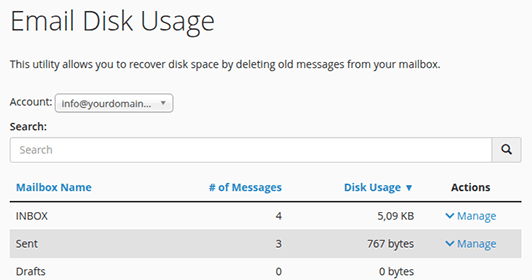
Check Space Usage
Space Usage

Monitor the space usage of individual email mailboxes and avoid issues with excessive occupancy. Get a detailed overview of the amount of space used and, if necessary, perform automatic deletion of messages that meet a certain criterion (e.g., messages larger than 10 MB).

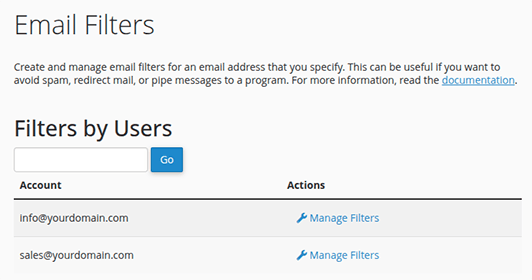
Create Filters and Actions
Email Filters

Automatically sort incoming and outgoing email using filters based on the sender, recipient, or keywords in the message subject. Set rules that will redirect, flag, or delete messages based on certain conditions. Ensure clarity and organization of your email messages.

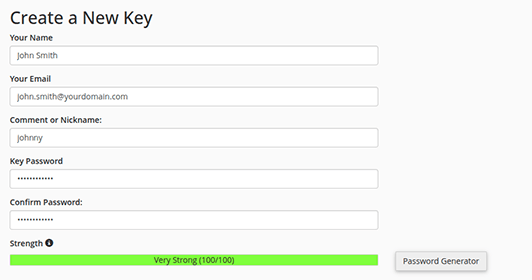
Create an Encryption Key
Encryption Key

Create an encryption key and protect your email with an additional layer of security. Ensure the encryption of sent or received messages and prevent unauthorized access to the content. By creating an encryption key, you ensure secure communication, privacy protection, and the safety of sensitive information.

Roundcube

Roundcube: A Web Interface for Easy Email Access

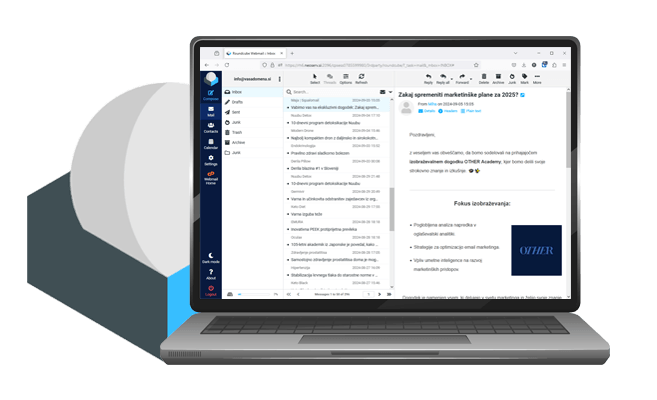
Roundcube allows you to easily manage all your email mailboxes through a web browser. Using an advanced interface, you can quickly and effortlessly access your email from anywhere and on various devices – whether it's a computer, phone, or tablet. Simply log in to Roundcube with your username and password directly through your domain (or cPanel control panel), where you have complete control over your email mailbox.

The Roundcube web interface, in addition to receiving and sending emails, offers all the important features: advanced email search, support for attachments, organizing messages into folders, managing contacts and calendars, importing/exporting mailboxes, the option to personalize the interface, etc. It also supports multilingualism and various security protocols, ensuring the security and flexibility of using email services.

The Complete Solution for Uninterrupted Email Work

At NEOSERV, we take care of everything: setup, maintenance, updates, and 24/7 monitoring of your private email server.
Email storage space
100 GB to several TB

of email storage

The private email server offers abundant space for storing your emails, ranging from 100 GB to several TB. If you need more space, we can easily increase the server's capacity according to your requirements.

Backups
Backups

at a separate location

To ensure high data security, your email backups are also stored at a geographically separate location. You can easily restore messages in cPanel from daily (14) or monthly (3) restore points.

Authentication protocols
SPF, DKIM, DMARC

authentication protocols

Properly configured security protocols help ensure your sent emails are recognized as trustworthy and successfully delivered. They also prevent spoofing and spam, offering greater protection against phishing attacks.

Server maintenance
Regular maintenance

and update management

After the server is set up, we take care of its regular maintenance and updates to ensure uninterrupted operation and security of your email server, allowing you to focus entirely on managing your emails.

Server monitoring
Usage monitoring

of server and mailboxes

The server usage monitoring system allows real-time tracking of space usage. We notify you before limits are exceeded and also monitor mailbox usage to prevent issues.

Firewall
Firewall

attack protection

The CSF firewall protects against brute force attacks, where automated scripts try various login combinations to hack into an email account. After multiple failed attempts, the IP address is temporarily or permanently blocked.

Login restriction
Login restriction

to country IP addresses

For added security, access can be restricted to Slovenian IP addresses only. This improves protection from foreign attacks. Restrictions can be applied to cPanel, webmail, or IMAP/POP3 login.

2FA protection
2FA protection

for secure login

Two-factor authentication (2FA) adds an extra layer of security when logging in to cPanel or your mailbox. Besides the username and password, 2FA requires a 6-digit code that changes every 30 seconds in your authenticator app.

No limits
No limits

on mailboxes and domains

The private email server lets you easily create unlimited mailboxes and send unlimited emails. You can also add unlimited domains and alias domains in the cPanel dashboard.

Technical support
Technical support

available every day (24/7)

At NEOSERV, friendly technical support is available 24/7, 365 days a year. Our team is happy to answer any questions and provide quick assistance if issues arise. To date, we’ve received over 3400 positive reviews from satisfied clients.

Private email server with 200 GB of storage from just €68/month + VAT
Send Inquiry

Free email transfer with no downtime

Free email transfer

Already have email set up with another provider? No worries — our expert team will handle the transfer of all your email accounts to the private email server. You can be sure everything will go smoothly, and you’ll be able to send and receive emails without interruption during the migration.

We offer a 90-day satisfaction guarantee

Satisfaction guarantee

Your investment in a private email server is risk-free. We’re so confident in the quality of our service that we offer a 90-day satisfaction guarantee. If during this time you find the service doesn’t meet your needs, we’ll refund your full payment — no questions asked.

Frequently Asked Questions

  • Who is the private email server intended for?

    The private email server is intended for larger companies and organizations that need a secure, reliable, and efficient solution for storing and managing email. Unlike email hosting, a private server provides you with a completely separate environment with its own IP address, and additional security control and advanced measures against potential abuses are also taken care of.

  • How do you ensure the security of the private email server?

    A private email server means the highest level of security, as we ensure effective protection with multi-layered security measures:

    • SpamAssassin is a modern solution for filtering unwanted mail, used for advanced protection of the email server. It acts as an anti-spam solution, detecting and filtering unwanted messages using various techniques. These include checking the authenticity of the sender's domain and IP address, analyzing content and outgoing links, reviewing message headers, using statistical methods, checking grammatical features, etc. If a received message exceeds a certain rating threshold, the system marks it as spam and filters it accordingly. This reduces the possibility of users receiving harmful or unwanted messages.
    • ClamAV® is an effective antivirus solution designed to detect malicious software such as viruses, trojans, spyware, and other harmful programs. With the functionality of thorough scanning of email servers and file systems, it provides protection against dangerous files and web threats. ClamAV® scans the content of files and emails and compares it with a database of known viruses, which is regularly updated, allowing for quick recognition of new threats. If the system detects a virus or suspicious content, it blocks, removes, or quarantines it.
    • Additional security of the private email server and your mailboxes is provided by a firewall for effectively preventing brute force attacks, the possibility of 2FA protection, and restrictions on logging into Slovenian IP addresses. In addition, we take care of daily backups of all your email (also at a separate geographical location) and regular updates of all security systems.
  • How many domains and mailboxes can I host on the server?

    You can add an unlimited number of domains (and alias domains) to the private email server in the cPanel control panel, and you can also create an unlimited number of mailboxes. In addition, the number of messages sent per hour is also unlimited, allowing you to communicate efficiently and without interruption.

  • How demanding is it to manage email on a private server?

    Managing email is very simple, as you receive access to the cPanel control panel as part of the private email server. In it, you can create new mailboxes with just a few clicks, assign them any size, set up email forwarders and autoresponders, manage calendars, and track the success of message delivery.

    Through the cPanel control panel (or directly through the domain), you can also access the Roundcube web interface, which manages individual mailboxes. This popular email client gives you complete control over received and sent email, creating arbitrary folders for better organization of the mailbox, and an interface for preparing and sending email messages.

  • How is the transfer of email from the old provider to NEOSERV carried out?

    You don't have to worry about transferring mailboxes from the server at the old provider to your new private email server at NEOSERV. We will transfer all your email accounts, including received and sent messages, quickly, professionally, and without downtime. This way, you will be able to send and receive e-messages without interruption at all times - both after the transfer and during the transfer itself.

  • Do you take care of the reputation of the IP address? How do you act if the server's IP ends up on the so-called blacklist?

    In the security systems of email servers, blacklists are often used to protect against unwanted and malicious messages. Each server or IP address can appear on blacklists for various reasons, which prevents the smooth delivery of e-messages.

    At NEOSERV, we are well aware of this mechanism, so we take care of systematic daily review of blacklists. If the IP address of our server appears on any of them, we immediately request its removal. In this way, we ensure a high reputation of the IP address (IP reputation) and the best possible delivery of your messages.

  • Does the initial setup of the email server represent an additional cost for the subscriber?

    We perform the initial setup of the email server with all necessary licensed software for you at NEOSERV free of charge. There are no additional (hidden) costs.

  • How quickly do you set up a private email server after agreement/payment?

    We understand the importance of secure and efficient email communication in the organization, so we quickly set up a private email server. We have 23 years of experience with server setup, so you can be sure that the work will be done technically flawlessly.

  • Is it possible to upgrade the plan if I need more space for mailboxes later?

    Definitely. If you ever start running out of space for email (which the system will also automatically notify you about), just let us know how much additional space you would like to have. The service is completely flexible, so we can easily adapt the email server to your needs.