


- Your cart is currently empty.
How to Use Cloudflare Under Attack Mode
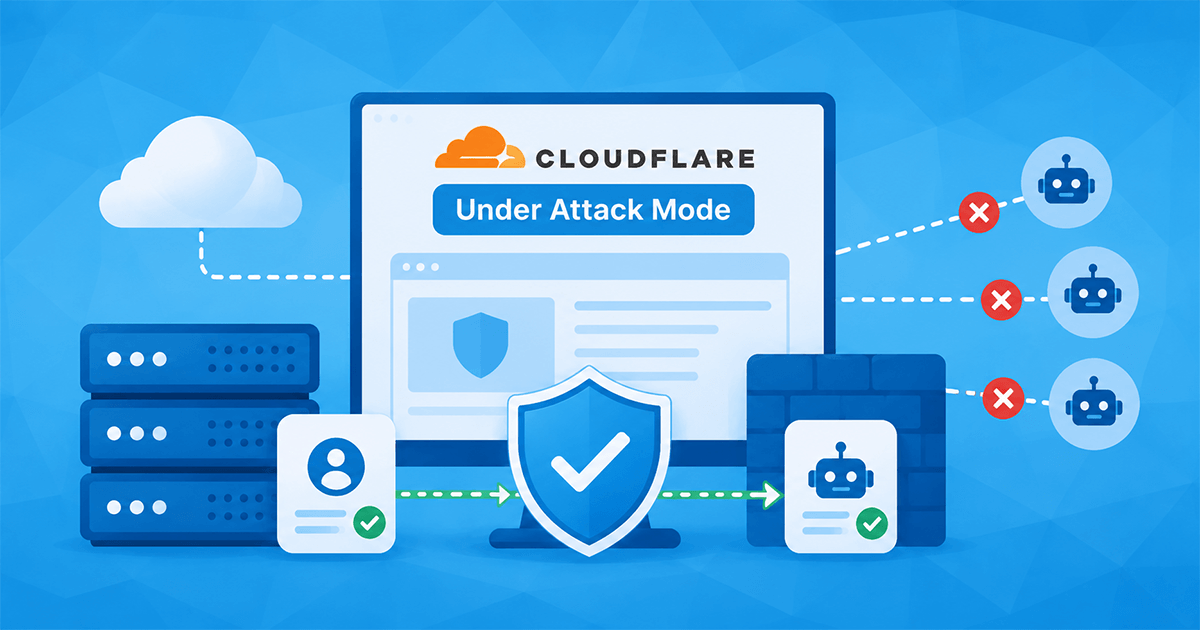

When a website becomes the target of an unusually high number of requests, it can become slow, unresponsive or unavailable within just a few minutes. In such cases, many website administrators turn to one of the most powerful protective features offered by Cloudflare – Under Attack Mode (UAM).
UAM helps mitigate HTTP DDoS attacks and limit excessive automated traffic. However, as it performs additional checks on visitors and automated systems, prolonged use can also affect entirely legitimate traffic. This can affect web analytics, advertising platforms, website monitoring systems and other integrations.
In this article, we will look at how Under Attack Mode works, when it makes sense to use it, and what problems it can cause. We will also demonstrate how to add exceptions in Cloudflare that allow verified systems to operate smoothly, whilst ensuring legitimate visitors have unhindered access to the website.
Contents
- What is Cloudflare
- What Is UAM (Under Attack Mode)
- How to Activate Under Attack Mode
- When to Use Under Attack Mode
- Why UAM Should Not Be Used for Extended Periods
- How to Add an Exception in Cloudflare
- Using Exceptions in Under Attack Mode: A Practical Example
- When to Disable Under Attack Mode
- UAM – Protection Without Disrupting Legitimate Traffic
What is Cloudflare
Cloudflare is a service that many people know primarily as a content delivery network (CDN). Such networks enable faster delivery of content to visitors, as certain elements of a website are temporarily stored in data centres around the world and served to users from geographically closer locations.
As well as faster content delivery, Cloudflare also offers a range of security features. It acts as an intermediary between website visitors and the server hosting the website, enabling it to filter, analyse and, if necessary, block traffic before it reaches the origin server.
Its most common functions include:
- improving loading speeds by caching content,
- managing DNS records,
- reducing server load,
- protecting against various types of cyber attacks,
- filtering malicious traffic,
- using a web application firewall (WAF).
One of the security features for which Cloudflare is best known is precisely its ability to protect against DDoS attacks. Among the protective mechanisms, the ‘Under Attack’ mode stands out, which can be activated with just a few clicks.
What Is UAM (Under Attack Mode)
Under Attack Mode (UAM) is a special protection mode in Cloudflare, designed primarily to defend against HTTP or so-called Layer 7 DDoS attacks. When activated, Cloudflare briefly delays the visitor’s access to the website and carries out an additional verification check. Once the check is completed, the user is granted access to the website.
Most legitimate visitors are barely aware of this process. A brief notification regarding the browser verification is displayed, and after a few seconds the page loads as normal. The purpose of this security mechanism is to prevent access by automated systems that attempt to overload the server with a large number of requests.
How to Activate Under Attack Mode
When we assess that additional protection is required, we can activate Under Attack mode in Cloudflare in a few steps:
- In the Cloudflare dashboard, open the Domains section.
- Select the domain for which you wish to enable protection.
- In the left-hand menu, go to Security -> Settings.
- In the Security level section, locate the ‘I’m under attack’ setting.
- Click the Edit icon.
- Enable the ‘I’m under attack’ mode setting.
- Confirm the change by clicking the ‘Apply settings’ button.

Once activated, Cloudflare performs additional checks on requests before granting them access to the website.
When to Use Under Attack Mode
One of the most common mistakes when using Under Attack mode is the assumption that it is a setting that should be left active indefinitely. In reality, the feature is intended for temporary protection against a specific threat.
It is advisable to activate Under Attack Mode in Cloudflare:
- when an active HTTP DDoS attack is detected,
- when traffic suddenly spikes significantly for no apparent reason,
- when the server becomes unresponsive due to an excessive number of requests,
- when the Web Application Firewall (WAF) and other security rules are insufficient to stabilise the situation.
Once the situation has stabilised, Under Attack Mode should be disabled and Cloudflare’s standard protection mechanisms should be checked to ensure they are once again providing an adequate level of protection.
Why UAM Should Not Be Used for Extended Periods
Although Under Attack mode effectively reduces the impact of attacks, it also has certain side effects. The additional checks are not intended solely for malicious traffic. They can also affect legitimate users and automated systems that are otherwise performing entirely legitimate tasks.
Modern websites are not intended solely for visitors. They are also accessed by various bots and services for advertising, analytics, performance monitoring and other integrations. As the ‘Under Attack’ mode performs additional checks on traffic, some of these may encounter obstacles.
Prolonged use of the ‘Under Attack’ mode may result in:
- disruptions to the operation of advertising platforms,
- problems with web analytics,
- difficulties with website performance monitoring systems,
- problems with the operation of verified bots and SEO spiders,
- disruptions to third-party integrations.
This does not mean that the ‘Under Attack’ mode is problematic. It simply means that it should be used judiciously and, where necessary, supplemented with appropriate exceptions.
Let’s now look at some specific examples where the ‘Under Attack’ mode can affect the operation of trusted services that access a website automatically.
Google Ads and AdsBot
Google Ads regularly checks the landing pages for its adverts. Its systems analyse whether the landing pages are accessible and comply with advertising policies.
If AdsBot is required to pass an Under Attack Mode verification check during this process, this may result in:
- warnings about unreachable landing pages,
- temporary ad suspensions,
- difficulties with re-verification,
- difficulties in diagnosing campaign issues.
Other Automated Services
Similar issues may also arise with other services that automatically access a website as part of their operation. These include performance monitoring systems, availability checking tools and various web crawlers for analysing and auditing websites (e.g. UptimeRobot, Pingdom and XML-Sitemaps).
If these systems encounter the ‘Under Attack’ mode whilst accessing a website, they may misjudge its status. This results in apparent outages, unavailability alerts and other incorrect findings.
Website administrators are thus given a distorted picture of the actual situation. The problem, therefore, does not necessarily lie with the website’s operation, but rather in the fact that automated services are unable to access it correctly due to these additional checks.
How to Add an Exception in Cloudflare
Cloudflare allows you to create rules to exempt certain types of traffic from specific security checks.
Follow these steps to create an exception rule:
- In the Cloudflare dashboard, open the Domains section.
- Select the domain for which you wish to enable protection.
- In the left-hand menu, go to Security -> Security rules.
- In the top right-hand corner, click the Create rule button.
- Select the Custom rules option.
- Create a new rule and define the conditions for the exception.
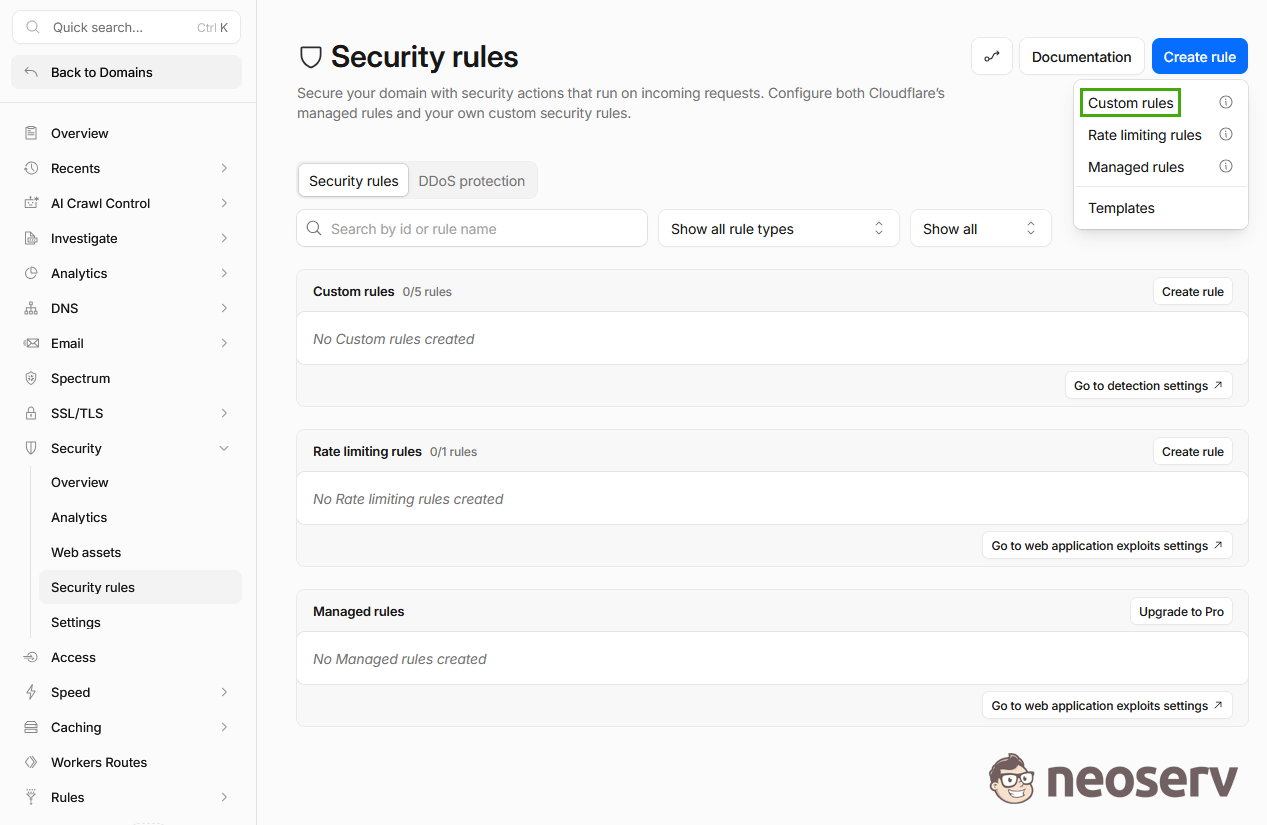
When creating rules, it is important that exceptions remain as narrowly defined as possible.
Exception for Verified Bots (Known Bots)
Cloudflare recognises known bots from major providers. These include search engine spiders, advertising systems, website performance monitoring tools and other trusted automated services.
For such cases, we can create a rule:
- Field: Known Bots
- Operator: equals
- Value: true
- Action: Skip
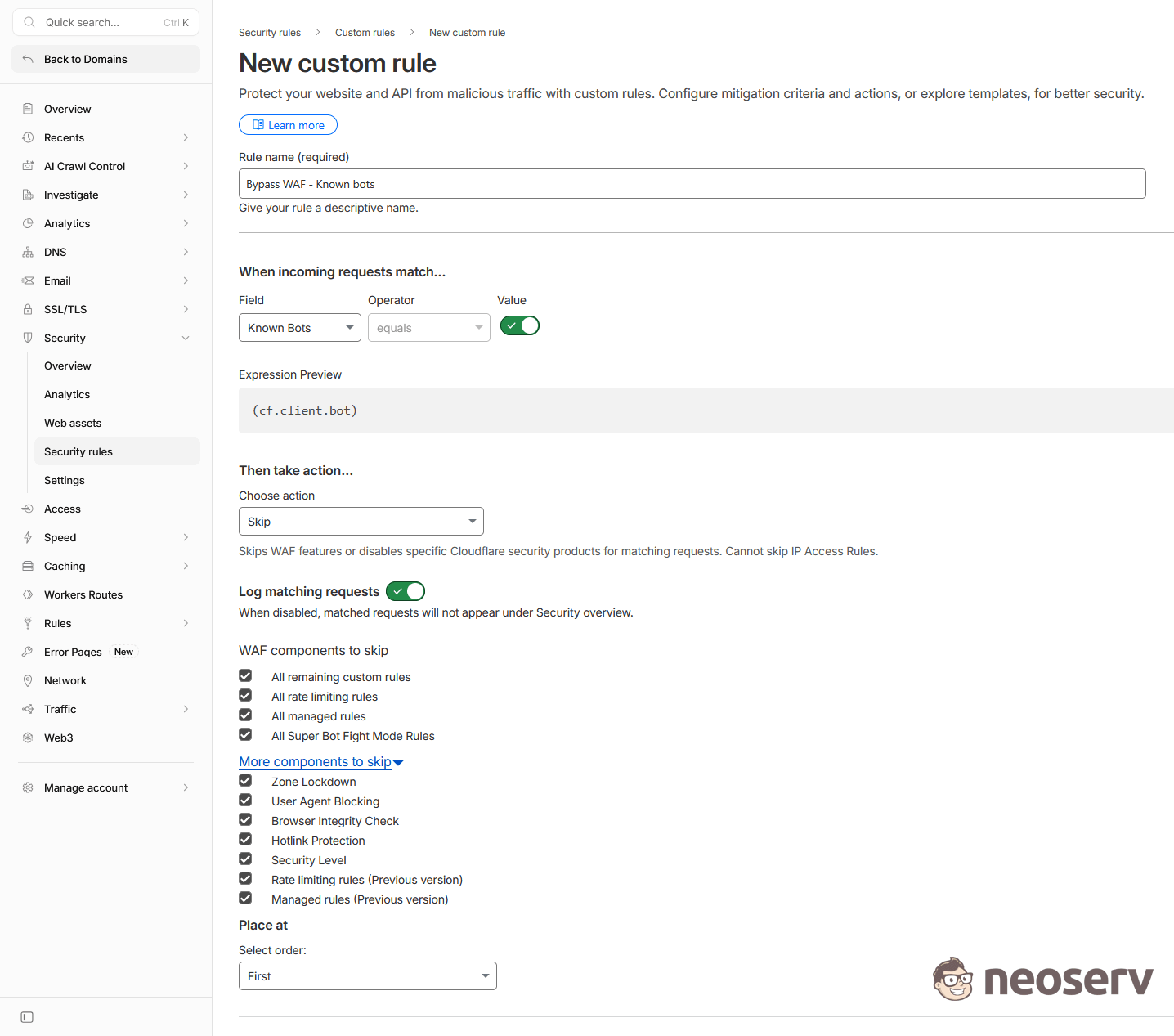
This allows verified bots to access the website without further checks under the ‘Under Attack’ mode.
Exception for Visitors from Selected Countries
In certain cases, it makes sense to create exceptions based on the country of origin of the traffic. If the website primarily serves specific markets and attacks do not originate from those countries, we can allow legitimate visitors access without verification.
Rule example:
- Field: Country
- Operator: equals
- Value: Slovenia
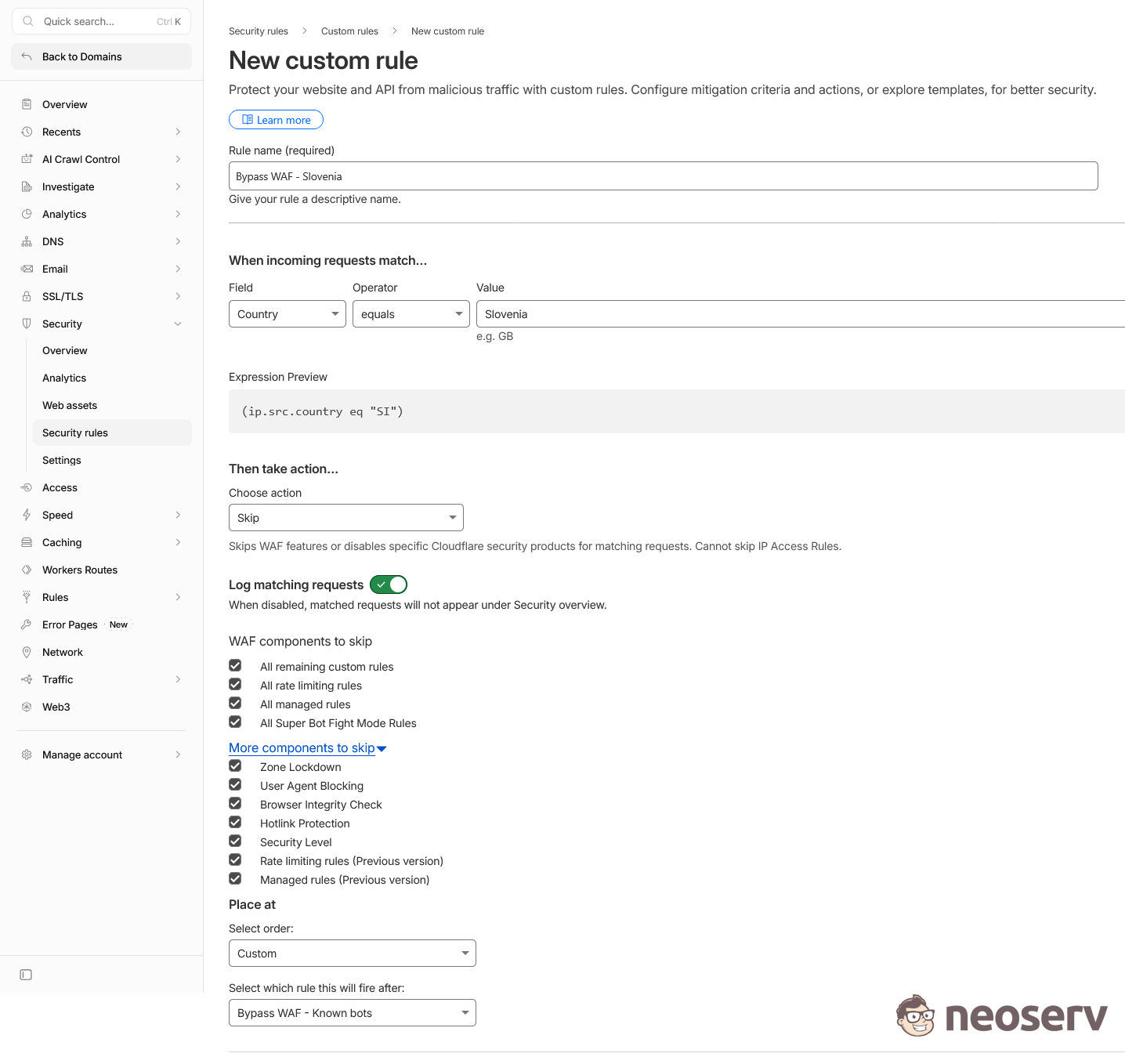
If necessary, we can include several countries in the rule, for example Slovenia (SI), Croatia (HR), Austria (AT) and other countries from which legitimate traffic originates.
Be careful when creating exceptions. Rules that are too broad can reduce the level of protection for your website. Exceptions should be limited to traffic for which there is a valid reason to trust it.
Using Exceptions in Under Attack Mode: A Practical Example
On one website, Under Attack protection was activated due to an increased number of suspicious requests. Following the activation of Under Attack mode, it became apparent that Cloudflare was also blocking requests from the AdsBot-Google and AdsBot-Google-Mobile bots, which Google uses to verify ad landing pages. Consequently, this led to issues with the functioning of Google Ads campaigns.
To maintain Under Attack protection whilst simultaneously enabling the smooth verification of landing pages, two rules were introduced:
- an exception for verified bots (Known Bots),
- an exception for visitors from target countries.
After these rules were implemented, the following became apparent:
- the Under Attack protection remains active,
- verified bots and other legitimate automated systems can once again access the website without additional checks,
- visitors from target countries no longer encounter the Under Attack verification,
- Cloudflare continues to filter the remaining traffic and block suspicious requests.
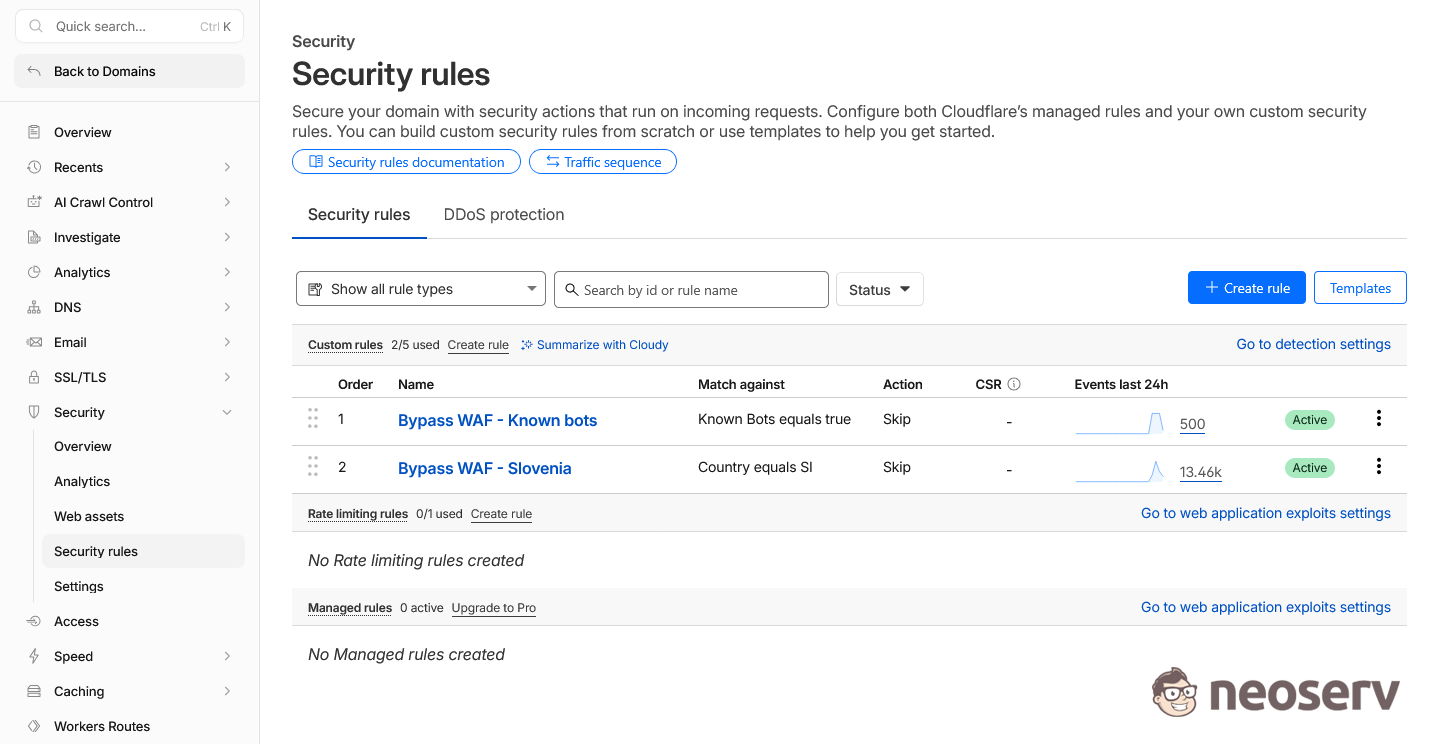
This example demonstrates that the ‘Under Attack’ mode does not necessarily present a trade-off between protection and availability. With appropriately configured exceptions, we can maintain a high level of protection without hindering the operation of legitimate automated systems.
When to Disable Under Attack Mode
Under Attack mode is primarily intended as a response to a specific threat, so once the situation has stabilised, it does not make sense to leave it active for longer than necessary.
When deciding whether to disable UAM, it is advisable to monitor:
- traffic statistics in the Cloudflare Analytics section,
- security events in the Security Events section,
- logs and access statistics on the server,
- alerts from external website monitoring systems.
If the data indicates that there are no longer any suspicious requests, or that there are significantly fewer than at the start of the attack, you can disable Under Attack mode and revert protection to Cloudflare’s standard security mechanisms.
As we already have the appropriate security exceptions in place, we can reactivate Under Attack mode if necessary should a similar wave of malicious traffic occur in the future.
After disabling Under Attack mode, it is also advisable to monitor the performance of advertising campaigns, web analytics and other integrations. Some systems require more time to re-verify, so the status is not always updated immediately.
UAM – Protection Without Disrupting Legitimate Traffic
Cloudflare’s Under Attack mode is one of the most powerful tools for protecting websites against HTTP DDoS attacks and other forms of excessive automated traffic. During an attack, it can rapidly reduce server load and help keep the website available.
At the same time, it is important to bear in mind that websites today are not used solely by visitors. They are also accessed by advertising platforms, analytics systems, performance monitoring tools and many other services. If the ‘Under Attack’ mode remains active for a prolonged period without appropriate exceptions, it may also begin to affect their operation.
Practice shows that the best results are achieved through a combination of several protective mechanisms. It makes sense to use ‘Under Attack’ mode in response to a specific threat, whilst at the same time ensuring the smooth operation of verified bots and legitimate visitors through carefully configured rules. This allows us to maintain a high level of protection without restricting access to the website.
COMMENT THE POST
Your comment has been successfully submitted
The comment will be visible on the page when our moderators approve it.