


- Your cart is currently empty.
Google Ads Promo Code for Online Advertising


Due to recent changes to the terms and conditions of the Google Ads Partner Programme, it is not possible to issue new promotional codes for online advertising at this time.
All of you who subscribe to at least the Green Hosting Package with NEOSERV are eligible for a Google Ads promotional code worth up to €120. Google Ads, formerly known as Google AdWords, is an advertising platform through which you can advertise your website or app in a variety of ways. The most popular are advertising on the Google Search Network and advertising on the Google Display Network.
As there are some questions that arise in relation to Google Ads vouchers or promotional codes for online advertising, we have decided to bring them together in one place.
- What is a Google Ads promotional code?
- Who is eligible for a Google Ads promotional code?
- How do I get a Google Ads promotional code?
- How do I use a Google Ads promotional code?
- How does a Google Ads promotional code work?
- How do I check if my Google Ads Promo Code is active?
1. What is a Google Ads promotional code?
A Google Ads Promo Code is a cash credit that advertisers receive in their advertising account to help them start advertising on the Google Ads advertising platform. The term voucher is also used to refer to a promotional code.
2. Who is eligible for a Google Ads promotional code?
The following people are eligible for a Google Ads promotional code:
- New Google Ads users.
3. How do I get a Google Ads Promo Code?
Have you purchased a hosting package with us that includes a Google Ads promo code? To use the voucher, please email us at info@neoserv.si and provide us with the following details:
- Your full name or the name of the company to which the advertising account will be linked;
- the email address that will serve as the username to log in to the Google Ads programme;
- the address of the website you will be advertising on.
We advise you to use a gmail.com account for your email address (example: john.smith@gmail.com).
Once we have received your details, we will create an advertising account for you in Google Ads. This will add your advertising account under ours, which is a prerequisite for obtaining the promotional code. You will receive an invitation to your email address, which you can then use to sign up for the advertising programme.
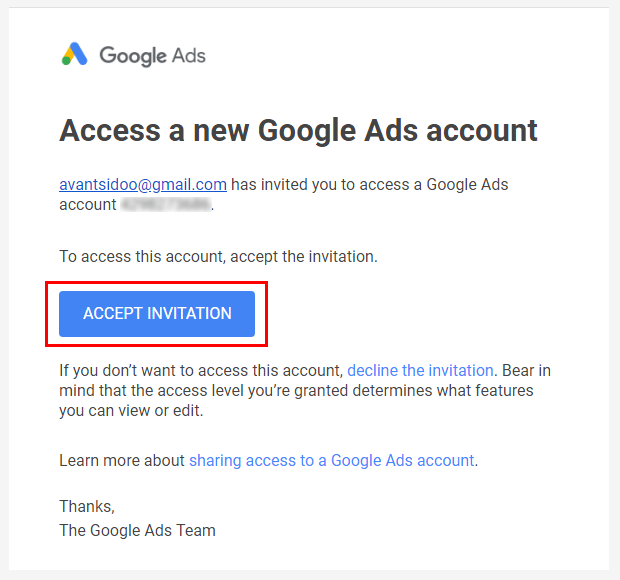
Click on the ACCEPT INVITATION button in the invitation to access Google Ads. You will be redirected to the advertising platform where you will be able to confirm your account and thus obtain administrator rights to edit it.
4. How do I use a Google Ads promo code?
You do not need to enter the promotional code manually, as it will be assigned automatically. All you need to do is:
- Enter your billing and payment details. Click on the TOOLS icon in the top right corner and select Billing & payments. Then enter your company details and your billing and payment method.
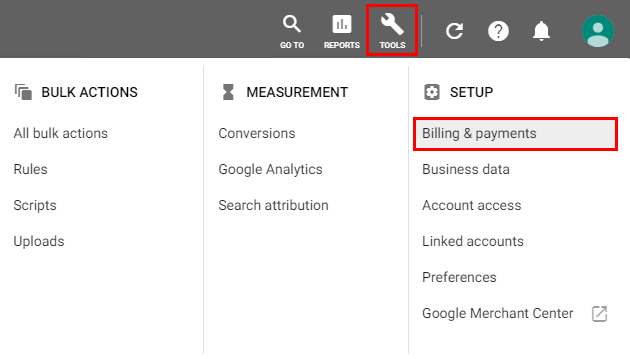
- Create an advertising campaign and start advertising. Once your website advertising is active, your account will start accumulating credit. Read more about this in the answer to the next question.
5. How does the Google Ads promo code work?
When you start using Google Ads, a promotional code will be activated automatically. As much money (up to €120) as you spend in the first 31 days after creating your Ads account will be credited to your Ads account in the following period.
- Example 1: You spend €30 on advertising in the first 31 days. After this period, Google adds €30 to your advertising account.
- Example 2: You spend €120 on advertising in the first 31 days. After this period, Google adds €120 to your advertising account.
- Example 3: You spend €300 on advertising in the first 31 days. Google adds €120 to your advertising account after this period.
You can use the credit to continue advertising your website.
6. How do I check if a Google Ads promo code is active?
You can check whether the promotional code for your advertising account has been successfully activated by following the procedure below:
- After logging in to Google Ads, click on the TOOLS icon and select Billing & payments.
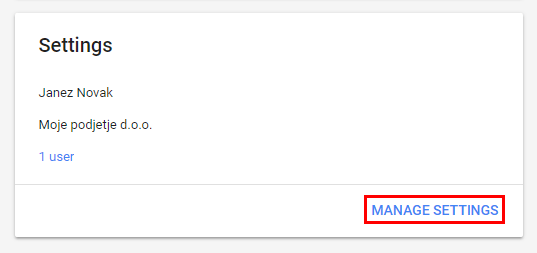
- In the Settings section, click on Manage settings.
- At the very bottom you will find the Promotional codes section. Click on the Manage promotional codes link.
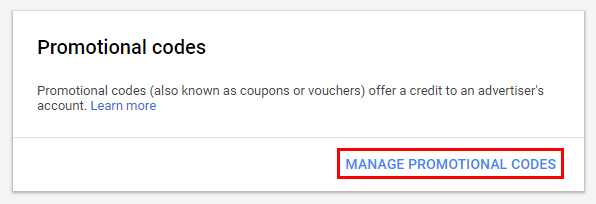
- Here you will find the details of the promotional code you have been assigned and the funds you are currently spending, which will be added to your advertising account as a credit after 31 days from the creation of your Google Ads account.
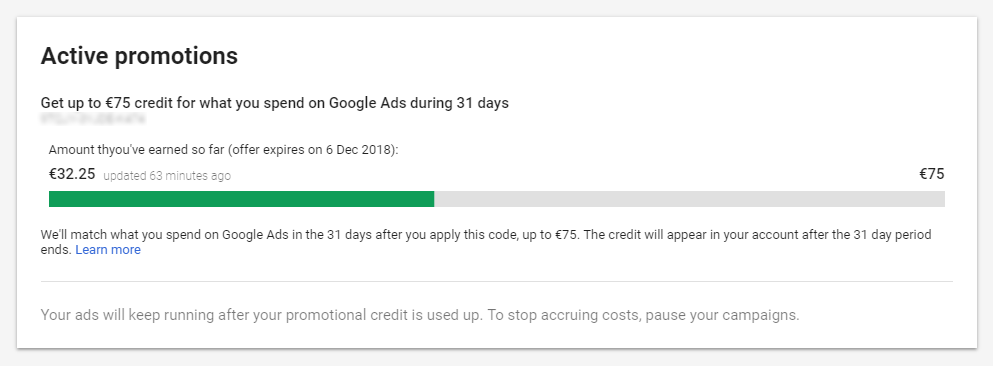
If you have not yet started advertising your website, the promotional code will not be active. In this case, you will only see a box to enter the promotional code instead of the information about the funds spent (step 4). You don’t need to enter it manually, as the Google Ads promotional code will be activated automatically when you start advertising. We advise you to start advertising as soon as possible, as you have 31 days from the creation of your advertising account to collect the bonus funds.
We advise you to check the Terms and Conditions for the use of promotional codes for online advertising.
Due to recent changes to the terms and conditions of the Google Ads Affiliate Program, the issuance of new promotional codes for online advertising is not possible at this time.
COMMENT THE POST
Your comment has been successfully submitted
The comment will be visible on the page when our moderators approve it.