


- Your cart is currently empty.
HTTP Slowly Being Replaced Due to Google Chrome

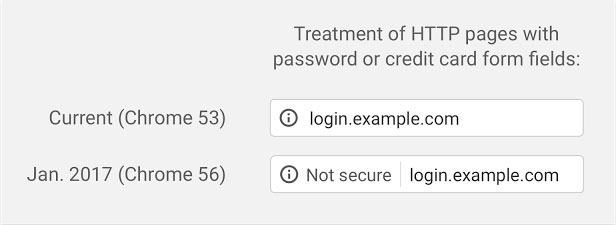
2017 may mean the farewell of HTTP. At the beginning of September this year, Google Chrome’s security department announced on their blog that they would be cracking down on sites that use the insecure HTTP protocol to transmit sensitive data. From January 2017, such pages will display the message “ Not secure”, so that any visitor can quickly find out whether a website is using the secure (HTTPS) or the non-secure HTTP protocol.

The warning will be displayed in three phases:
- On HTTP pages where credit card data and passwords are transferred.
- On all HTTP pages that you use Google Chrome in Incognito mode.
- On all HTTP pages, even in normal browsing mode.
Google is not the only company to have taken this measure. Apple will also require HTTPS for iOS apps by the end of 2016.
Why will this change happen?
Websites that operate over HTTP are not secured and offer no protection against unauthorised access and data misuse. However, the HTTPS protocol encrypts data, so Google Chrome wants to persuade website owners to start using HTTPS.
You can get a secure HTTPS protocol for your website by installing an SSL certificate.
Change in practice
From January 2017, users will see an unsecured page in the toolbar with a warning to the left of the website URL.
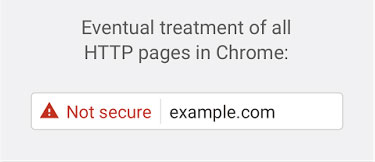
 When the warning is applied to all websites, it will look like the image below.
Additional benefits of upgrading to HTTPS
In addition to the above-mentioned innovations, installing an SSL certificate will bring you additional benefits:
- Your website will rank higher in Google search .
- More visitors will trust it .
- In the case of an online shop, it will increase your revenue.
To avoid inconvenience and possible loss of income, we advise you to decide now to install an SSL certificate that will display your website or shop on a secure HTTPS connection. At NEOSERV you can choose between domain, business and extended (EV) SSL certificates. In case you don’t know which SSL certificate is best for you, you can contact our support team and we will be happy to advise you.
COMMENT THE POST
Your comment has been successfully submitted
The comment will be visible on the page when our moderators approve it.