


- Your cart is currently empty.
Install an SSL Certificate Now to Secure Your Website


Don’t have an SSL certificate installed on your website? Starting with version 68, Google Chrome will warn users when they are on a page that is running on an insecure HTTP protocol. At the time of publication (March 2018), the current version of Google Chrome is version 64, and version 68 is expected to be available from July 2018.
HTTP pages will be clearly marked
Google Chrome already warns users when a web page is located on an HTTP link. However, from July 2018, there will be an additional “Not secure” warning next to the URL of an unsecured web page. A similar message is already displayed on HTTP pages that require sensitive data such as passwords and credit card numbers. However, from Chrome version 68 onwards, the “Not secure” warning will be visible on all unsecured pages, regardless of content, with no exceptions.
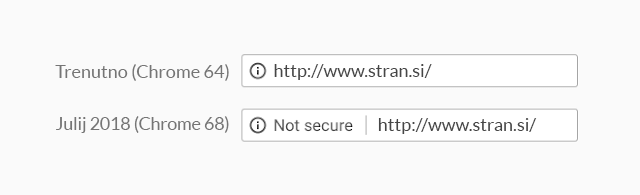
Google Chrome is not the only browser to adopt this practice. Mozilla Firefox will also, from version 59 onwards, clearly inform users if they are visiting a website running on the HTTP protocol. Microsoft Edge and Apple’s Safari will follow.
No more excuses for not using an SSL certificate
More and more businesses and website owners are becoming aware of online security and the use of SSL certificates is certainly one of the cornerstones of online security. This is because by using it, the data between a website and its visitors is properly protected, mostly by 256-bit encryption, which is considered one of the most secure methods of data encryption.
Google has also been working towards a safer internet for many years. One method of encouraging owners to use HTTPS is by ranking websites that use HTTPS higher in search results than those that do not.
Encouragingly, a Google report says that:
- More than 68% of web traffic is protected on Google Chrome, which runs on Windows and Android,
- more than 78% of traffic on Chrome OS and Mac OS is protected,
- 81 of the top 100 most visited sites on the web run on HTTPS.
But by using the “Not secure” warning, Google aims to improve these results even further.
Purchase an SSL certificate
If your website is marked “Not secure“, Google Chrome will not prevent users from visiting it. However, such a warning will make users question the legitimacy of the website and the security of the information they enter on it. It is to be expected that many people will prefer to leave such a site and visit a secure, competing site. You probably do not want that to happen.
As July is fast approaching, we recommend that you choose a secure HTTPS protocol as soon as possible. Your site will work on it by installing an SSL certificate, which you can order from NEOSERV at a low price. If you have arranged hosting for your website with us, we will install the SSL certificate you order free of charge.
COMMENT THE POST
Your comment has been successfully submitted
The comment will be visible on the page when our moderators approve it.