


- Your cart is currently empty.
Joomla Performance Tips: Speed Up Your Website


Joomla is a free and extremely popular website building system. It powers 5% of all websites, which may sound low, but it is still the second most popular CMS, after WordPress. It is used by a wide range of corporations, agencies, government organisations, businesses and even owners of small, personal websites.
In this post, we reveal how to speed up Joomla in seven steps. This will ensure that your website is up and running quickly and that your visitors have a great user experience.
Before you start speeding up your Joomla system, make sure you have backups of your site. This way, you can get your site back up and running in the event of a performance issue.
What is Joomla?
Joomla has been around since 2005 and is one of the most commonly used CMS (Content Management Systems) for building websites. The most common reasons why users choose Joomla are:
- Multilingualism. Unlike WordPress, Joomla has a built-in option to create a multilingual website. There is no need to install additional plugins and components to translate the website.
- Community. Creating an online community with Joomla is easy. The system supports the registration of new members, the publication of news, articles and contributions by external authors, the creation of a forum, etc.
- Extension database. Joomla offers just over 7 000 extensions, which means an organised directory of extensions. WordPress, for example, has an extensions database containing over 40 000 plugins. Among them are many unupdated or unusable plugins, such as the logout roulette.
- Built-in caching. Unlike WordPress, Joomla comes with built-in caching options and additional caching extensions.
- Ease of use. Joomla does not require the presence of a full-time web developer.
Speed up your Joomla system in seven steps
It’s very important to make sure your Joomla website runs fast. Speed affects your website’s traffic, conversions, revenue and even your website’s rankings in Google search results.
Radware has carried out an interesting analysis that shows how important page load time is:
- Shopzilla achieved a 12% increase in revenue after reducing page load time from 6 seconds to 1.2 seconds.
- Yahoo increased traffic by 9% with every 400 ms speed-up of the website.
- Amazon increased its revenue by 1% for every 100 ms faster loading time of its webshop.
- Google loses 20% of its traffic for every additional 100 ms it takes to load a page.
Speed is therefore very important. How long does it take for your Joomla website to load? Use one of the tools below to check:
In case the results show a less than excellent rating, follow the tips below on how to speed up your Joomla system.
1. Hosting
Before you start speeding up Joomla itself, it is definitely important to choose the right hosting for your Joomla site. At NEOSERV, we offer competitively priced hosting on extremely fast and reliable SSD servers. Order your package today and take the first step towards getting your site up and running fast.
2. Updates
It is very important to always use the latest version of your system as it usually contains fixes such as code, speed and security improvements. Also make sure that all your active extensions are up to date.
a. Update your Joomla system
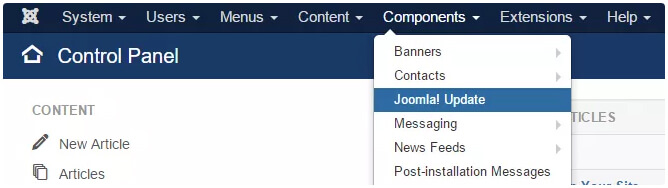
To update Joomla to the latest version, you can either click on the “Update Now!” notification that appears in the Dashboard, or you can update manually by navigating to Components-> Joomla! Don’t forget to back up your website, especially before you make major updates.
b. Update extensions
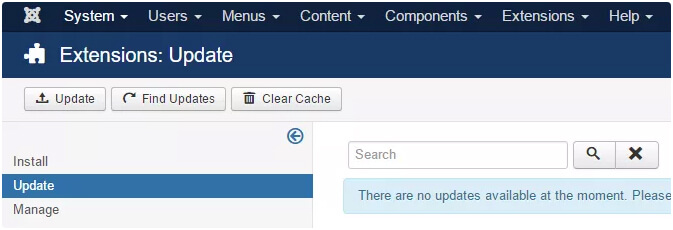
To update Joomla extensions successfully, find the Extensions section in the menu and select Manage-> Update.
3. CDN
CDN stands for Content Delivery Network, which translates to Content Delivery Network. Using this feature will ensure that your website loads just as fast, no matter where in the world the user is coming from.
With the KeyCDN extension, you’ll have your Joomla site loading equally fast all over the world in just seven steps.
Detailed instructions on how to enable this feature are described in the Joomla CDN Integration post.
4. Caching
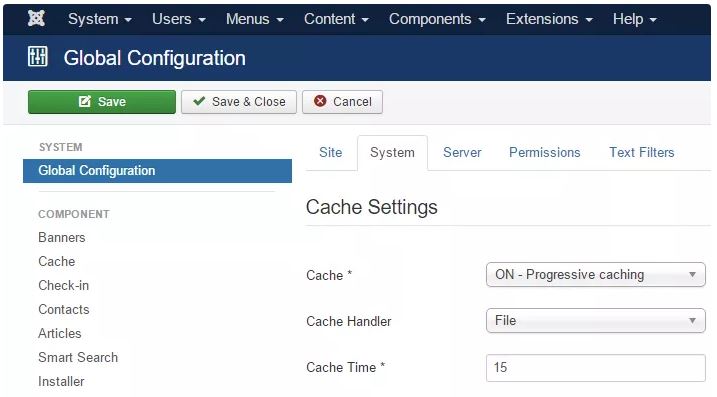
Caching is an effective way to make your site run faster. Joomla offers caching by default, which can be activated in five steps:
Under System, click Global Configuration and select System.
In the newly opened window, enable the caching function. You can choose between two options:
- Conservative Caching: cache content for each unique visitor,
- Progressive Caching: cache and deliver the same cached content to all visitors.
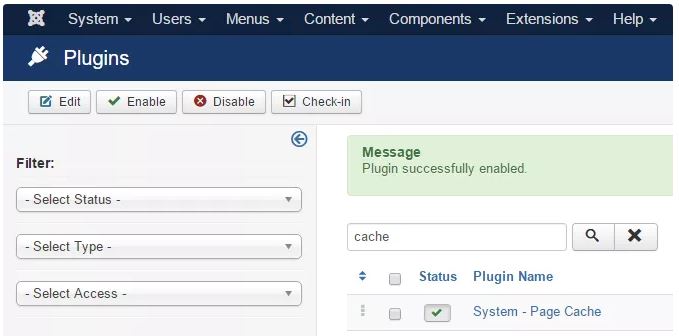
Additionally, enable the Joomla extension for page caching.
- Under Extensions, select Plugins.
- Type “cache” in the search box.
- From the ones you have selected, tick the System – Page Cache plugin.
5. Image optimisation
Images often account for more than 50% of the capacity of an entire website. They can significantly increase page load times, so it is important to optimise images accordingly.
Unfortunately, Joomla does not offer a preloaded option for this action, but you can install extensions that are designed for this purpose. One of the popular ones is EIR – Easy Image Resizer. Imgen, Prizm Image, ImageRecycle image optimizer, etc.
6. Joomla Compression
System compression can further speed up the performance of your Joomla site. Joomla Joomla Joomla can be activated in three easy steps:
- In the System tab, select Global Configuration and Server.
- Enable the Gzip Page compression option by clicking the“Yes” button .
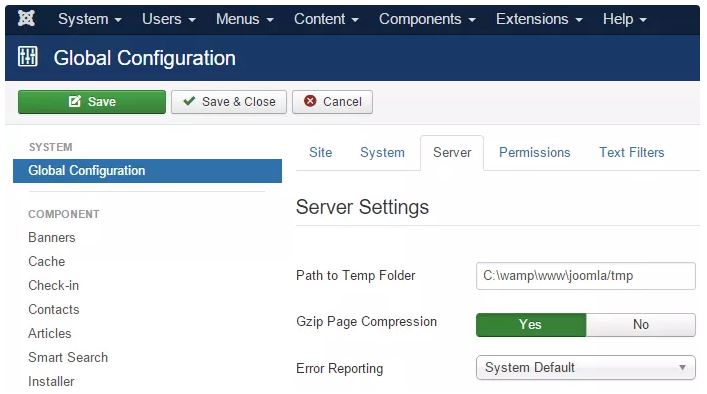
- Click on the Save button.
7. Browser cache
You can also activate the browser cache. This function tells the browser whether to load page files from the server or from the browser cache.
- To enable this feature, first select Extensions -> Plugins in the Extensions tab.
- In the next step, under System – Page Cache, select ” Yes” in the Use Browser Caching field.
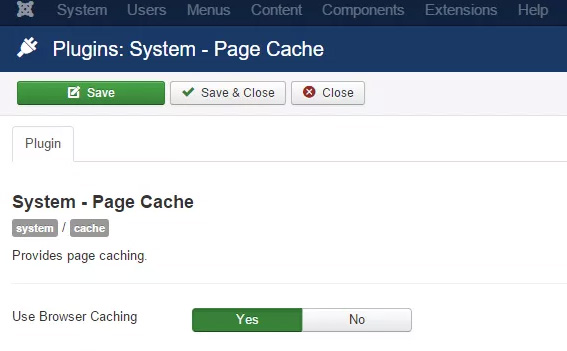
- Finally, click the Save button.
Speed optimisation extensions
If you want to further improve the speed of your Joomla site, use one of the following plugins: JavaScript Async and Defer, jQuery Easy or LLFJ.
Conclusion
As you can see, there are at least seven steps you can take to effectively speed up your Joomla site. Have you done the test we advised you to do in the first part of this post before speed optimization? Once you have completed all seven speedup steps, run the test again. We believe you have successfully sped up your Joomla site.
If you are not yet hosting your site with NEOSERV, you can do so in a few easy steps and speed up your site even further. Don’t worry, we will transfer your website from your existing provider to us for free.

COMMENT THE POST
Your comment has been successfully submitted
The comment will be visible on the page when our moderators approve it.