


- Your cart is currently empty.
Magento Speed Optimization: How to Achieve 100/100


In today’s world of fast information and lack of time, shoppers are not being held back. They want their needs met immediately and a seamless user experience. Slow, time-consuming page loads can be fatal for an online shop.
Have you put a lot of effort into setting up your new Magento online store, but the loading speed is far from optimal? Don’t worry, with a few adjustments and speed optimization you’ll enable your site to reach truly impressive speeds.
Learn below the key steps to achieve maximum speed for your Magento webshop. Discover how to easily outperform your competitors and delight your customers with lightning-fast responsiveness. Speed is of the utmost importance, so make sure your online store gets it too.
Magento errors
Problems with slow webshop performance are most often caused by additional Magento modules that bring new functionality and change the way the shop works. The more of them there are, the more they affect the speed of the store, which can slow down some processes significantly. This doesn’t mean that you can’t have dozens of modules and still have a fast online store. If the modules are made to a high quality and thoroughly tested, they can even speed up the webshop.
You can test how the store works in the background and how the modules run by checking how the server responds before adding each new module. Focus on how fast the processes are and whether there are any errors in the execution.
You can check forerrors by checking the error logs. These are located in the var/log folder in the Magento platform and are written in different log files. The most urgent ones to fix are those in the exception.log file, as these errors prevent code execution and cause interruptions.
When severe malfunctions occur, a notification with the error code is displayed instead of the webshop. You can find out which error has occurred by checking the details of the report located in the var/report folder.
If you are having trouble troubleshooting the malfunction, you can help by adding code to the beginning of the index.php file:
ini_set('error_reporting', E_ERROR);
register_shutdown_function("fatal_handler");
function fatal_handler() {
    $error = error_get_last();
    echo("<pre>");
    print_r($error);
}
The above code will return the last error before the abort. Please only add the code to the test version of your Magento store, as its inclusion may interfere with some features such as checkout. It only serves to detect errors, fix them, and remove the code once you have done so.
By removing all errors and warnings, the log files should be empty and the webshop should run much faster.
If you have a slow webshop due to a multitude of modules in use, it is very important not to solve the problem with an extra module that promises super speed, but to fix the original situation first. The chances are that the additional module will make the performance even worse.
Optimising the display of your Magento store
Once you’ve fixed the errors, you can start optimising the display of your webshop. Google PageSpeed Insights can help you check the speed of your site. This online tool will give you an overview of the current performance of your Magento store on both mobile phones and computers in just a few seconds.
Make sure that your store’s loading speed on mobile is below 3 seconds and the performance rating is above 50. This will help you retain many customers you would otherwise lose.
Degriz d.o.o., a company specialising in Magento, strongly recommends PageSpeed Insights analysis because after reviewing several Slovenian online stores, they found that most of them had a mobile version load time of more than 10 seconds. These included some that won awards for the best online stores.
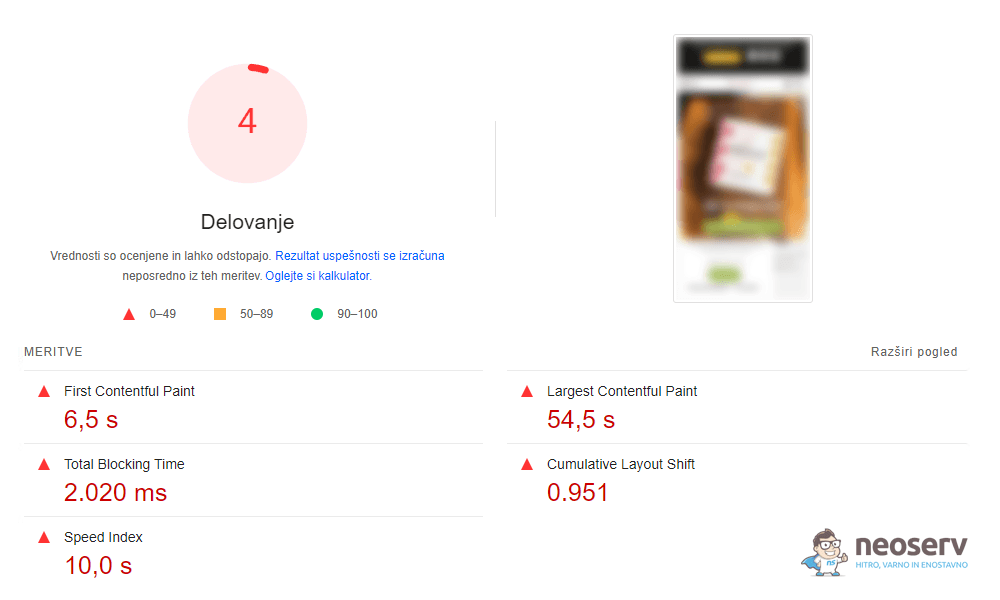
PageSpeed Insights will not only report on your store’s current performance, it will also suggest actions you can take to improve it. Here are some of the most common errors and their solutions:
- Modern image formats: convert your images to WebP format, which you can do with a module that converts all images in your Magento webshop.
- Appropriate image sizes. You can do this with the
<picture>tag, whereyou define different image sources for different screen widths. - Use lazy loading for images that are not in the viewport, so that they only load when the visitor scrolls lower on the page. Add a
preloadattribute to the first visible images so that they load preferentially. - Reduce JavaScript runtime: Check which scripts you are loading and remove unnecessary ones. Many pages load unnecessary libraries or fonts that can be loaded directly from the server.
- Reduce the impact of third-party code: Build in first-party tracking for tools used to monitor advertising.
In addition to these measures, there are many others, which are described in great detail on the PageSpeed Insights page. Take the time to check them out and make sure you optimise the speed of your Magento store to achieve fast loading times and an improved user experience.
Optimised server for fast store performance
Have you followed all the steps we’ve outlined in this guide, but your Magento store is still running slowly? We definitely recommend you try our lightning-fast TURBO hosting or opt for a high-performance and 100% scalable VPS server, as the difference between hosting with us or on the average hosting provider’s server can be extremely significant.
Did you know that at NEOSERV we offer a 30-day free trial of our TURBO packages? Take this option and see for yourself the quality of our servers, which are based on high-performance Intel Xeon processors, NVMe SSDs and modern LiteSpeed technology, before you pay for your package.
When it comes to speed optimisation of your Magento online store, it’s also important to ensure that the platform itself and all its modules are up-to-date and that you’re using the latest technologies. In some cases, just upgrading to a newer PHP version can have a significant impact on the performance of your store.
Statement.
Since I have been using NEOSERV hosting (TURBO package), my work has become much easier as I no longer have to deal with server problems. This way and with fast performance I save a lot of time, which I can spend on developing and preparing new content.
The operation of the Magento webshops that we at Degriz d.o.o. regularly build for our clients is significantly faster on NEOSERV servers than it was on servers from other providers with whom we have leased web hosting in the past.
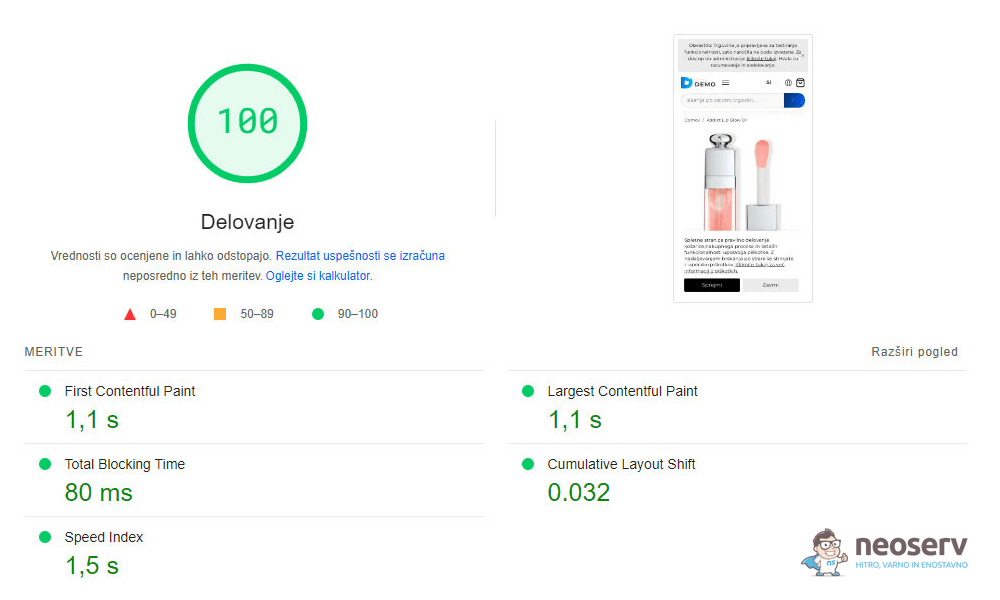
In addition to the high capacity of the available server resources and the use of LiteSpeed web server, a great advantage of their TURBO packages is the cPanel control panel, which allows easy and efficient management of domains, email boxes and SSL certificates, the ability to quickly change the PHP version and settings, use all the necessary PHP extensions and so on.
Together with NEOSERV, we have prepared two exclusive packages for creating a professional webshop at a special price. The first package includes a webshop on the OpenMage platform, while the second on the Magento 2 platform. Both packages include a pre-built template for a quick start, modules to extend the functionality, 20 hours of professional customisation of the webshop, a Slovenian interface and instructions, and 2 months of free TURBO hosting.
You can check the details of the packages and the DEMO version of the webshop at the link below:
COMMENT THE POST
Your comment has been successfully submitted
The comment will be visible on the page when our moderators approve it.