


- Your cart is currently empty.
PHP 5.6 vs PHP 7: Performance and Features Compared

PHP is an open source programming language developed by Rasmus Ledof in 1994. It has been the standard for server-side programming languages since the beginning, running on almost 80% of servers. It is followed by ASP.NET with just under 20%, which means that only a handful of servers run other programming languages such as Ruby and Java.
It’s been more than two years since the developers of the PHP programming language introduced version 7, which is claimed to be significantly faster than the previous version 5.6. In this post, we check whether this is the case and how to set up PHP 7 on your hosting package.
The benefits of PHP 7
What we have written many times in our posts, we will stress again – speed is one of the key factors for a successful website. Speed is also affected by the choice of the right PHP version, which we’ll look at in more detail later in this post.
The main advantages of PHP 7 over PHP 5.6 are:
- PHP 7 provides improved PHP code processing, caching and loading of the website and its parts.
- PHP 7 offers additional features for developers such as return type, spaceship operator and null coalescing operator.
- Developer support is available for PHP 7, while it was only available for PHP 5.6 until 31 December 2016.
- Each subsequent version 7 – 7.1, 7.2 and 7.3 – is even slightly faster than its predecessor.
The benefits of PHP 7 are also demonstrated by the results of a survey conducted by Nestify:
- More than 70% of web developers use PHP 7 in their work.
- Only 3.8% of developers would switch web hosting providers if they only offered PHP 7.
- According to Nestify’s testing, PHP 7 runs almost 2x faster than PHP 5.6.
While reading this post, you may have noticed that we keep talking about PHP versions 5 and 7. What happened to PHP 6? Before version 7, the last stable version was 5.6. There was also a version 6, but due to a number of performance instabilities, the developers decided that the next production PHP version would be numbered 7. You can read more about why version 6 was never officially released on wiki.php.net.
We advise you to always choose the latest version, at the time of publishing this article it was version 7.3.
PHP 7 and WordPress
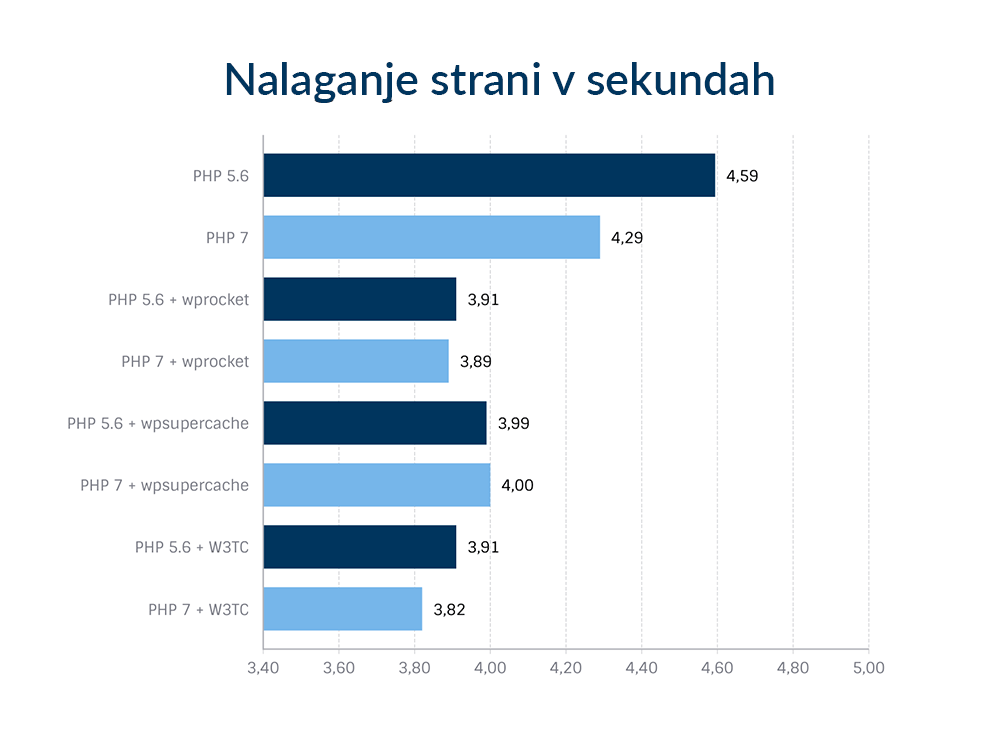
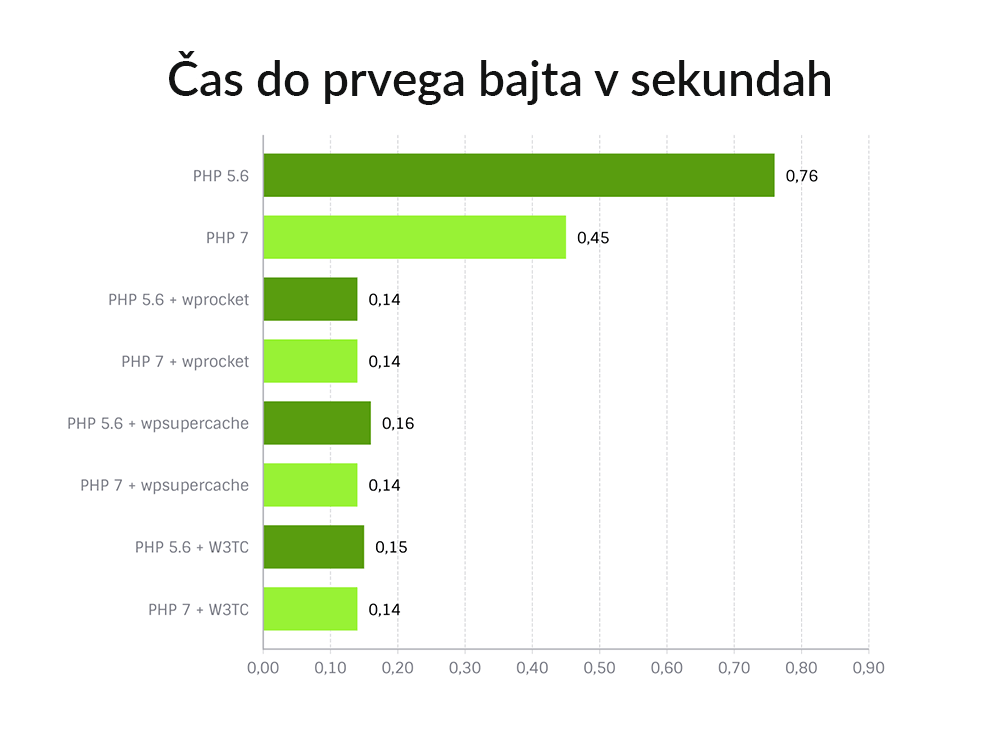
The improved performance of PHP 7 is also noticeable in the speed of WordPress websites. This is evidenced by the results of a test carried out by the Dutch company Savvii, using WordPress with the WooCommerce plugin and 50 products added. They tested with PHP 5.6 and 7, without using any additional plugins, and then with three different caching plugins – W3 Total Cache, WP Rocket and WP Super Cache. To get the most accurate results, each test was run nine times. The results were as follows:
- Page load:
 2. Time to First Byte (TTFB):
3. Speed index:
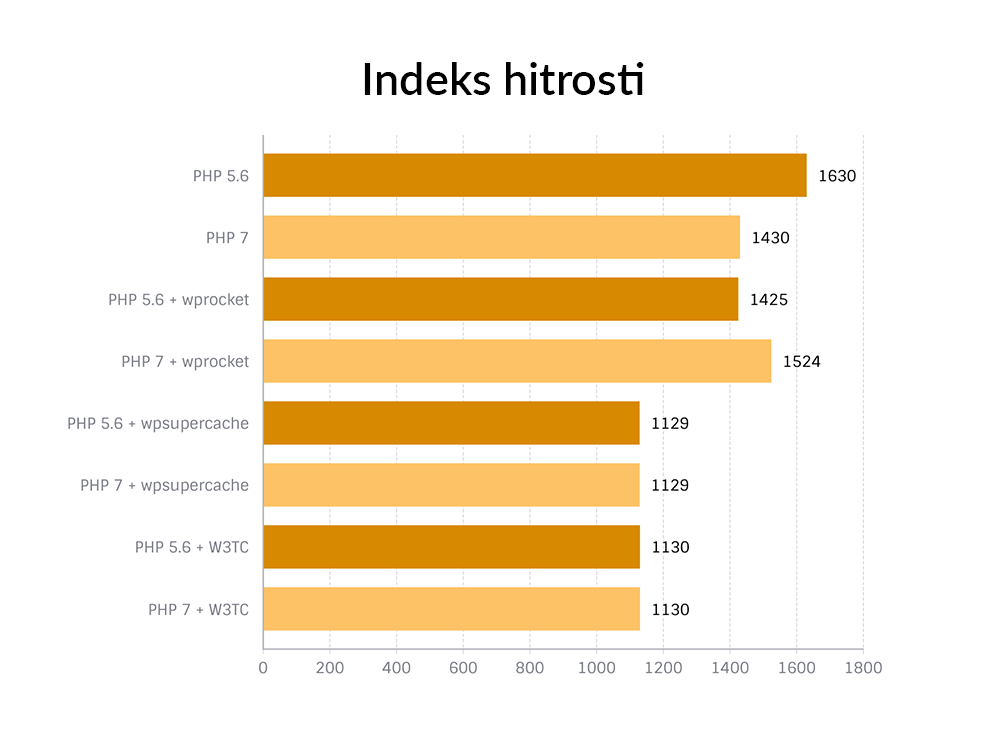
The results clearly show that a website is faster on PHP 7 than on PHP 5.6 if it does not use any of the caching plugins. The test page loaded on average 0.3 seconds faster with PHP 7, the time to first byte was 41% faster and the speed index was 12% better with PHP 7 compared to PHP 5.6.
When using the caching plugin, the changes between the PHP versions are minimal. The reason is that most PHP requests are made with caching, so it doesn’t matter which PHP version you use.
Does my WordPress site support PHP 7?
It’s true that it’s been more than two years since PHP 7 came out, but still some of the graphical templates and plugins in WordPress don’t yet support this version of PHP. You can check the compatibility of your WordPress website using the dedicated PHP Compatibility Checker plugin.
Selecting PHP 7 in the cPanel control panel
Do you have web hosting with us? Then you can select PHP 7 in a few simple steps:
1. Log in to your cPanel.
2. Click on the Select PHP Version icon under the SOFTWARE icons.
 3. On the newly opened page, under Current PHP version, select the latest PHP version.
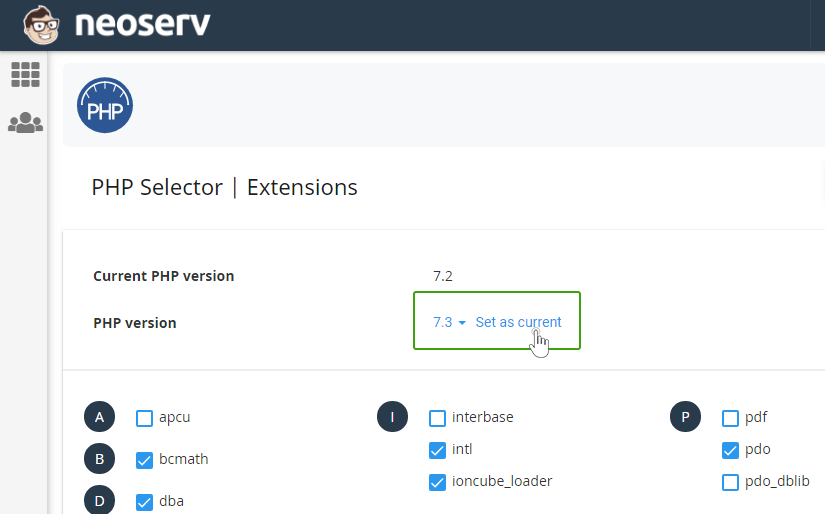
4. Click on the Set as current button.
Congratulations, you have successfully set up the latest PHP version on your hosting package. If you have multiple websites and want to use arbitrary PHP versions for each site, the post Assigning PHP version to each directory will help you.
The results of various tests therefore support the claim that PHP 7 speeds up your website. Also at NEOSERV we offer fast SSD hosting that supports the latest PHP version. Secure your package at a great price today.

COMMENT THE POST
Your comment has been successfully submitted
The comment will be visible on the page when our moderators approve it.