


- Your cart is currently empty.
Do Your Customers Feel Safe Shopping Online?

One of the easiest and most affordable ways to improve your online sales results is to install an SSL certificate. Although the process is really simple, most online shop owners make a fatal mistake.
They fail to give their visitors clear signs that they have installed a certificate and that their shopping experience is completely secure. They do not tell visitors that a trustworthy company is behind the shop and that all sensitive data is protected by advanced encryption. If you have already invested in an SSL certificate, don’t make this mistake yourself!
Here are two ways to let your potential customers know at a glance that their personal data is protected, that your business has been verified by a recognised certificate provider and that online shopping is definitely safe.
If your visitors are aware of this, you can expect happier customers and increased online sales.
Sitemap
How to remind visitors to use an SSL certificate
https:// at the beginning of the web address and the padlock icon at the top of the browser are basic indicators that an SSL certificate has been installed on the webshop. These visual elements are provided to every SSL Certificate subscriber, whether the certificate is a domain, business or extended certificate.
Although you can expect improved online sales results from these two indicators alone, you can achieve much more with just a little extra work.
1. Use a seal – Trust Seal / Trust Logo
Did you know that when you buy an SSL certificate, you also get the option to use the issuer’s seal? It’s true, and it’s more than advisable to take advantage of this option, as it’s a highly visible element that creates a sense of trust with visitors.
Sectigo SSL certificates include two types of seals, the Trust Seal and the Trust Logo.
Trust Seal
The Trust Seal is a static image that tells visitors that your website uses an SSL certificate. You can implement the following Trust Seal for all Sectigo SSL certificates.
To add the Sectigo Trust Seal to your website, follow the procedure below:
- Install the SSL certificate on your domain (if you have a web hosting subscription with us, we will do this for you).
- Visit this page where you will find the relevant HTML code and instructions for installing the Trust Seal.
Trust Logo
The Trust Logo is the most commonly used indicator of a website’s trustworthiness. It can be used if you decide to purchase a business or extended Sectigo SSL certificate (not valid for Multi-Domain certificates). It is a seal that a visitor can click on to check the details of the certificate and the company.
For Business and Extended SSL Certificates, the Trust Logo shows the company name, the domain URL, the physical address used in the CSR, the telephone, fax and email address to which the certificate was issued.
To add the Sectigo Trust Logo to your website, follow the procedure below:
- Install the SSL certificate on your domain (if you have a web hosting subscription with us, we will do this for you).
- Visit this page to find the relevant HTML code and instructions for installing the Trust Logo seal.
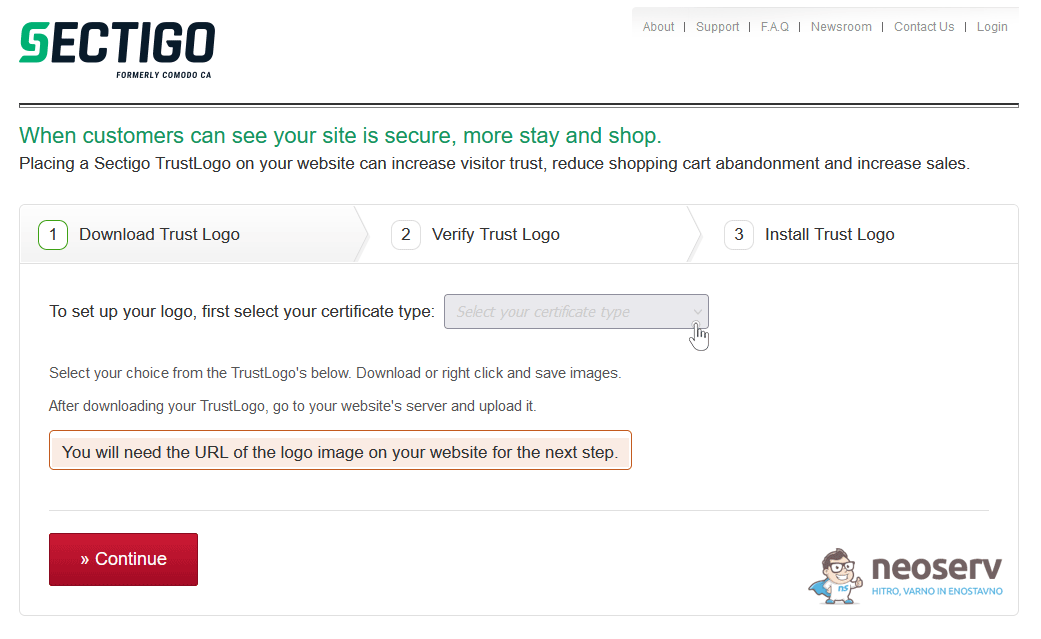
1. Select the type of certificate from the drop-down menu.
2. Select the desired seal size and download it by clicking on DOWNLOAD. Click Continue.
3. Save the Trust Logo seal image to your hosting package. Upload it to the folder where your website is stored.
4. In the next step, check the link to the image. Paste the URL of the image in the appropriate field and click on the VERIFY button.
5. If you have successfully followed the steps, the Trust Logo seal image will appear in the frame. Click on the Continue button.
6. You will then be presented with two HTML codes to add to your web page.
If you are using WordPress, you can add the HTML code using the free WPCode plugin.
Whichever SSL certificate you end up with, make sure you take advantage of all the benefits that certificates have to offer. Add the seal in a prominent place in your online shop so that visitors will notice it and know that they are shopping securely online.
Some online shops also place the seal on the last step of the order – next to the “Order” button. This also increases the percentage of purchases made.
It is best to try out different options and find the one that gives the best results for your online shop.
2. Invest in a Business (OV) or Extended (EV) certificate
Do you know why a Business SSL Certificate and an Extended SSL Certificate provide a higher level of security for using an online shop than a Domain SSL Certificate? Because the issuer of the certificate verifies the ownership of the domain, in addition to verifying the business.
- In the case of a domain certificate, the purchaser of the SSL certificate receives a verification email from the issuer of the certificate to the email address that is listed in the WHOIS database as the domain owner’s email address. By clicking on the link, the verifier confirms that the domain for which the SSL certificate is issued is definitely managed by the domain owner.
- In the case of business and extended certificates, in addition to the domain verification, the company ordering the SSL certificate is also verified. The issuer of the certificate verifies the actual existence of the company, the type and status of the organisation and the physical address. In the case of an extended certificate, verification of the validity of the telephone number, the time of existence of the company, tax compliance and certain other verifications are also carried out.
A business or extended SSL certificate is a reliable indicator that an online shop is definitely operated by a trustworthy company. However, to obtain an Extended Sectigo Certificate, a company must also meet additional conditions, such as having been in existence for at least three years and having paid its taxes.
So how do I find out if an online shop is using a business or extended SSL certificate? Simply by clicking on the padlock icon located on the left-hand side of the URL.
Please see the images below for information on the use of an SSL certificate that has also been subject to business verification. The first image shows the Google Chrome browser and the second image shows the Mozilla Firefox browser.
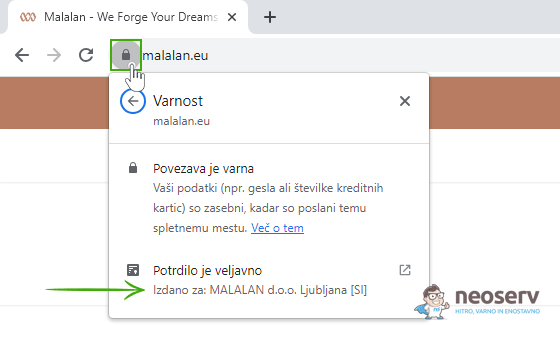
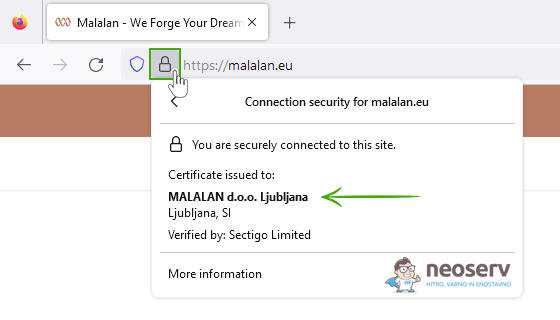
The largest Slovenian online shops already use a business or extended SSL certificate. They realise that the investment in data security, company credibility and customer trust is worth much more than they have to pay for this type of security certificate on an annual basis.
Don’t let the competition get ahead of you!
Finding ways to get ahead of the competition with an online shop can be very time-consuming and extremely expensive. Every now and then, however, a simple and affordable opportunity comes along that can make a big difference to the bottom line. SSL certificates are undoubtedly one of these.
You have probably noticed that more and more online shops are located on the secure https:// link. But few of them are reaping the full benefits of an SSL certificate. The use of business and mainstream certificates is also still quite low in Slovenia, which makes the investment in them all the more justified.
Don’t let your online shop be just average! Opt for the widely used SSL certificate that is now synonymous with online security. Don’t forget to place the seal in a prominent position, as it will further convince your potential customers to complete their order.
We recommend that website owners opt for the Sectigo EV SSL certificate, which is the most cost-effective of all the widely used certificates. Don’t worry about installation. If your webshop is hosted with us, we will install the SSL certificate on your hosting package for free!
COMMENT THE POST
Your comment has been successfully submitted
The comment will be visible on the page when our moderators approve it.