


- Your cart is currently empty.
8 Tips for Creating a Popular and Recognizable Blog


Nowadays, setting up a blog is very easy. You choose a domain, register it, buy web hosting and set up your blog with just a few clicks via the control panel. Even writing posts is not a chore if you have a little creative flair and spelling is not too much of a problem. On the contrary, it’s enjoyable, and when you publish a new post, you’re sure to feel great.
If you have the desire to write a “blog”, don’t hesitate, as it will benefit you in many ways:
- You will improve your writing skills,
- you will learn a lot of new things as you prepare your posts,
- others will find out about you, which will open many doors for you,
- you will learn how to use a web content editing system (e.g. WordPress),
- and last but not least, you will be able to make money from your blog.
At first glance, it all looks very nice and simple, but in most cases there is a problem, because many blogs are not visited after a year or more. It’s not that the authors don’t write interesting posts, it’s just that not enough people find out about their blogs.
To make sure that you don’t end up with a blog that is an end in itself, today’s post gives you eight “SEO” tips on how to create a blog that is visible and well-visited.
1. Determine your target audience and choose your topics
Do you know who your posts are aimed at? Always define your target audience before you start writing a post. Always imagine a person who will read your article with great interest and take the desired action, e.g. share the article on Facebook.

With a well-defined target audience, you will find it easier to choose the topic of your post and adapt your writing style, which will make visitors identify more with your content. It will also make any publicity for the post much more effective, as you will know exactly who you need to publicise your content to.
If you post frequently, you’ve probably been in a situation where you just didn’t know what else to write. If this is the case, use the following tips to help you:
- Check online forums, social networks and comments on other people’s blogs to see what people are asking and what problems they are facing. Based on the information you get, write an article to help solve the problems.
- Prepare a comprehensive guide with well-illustrated steps.
- In the article, focus on a list of pros and cons.
- Create an interesting and graphically polished infographic.
- Make a case study and present the results in an illustrative way.
2. Set an objective for each new contribution
It is very important that you know exactly what you want to achieve before you start writing. It is also essential that you can measure the results. Google Analytics – a tool for monitoring and analysing data about visitor behaviour on your website – can help you to track some of your goals. The basic use of the tool is not difficult, nor is the implementation of the code to collect the data. If you’re using WordPress, one of the many free plugins will help.
Not sure which targets to set? Let us list some options to help you define yours:
- The post should provide 20 sign-ups to the newsletter database.
- 100 people read the article in one month.
- The article should generate €30 affiliate commissions per month. By the way, did you know that NEOSERV also has an affiliate programme with 25% commissions?
- Advertising the post on Facebook should generate 70 new likes to your Facebook page.
- Visitors should stay on the post page for at least three minutes on average.
Don’t neglect this step, as you’ll know how successful your blog is by how well you meet your goals. Achieving your goals also acts as an extra motivation!
3. At least half of your posts should include keywords
You can attract visitors to your blog in many different ways. Some people will find you on Google, others will find out about your blog through social networks, and the most loyal will already know you and will type your domain name directly into their browser. Of course, you can also opt for paid advertising, for example on Facebook.
You should use as many channels as possible to drive visitors to your blog. You should certainly not neglect free ‘organic’ traffic, i.e. visitors who reach your blog via Google. So how do you get more of these visitors? First of all, by using the right keywords.
A keyword is a phrase made up of one or more words. It is the basis on which a paper should be written. Keywords are those that are frequently typed into search engines by web users, for example “website optimisation”, which is reportedly typed into Google almost 1000 times a month.
We recommend Keywords Everywhere, a Chrome or Firefox browser add-on, for an indication of the number of searches per month. If you use Google AdWords and have active campaigns, you can find average monthly searches in Google’s Keyword Planner. You can also use this tool if you don’t advertise, but in this case you will only see approximations of monthly searches, for example 10 – 100, 100 – 1K or 1K – 10K.
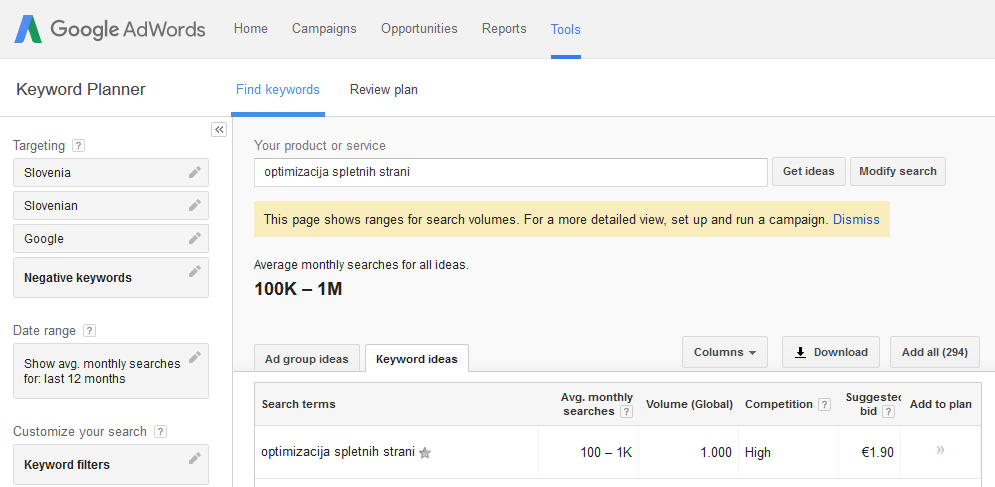
Using keywords will give Google a clear idea of what each post is about. As a result, you’ll rank higher in search engines, which will also drive more traffic to your blog. You can read more about how to use keywords correctly in the next section.
For some posts, keywords simply won’t be an option. In this case, since you can’t count on a lot of traffic via Google, you will need to attract readers in other ways. You will probably get the most from social media promotion, but maybe someone on an online forum will also benefit from a link to the article.
4. Optimise your keyword posts accordingly
Let’s stick to keywords first. We advise you to choose one main keyword for your post, but you can also choose a few similar or so-called long-tail or extended keywords. Let’s say you want to write an article about heat pumps. In this case, you would choose “heat pumps” as your main keyword and “heat pump operation” as a long-tail keyword.
It is also important to use thematic keywords, i.e. keywords that are related to the topic you are writing about. In this example, you could also use “central heating”, “domestic hot water heating”, “hot water storage tank”, “heat storage tank”, “air water heat pump” and so on.
Before you start drafting your paper, make a list of thematic keywords. You can find these using the Keyword Planner tool, or you can visit websites that rank highly on Google for your main keyword and look at their content structure.
Capture the main keyword in the title of the (sub)page, in the main title of the article (H1), in one of the subheadings (H2-H6), and also write it a few times in the content itself. Make sure that the post looks natural and that you do not overdo the keyword, as Google may penalise you if you do not. Write with your visitors in mind!
5. Make your posts easy to read
Have you ever come across a blog while browsing the web where the posts look very long and completely unreadable? Maybe the content wasn’t broken down enough, maybe the author used a font that was too small, maybe something else was wrong. The fact is that such posts are much harder to read, which is why a good number of visitors decide to leave the blog in a hurry.
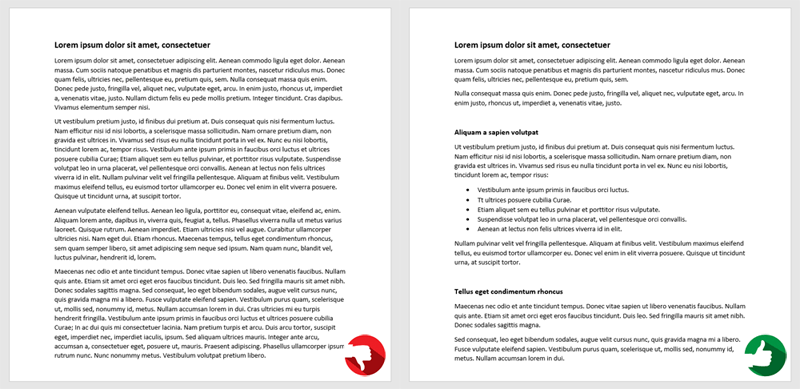
If visitors do not stay longer and read more posts, Google will consider that it is a low-quality blog that does not deserve a prominent position in the search engine. User experience is clearly an extremely important factor that increasingly influences the ranking of websites in Google search.
To ensure that your blog does not fall victim to hard-to-read content, consider the following:
- Keep paragraphs short and separated with plenty of white space.
- Separate your post into several sections with interesting subheadings.
- Use bulleted or numbered lists for enumeration.
- Bold or italicise important parts of the content.
- Do not underline words, as this style is ‘reserved’ for links.
- Place images, videos and other graphic elements in the content in a meaningful way.
- Use CTA buttons, but do not overuse them.
Don’t forget to check the spelling and grammar of the text before publishing!
6. Make it easy to share on social networks
Interesting and useful posts are often shared via social networks. It is very important to make it easy for blog readers to share your posts on the most popular social networks:
- Facebook,
- Twitter,
- Google+,
- LinkedIn.
Where to place share buttons? The answer depends on the structure of your blog, but in principle you have two options.
The first is floating buttons on the side of the content, which are visible at all times as they travel with the visitor while reading the post. Make sure they are not too far away from the content, otherwise they can quickly become completely invisible. Also make sure that buttons do not overlap other elements in their vertical path.
Alternatively, place the buttons below the post, as most visitors decide whether or not to share a post on social media after they have read the post in full. We also advise you to invite readers to share and comment at the end of the post.
For those of you who use WordPress for blogging, use the plugins to set up social sharing buttons. You can try Custom Share Buttons with Floating Sidebar or Simple Share Buttons Adder, but otherwise there’s a lot of choice, so with a bit of testing you’re sure to find the right solution.
7. Let as many people as possible know about your blog
Speaking of social networks, let’s stick with them for a bit. Simply waiting for your blog readers to share your posts on their own will not be enough. Make the most of the potential of Facebook, Google+ and Twitter. Create a dedicated blog page on each of these networks and always share your posts yourself.
In the beginning, you will face the problem of how to get likes on your Facebook page. Once you have refined your profile and added some posts, ask your friends for likes first. Then add interesting posts regularly (not just links to blog posts) and comment on posts on other Facebook pages. If you want faster results, give your best posts a few euros for advertising. By following these simple tips, your number of likes will grow steadily.
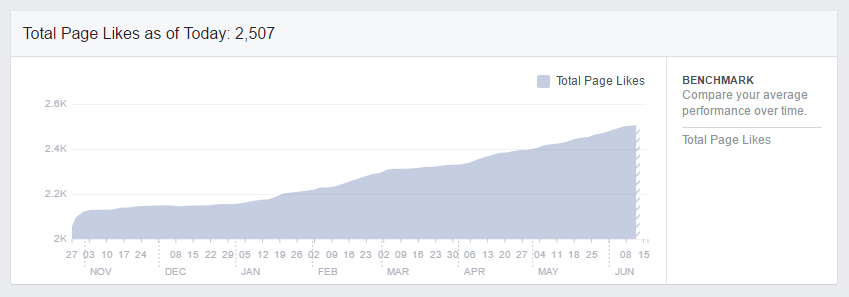
You can also help yourself gain visibility by commenting on other authors’ posts. Most blogs have commenting enabled, but the best thing is that you can usually put a link in your name that leads to your blog. In this way, a small proportion of readers of other blogs will find out about you, but it will definitely make a difference in the long run. It may well be that by commenting on other people’s posts you will gain the most loyal visitors who will be happy to return to your blog.
Let us also introduce you to a method with a double effect. This approach requires a little more work, but the effort is well worth it. Search online for blogs that are thematically related to yours. Also look for the authors’ contact details, especially their e-mail addresses, and ask them about the possibility of publishing articles on their blogs. Tell them exactly what you would like to write about and, of course, mention that you would like a link to your blog in return.
So why the double effect? Not only will some visitors be redirected to your blog via links on other blogs, but your blog will also become “stronger”. Thematically linked external links will have a positive effect on the authority of your blog, which will consequently start to appear higher in search engine results.
There are many ways to promote your posts for free. Let us reveal one more. If you have mentioned a famous personality in your post, for example a sportsman or a businessman, let them know. Do this by mentioning the username on the social network – add “@” in front on Twitter and “+” (without the quotes) on Google+.
8. Edit internal links
Do you have a lot of posts on your blog? Go through them and place links in them in a meaningful way that will lead visitors to related posts. This will make it easier for anyone reading older posts to discover interesting new content, and internal links will make it easier for Google to find new posts more quickly.
Internal links can also have some impact on the search engine rankings of individual posts. Imagine you have 100 blog posts, 10 of which contain an internal link to a specific article. It is obvious that this is a very important article, and Google will also notice this. As it assigns more value to it, this is reflected in the visibility of the article in the search engine. So don’t forget to define your keywords!
Although you can make a difference to search results by deliberately creating internal links, we recommend that you don’t overdo it. Always ask yourself first whether the link would be useful to the visitor, and if so, only then place it in the article.
So, now get to work!
Did you get excited about the idea of having your own blog while reading today’s post? Great, that was our intention! We’re confident that you can manage to create a well-trafficked blog that will eventually earn you a nice income.
Are you still at the very beginning? We recommend you read the article “How to get a great domain for your blog?” first, because you’ll need a good foundation to get your blog noticed.
 In addition to a domain, you’ll also need quality web hosting to ensure your blog is up and running quickly. You know – if your blog is slow to respond, visitors won’t waste time on it. Many of them will look for an alternative where they can save both time and nerves.
At NEOSERV, we’re very aware of this, which is why we’ve provided fast SSD servers that deliver exceptionally low response times. In addition, we offer all our clients access to the cPanel control panel, where you can install your WordPress blog with just a few clicks.
And if you run into problems, despite the simplicity? Don’t worry, you can always contact our team who will be happy to answer any questions you may have.
COMMENT THE POST
Your comment has been successfully submitted
The comment will be visible on the page when our moderators approve it.