


- Your cart is currently empty.
Critical Vulnerability: Divi, Extra, Divi Builder

On 23 July 2020, the Threat Intelligence (Wordfence) team discovered a vulnerability in two Elegant Themes graphical templates, Divi and Extra, as well as in the Divi Builder plugin. Together, these products are installed on approximately 700,000 websites. The vulnerability allowed authenticated attackers with the ability to edit contributions to upload arbitrary files, including PHP files, and to execute code remotely on the vulnerable website’s server.
On 29 June 2020, the developers of Elegant Themes announced that they would patch the vulnerability in the next version. Security updates were thus released on 3 August 2020, in version 4.5.3 for both the graphical templates and the plugin.
If you haven’t already taken care of the updates and are therefore using …
- Divi 3.x
- Extra 2.x
- Divi Builder 2.x
… we strongly advise you to update the graphical template or plugin to the safe version 4.5.3 immediately.
An alternative is also available. If you are not able to update at the moment (e.g. because you have made manual changes to the graphic template), you can use the “Security Patch Plugin” to patch the vulnerability of your website.
Users of the Wordfence Security Plugin are also protected against attacks, as the plugin has a built-in firewall that prevents malicious files from being uploaded.
How do I update the Elegant Themes graphic template/plugin?
If you have added a username and API key to use Elegant Themes in your website’s Dashboard, you can update directly in the WordPress administration.
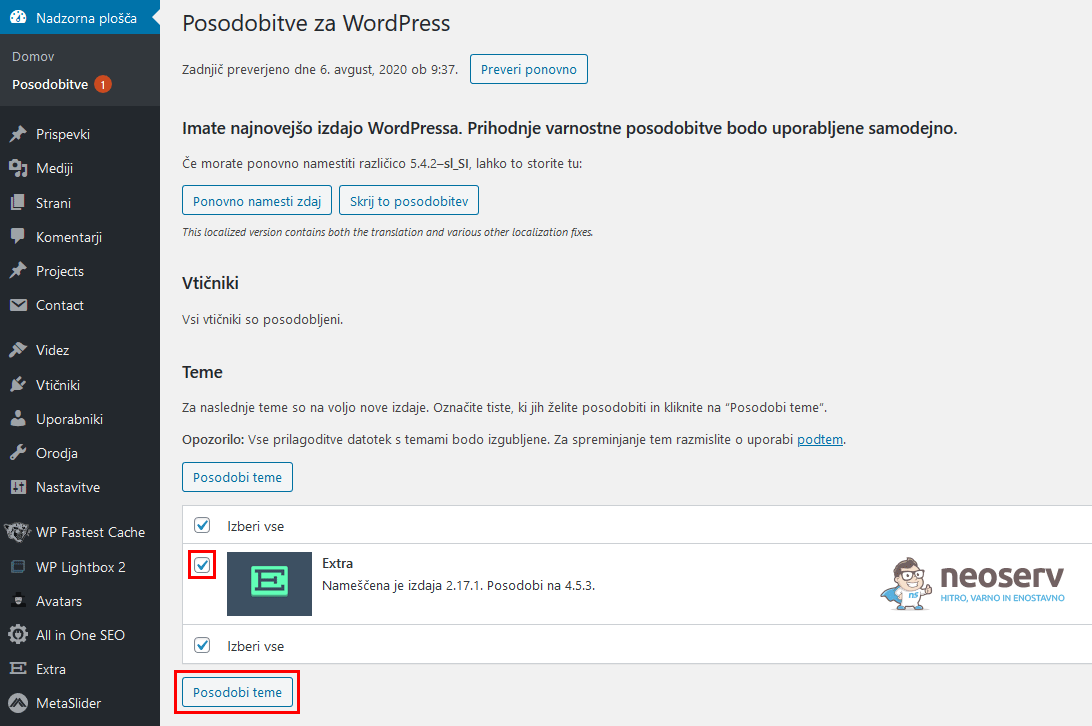
After logging into the administration, click on Updates in the left menu, select an Elegant Themes product (Divi, Extra, Divi Builder) and click on Update Themes or Update Plugins.
Note: Elegant Themes developers have also made the security update available to users whose licenses or accounts have expired.
Protect against vulnerabilities with Wordfence Security
As mentioned above, you can also protect yourself with the Wordfence Security plugin, which has a feature that disables the execution of code in theuploads folder.
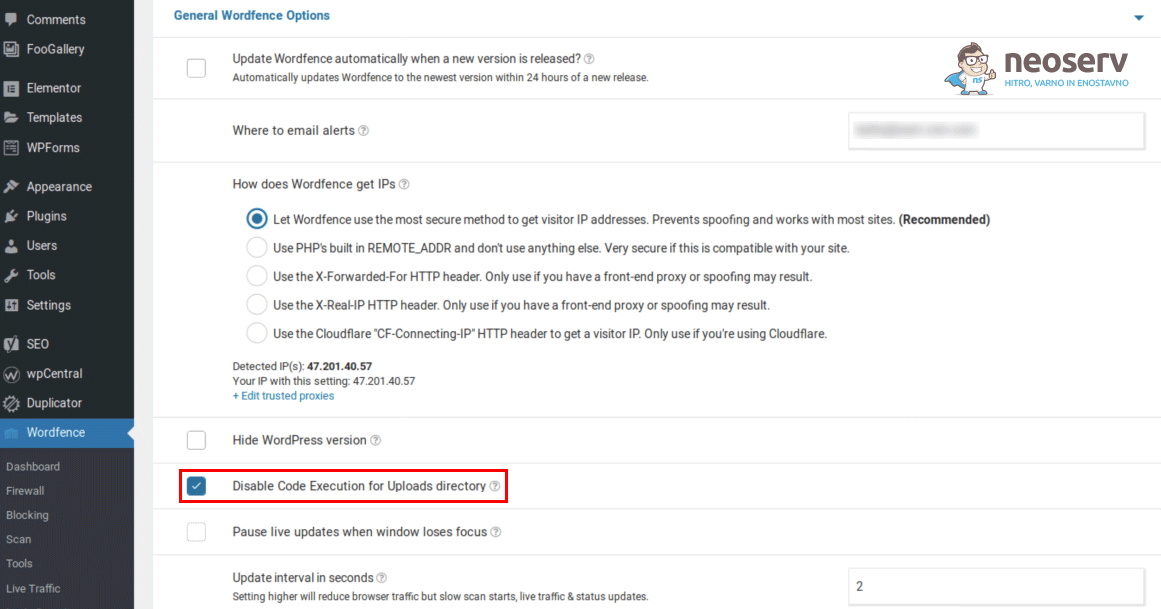
Even if you are not using one of the vulnerable Elegant Themes products, we advise you to enable this setting as it will provide additional protection against vulnerabilities. This setting will disable the uploading of PHP files to the uploads folder where uploaded files are stored.
COMMENT THE POST
Your comment has been successfully submitted
The comment will be visible on the page when our moderators approve it.