


- Your cart is currently empty.
Windows Live Mail Discontinued After June 2016

Windows Live Mail 2012 (WLM 2012) is the software Microsoft introduced to replace Outlook Express as part of the Windows Essentials suite, which includes Live Mail, Live Writer, Photo Gallery, Movie Maker and OneDrive. It also included Messenger, which was later replaced by Skype. Unfortunately, the suite hasn’t been updated since 2012, as Microsoft has turned its attention to developing other applications.
Microsoft announced last October that WLM 2012 would be discontinued at the end of June 2016, so it will be necessary to find other software for local email subscription. All current email applications – Office 365, Hotmail, Live Mail, MSN Mail, Outlook will be replaced by a single Outlook.com application.
The problem arises because WLM 2012 does not support the new Application Programming Interface (API) required for full synchronisation with Outlook.com. Microsoft could have upgraded WLM 2012, but chose to use a different email programme instead.
Can I still use WLM 2012?
So WLM 2012 is saying goodbye, but you can still use it if you want. You need to make a new account for your existing email address and select the option: manually configureserversettings. The incoming mail server should be IMAP, with the address imap-mail.outlook.com and theport number 933. For the outgoing mail server, use smtp-mail.outlook.com and port number 587.
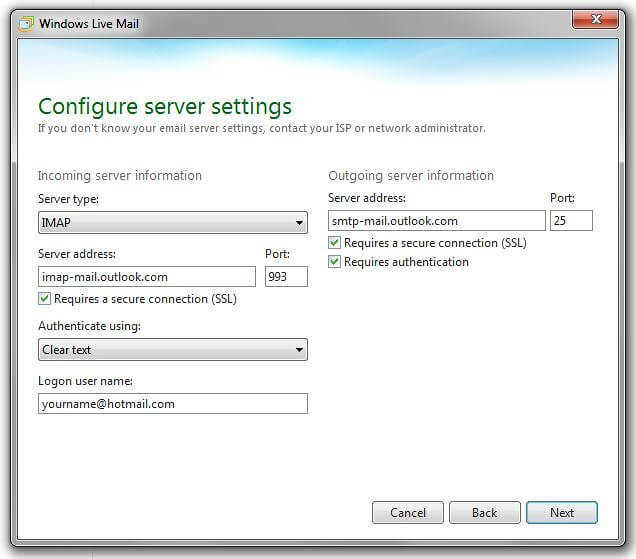
Once you have downloaded your emails with the new settings, you can use the mouse (drag and drop) to transfer the emails from your old Microsoft account to the new one.
Please note that you can only transfer emails. Contacts, calendars and other data cannot be transferred. So don’t delete your old account, or you’ll lose all the data mentioned above.
What does Microsoft advise?
They recommend using the free Mail app or Outlook, which is part of the Microsoft Office suite. It is a paid tool, but existing WLM 2012 users get it free for one year.
The most obvious problem is that you will have to pay around €78 per year to use Outlook after one year. In fact, for that price you get the whole Office 365 Personal suite, which includes all Microsoft Office applications plus 1 TB of free cloud storage. Or you can lease just Microsoft Office Outlook 2016 for a one-off amount of around €65.
So the choice is quite limited. You can upgrade to the paid version of WLM 2012 or change to the more basic Mail app, but in either case you don’t have to stay the same. The Mail app has an additional problem, as it works on Windows 8/8.1/10, but not on Windows XP/Vista/7.
Transferring to the new software
If you decide to use Mail app or Microsoft Office Outlook, you will need to import your data from WLM 2012. WLM stores individual emails in .eml files that can be easily transferred between programs or computers.
Alternative options
If you don’t like the options of switching to the Mail app or Outlook, there are other clients. The most recommended alternatives are Thunderbird, Mailbird and eM Client. The first is a free, open source programme, while the other two offer a free and a paid version.
COMMENT THE POST
Your comment has been successfully submitted
The comment will be visible on the page when our moderators approve it.