


- Your cart is currently empty.
WordPress Optimization: Cache and Query Strings


We recently wrote on our blog about how to prepare for the increased website traffic that can come with a major advertising campaign. We listed a number of important steps to keep your site up and running quickly, one of which was setting up effective caching.
Caching allows elements of a web page to be cached instead of being reloaded over and over again for each visitor, allowing much faster loading times. However, WordPress users should make sure that the caching plugin is correctly set to ignore query strings.
The problem is that visitors who access your website via advertisements (Google, Facebook, Instagram, etc.) or links in your newsletter may be loading pages that are not cached. And if there are a lot of such visitors in a short period of time, your website may start to work very slowly or even stop working.
Table of contents
- What is a query string?
- Query string caching problem
- Optimising WordPress plugins for caching
- Cloudflare: caching of query strings
What is a query string?
A query string is a part of a web link or URL (Uniform Resource Locator) that assigns values to certain attributes, known as keys or parameters.
Using query strings
Query strings are used to send additional data to a server, for example to:
- filtering content (e.g. in online shops),
- search for information (e.g. in search engines),
- use tracking cookies (e.g. in advertisements and newsletters),
- to download user preferences (e.g. via contact forms),
- transmission of other data necessary to process the request.
Examples of query strings
Let’s look at some examples of URLs that include a query string:
https://www.spletna-trgovina.com/tekaska-obutev?brand=salomon&size=43&color=whitehttps://duckduckgo.com/?q=poizvedba&df=y&ia=webhttps://www.vasadomena.si/?fbclid=IwZXh0bgNhZW0CeTAAAR2wroBdH8Wj34YF1ArTFBphttps://domena.io/blog?utm_source=newsletter&utm_medium=email&utm_campaign=julij24
Structure of the query string
Learn about the structure of a query string and the characters used in it:
- a query string starts with a question mark (
?), - followed by one or more key-value pairs, where the elements are separated by an equal sign
(=), - individual key-value pairs are separated by an ampersand
(&).
Query strings are an important part of web technologies because they allow dynamic interaction between users and the server. Due to their simplicity and functionality, they are widely used in various web applications.
Problem with caching of query strings
The caching plugins work by caching each URL individually. Let’s assume your website has three pages:
https://www.vasadomena.si/izdelkihttps://www.vasadomena.si/storitvehttps://www.vasadomena.si/o-podjetju
The plugin will cache one copy of each page and serve this copy to visitors, making the loading of individual pages much faster. This way, there will be no more database queries and loading of individual elements in the background.
However, the problem arises with URLs containing a query string, as the caching plugins also detect such links as unique pages. This results in pages being cached:
https://www.vasadomena.si/izdelkihttps://www.vasadomena.si/izdelki?brand=nikehttps://www.vasadomena.si/izdelki?brand=nike&size=43https://www.vasadomena.si/izdelki?fbclid=AR2wroBdHoWj34YF1bATroBdH8Wj3https://www.vasadomena.si/izdelki?utm_source=google&utm_medium=cpc
The plugin detects the above five pages as unique, so it caches each one individually, even though the content on some of them is identical. Some query strings should therefore be stored separately, others should not.
- It makes sense to cachequery strings that affect the display of a page (e.g. the use of filters in an online shop) separately, as each one returns different page content.
- A query string that does not affect the content or structure of the page (e.g. tracking cookies) should be cached as the original page.
Query strings that should be excluded from caching
The most common query strings related to tracking cookies that should be cached as the original page are:
- fbclid – a query string added by Facebook to all links that lead from Facebook to other websites.
- ref – query string used by Google to track conversions.
- utm* – a query string used by many plugins or services to track referrers.
- gad – query string used by Google to diagnose and fix problems with ads in the Google Ads platform.
It makes sense to exclude the above query strings from the caching system for three reasons:
- The plugin will load the same cached page as the source URL without the query string, which will make the web page appear much faster to the visitor.
- The plugin will not consume (huge) amounts of server space by constantly creating new cached pages for each new query string.
- Since visitors will be shown a cached source page for different query strings, even when there is a simultaneous influx of multiple users (e.g. during an ad campaign), the website will not be overloaded.
If your WordPress site uses other query strings not listed above, you can exclude them using the advanced caching plugin. Don’t worry, even if you exclude query strings that are used for tracking (e.g. conversions), the functions will work normally as the server will still record hits for those URLs with query strings.
Optimising WordPress plugins for caching
If you’ve checked the above examples of query strings carefully, you’ve probably noticed the ?fbclid= attribute with the value of a random sequence of characters added by the Facebook platform to links to websites. This can be a major problem in the case of a large-scale advertising campaign where links lead to a website or shop where the caching is not arranged with the possibility of an “infinite” number of different query strings in mind.
The result is that each individual visitor is presented with a non-cached version of the website, which means slower loading times and even the possibility of the website being overloaded or inoperable when a large number of visitors visit at the same time.
The most popular WordPress caching plugins allow visitors to load cached pages despite the query string in the URL, thus avoiding the problem described above.
LiteSpeed Cache
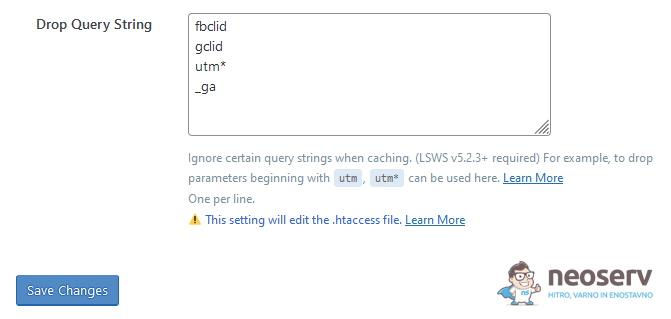
LiteSpeed Cache caches all query strings by default. If you want to exclude individual strings from the caching system, you can do so in the plugin settings:
LiteSpeed Cache -> Cache -> Drop Query String
In most cases it makes sense to enter the following records in the field:
- fbclid
- gclid
- utm*
- _ga
- gad
Documentation: https://docs.litespeedtech.com/lscache/lscwp/cache/
WP Rocket
WP Rocket does not cache pages with query strings by default. For all parameters below, it ignores the query string and loads the standard file from the cache, regardless of the parameter values in the URL:
- utm*
- fb_action_ids
- fb_action_types
- fb_source
- fbclid
- _ga
- gclid
- age-verified
- ao_noptimize
- usqp
- cn-reloaded
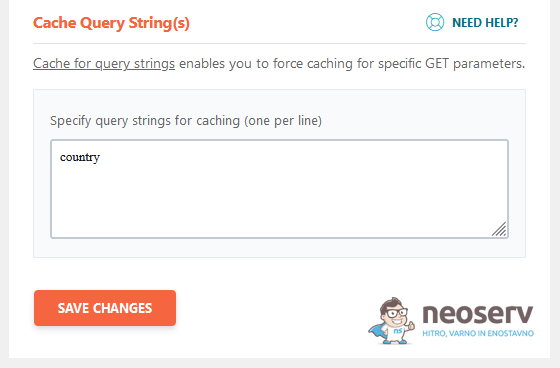
This plugin allows you to enter the query strings you want to be cached. For example, if you want to cache pages containing the query string country, you can add that record to the list here:
WP Rocket -> Advanced Rules -> Cache Query String(s)
Documentation: https://docs.wp-rocket.me/article/971-caching-query-strings
If you want to change the default settings for caching query strings or add new strings to the exempted strings, you need to install an additional plugin: WP Rocket | Ignore Query Strings. You will also find instructions on how to set up this plugin correctly.
Swift Performance
By default, Swift Performance bypasses caching for POST requests and all GET requests where the query string is not empty. The plugin ignores the following GET parameters:
- utm_source
- utm_campaign
- utm_medium
- utm_expid
- utm_term
- utm_content
- fb_action_ids
- fb_action_types
- fb_source
- fbclid
- _ga
- gclid
- age-verified
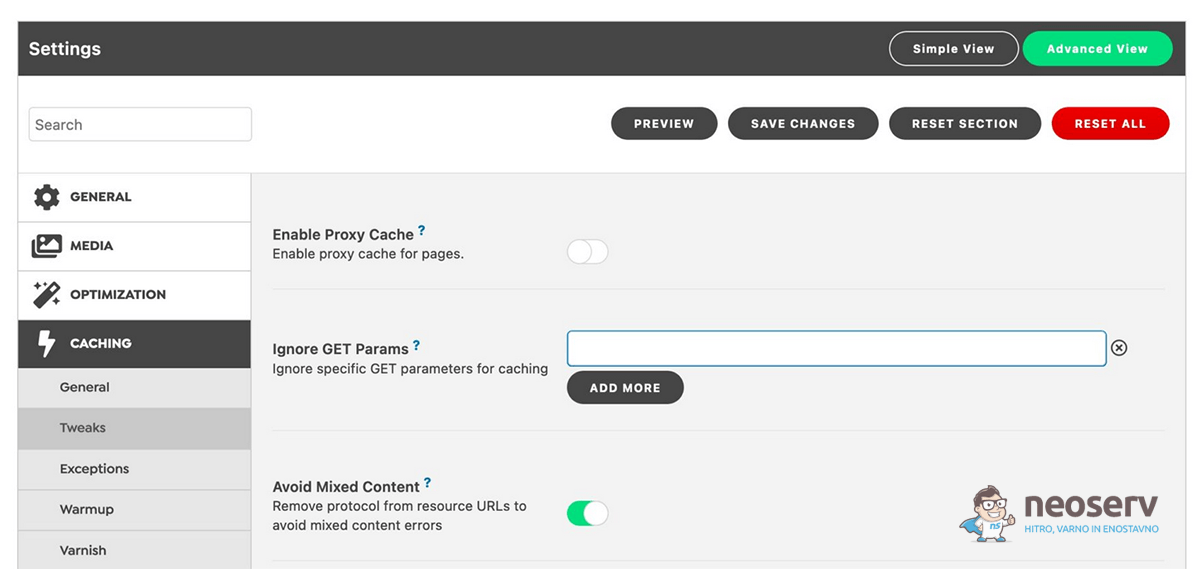
As shown in the figure below, the plugin allows to add additional GET parameters exempted from the caching system.
Documentation: https://docs.swiftperformance.io/knowledgebase/ignore-get-params/
Cloudflare: query string caching
Cloudflare is a Content Delivery Network (CDN) that enables faster loading of web pages by serving content from the server closest to the visitor. It uses caching technology to improve the speed and performance of web pages, so let’s take a look at what you can do with Cloudflare’s query string caching below.
Caching Level
Within your user account, you can set how much static website content you want Cloudflare to cache. A higher caching level can speed up page load times.
The setting is available here.
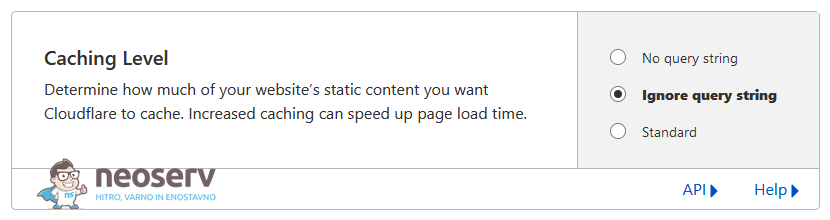
You can choose between three caching levels:
- No query string: the system serves the resource from the cache when there is no query string.
- Ignore query string: The system serves the same resource to everyone, independent of the query string.
- Standard: The system serves a different resource each time the query string changes.
Documentation: https://developers.cloudflare.com/cache/how-to/set-caching-levels/
You are advised to choose the setting that serves the same resource to everyone, independent of the query string(Ignore query string), and then set additional caching rules if necessary, as discussed below.
By selecting this level of Ignore query string caching, you will ensure that your visitors are served cached source pages even if the URL contains a query string (e.g. fbclid or gclid).
Cache Rules
The Cache Rules settings section allows you to set rules about which resources should be cached and how long they should remain cached.
The setting is available here.
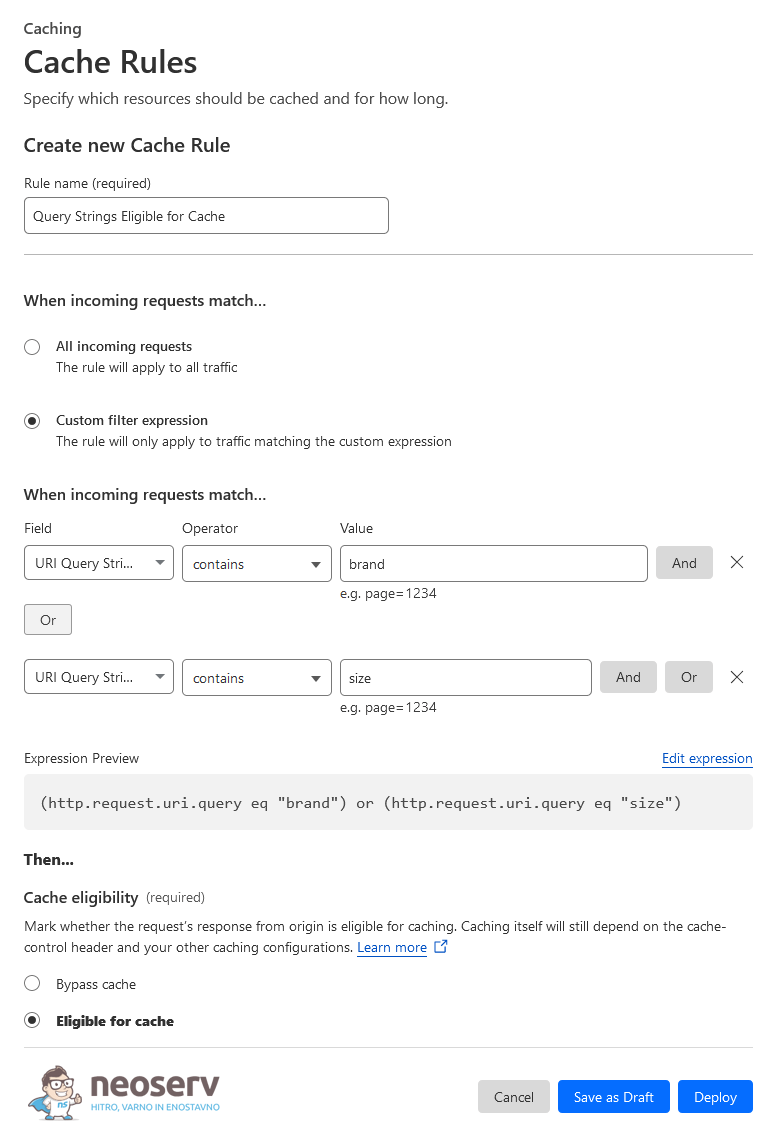
- Click on the blue Create rule button.
- In the Rule name field, enter a meaningful name for the new caching rule.
- In the
Fieldfield, select the URI Query String, in theOperatorfield, set contains, and in theValuefield, enter the query string you want to add to the caching process. On the right-hand side, click the Or button to enter any additional query strings. - When setting the
Cache eligibility, select the Eligible for cache option. - Save and activate the new rule by clicking on the Deploy button.
Documentation: https://developers.cloudflare.com/cache/how-to/cache-rules/
The additional caching rules will ensure that pages with certain query strings are cached. For example, in the case of an online shop, it makes sense to cache pages generated by the filtering option, e.g. displaying products bybrand.
By effectively managing the caching of pages that include a query string, you will not only speed up the performance of your website. At the same time, you’ll ensure that your site works smoothly even when you have a large number of visitors at the same time.
COMMENT THE POST
Your comment has been successfully submitted
The comment will be visible on the page when our moderators approve it.