


- Your cart is currently empty.
WordPress: How to Activate Under Construction Mode

I’m sure you’ve come across a website that says Under Maintenance in big letters. This meant that the website was under maintenance at the time, so the content of the website was not visible to visitors. In addition to the notice itself, a cute graphic may have been added to liven up the otherwise dull notice.
As WordPress is an extremely user-friendly system, even someone with no programming skills and no flair for graphic design can easily set up a site like this. Since the entire website is locked at the same time, making it inaccessible, the notification is useful in two situations in particular:
- When you are building a website.
- When you are making major changes to a web page.
Here’s a free WordPress plugin that will help you make the notification your own. You’ll also be able to choose from around 30 different graphic templates.
WordPress plugin.
One of the most popular WordPress plugins that makes it easy to lock your website and display the notification you want is Under Construction. With just a few clicks, you can create a page that looks like this …

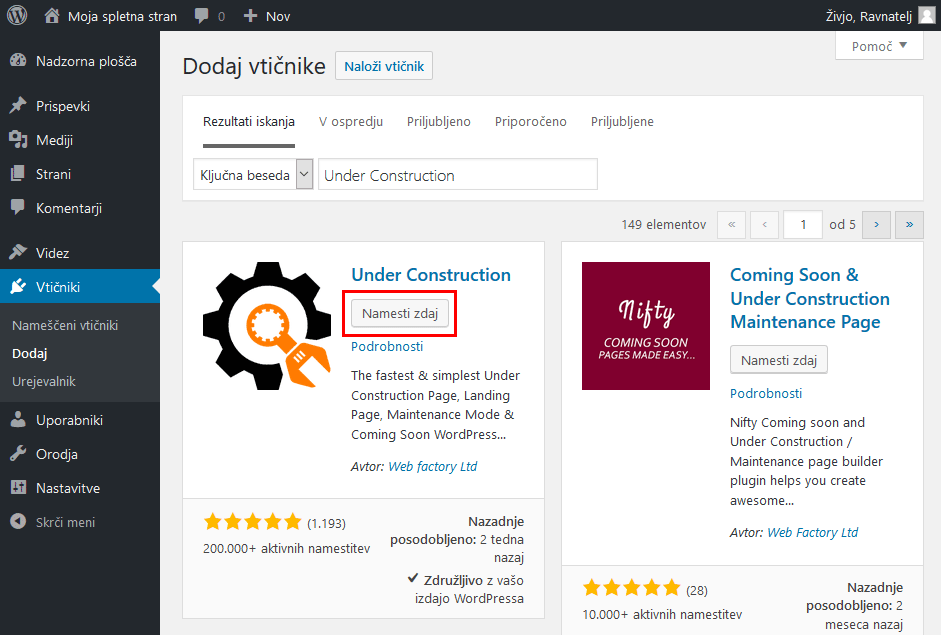
How do I get to a page like the one in the picture above? In the WordPress administration, hover over the Plugins link and click on Install. Type Under Construction into the search engine, then click on the Install Now button for the plugin by Web factory Ltd. Once the plugin is installed, activate it.
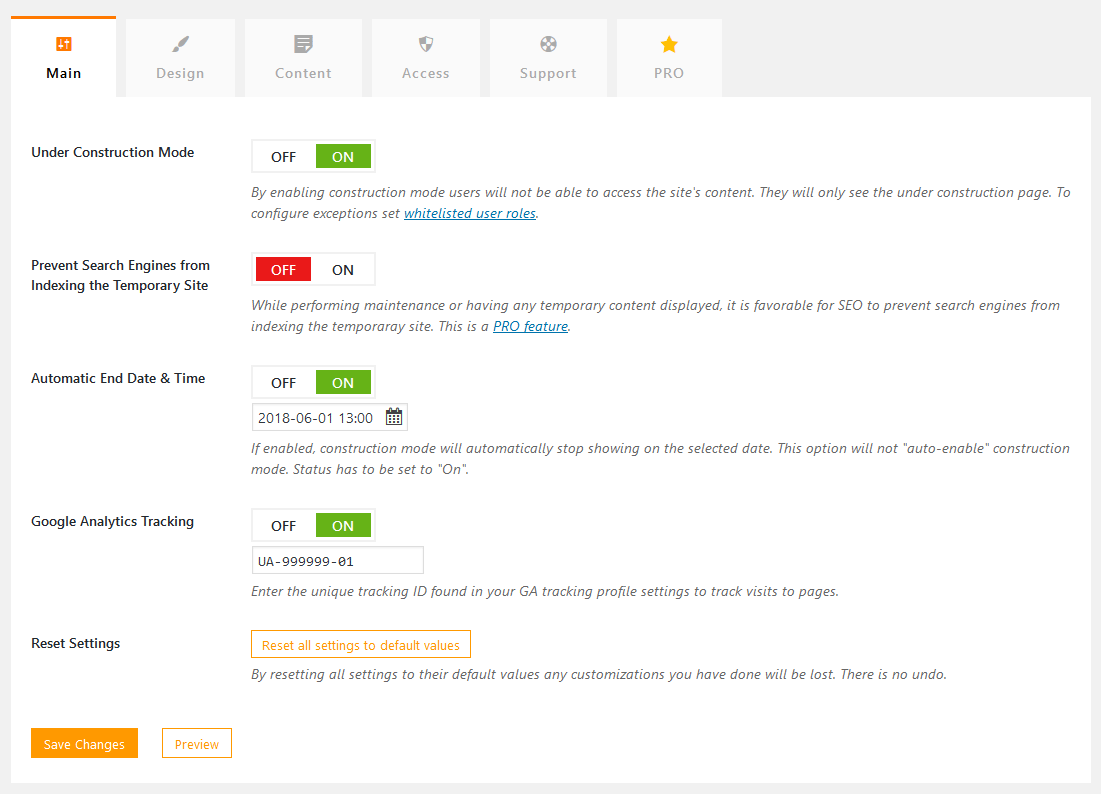
Then hover over Settings and click on the Under Construction link. As you will see, there are several tabs with different settings. The first four tabs are particularly important.
1. Main: Here you can turn on the “Under construction” notification to lock the content of the web page. If you wish, you can prevent the page from being indexed by search engines. You can also set the date when the content of the web page should become visible again. The plugin also allows you to use the Google Analytics code to record your visit statistics.
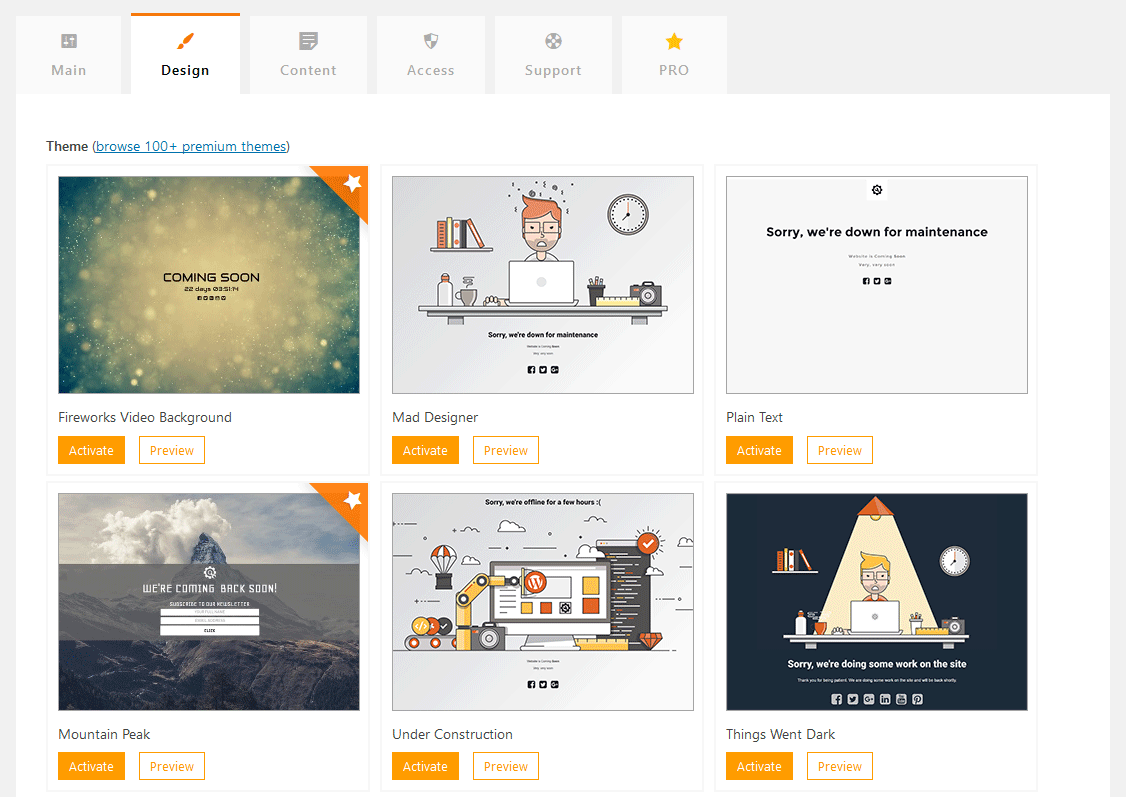
2. Design: in this tab you can choose from a number of graphic templates. Click on the Preview button to preview the design you want and Activate to make your final choice.
3. Content: Here you will prepare the content displayed below the image you selected in the previous step. You can also add icons with links to your social media pages.
4. Access: In the free version of the plugin, this is where you can specify which WordPress user roles (administrator, editor, author, contributor, subscriber) you want to see the site content instead of a notification that the site is under construction.
We advise you to add a tick to the Administrator role in the fourth tab(Access). If you are going to build or maintain the website, this is the only way you will be able to see the changes you have made to it. Otherwise, you will also see the graphics selected in the other tab.
Possible alternatives
If you browse the database of free WordPress plugins, you will find many others that offer similar functionality to the Under Construction plugin. Some of them, and especially their paid versions, also offer:
- displaying a subscription box to receive a newsletter,
- display a countdown timer,
- the possibility to partially lock web content,
- display of contact details, etc.
Not satisfied with the plugin we have presented in today’s post? Then it’s best to check out the Coming Soon Page & Maintenance Mode, WP Maintenance Mode, Elementor Page Builder, Maintenance and similar plugins.
Have you found a better one yourself? We’d love it if you share your discovery with us and other readers of our blog in the comments.
COMMENT THE POST
Your comment has been successfully submitted
The comment will be visible on the page when our moderators approve it.