cPanel is the only correct choice for you, because you can:

  • Create a new mailbox with a single click.
  • Set up a website, store or forum in
    30 seconds.
  • Monitor visits to websites yourself.
  • Read email in a web browser (webmail).

Email

1 click for a new email address
Easy creation of a mailbox
Create a new email address with a single click.

Not a computer expert?
Nevertheless, you will be able to create email addresses yourself, which you need for you or your company.

Short instructions for:
Using email on a computer
Easy creation of a mailbox
Read your email in the email client of your choice.

You can use your email immediately, regardless of which computer you have. We have prepared friendly instructions for everyone.

Short instructions for:

Email on mobile devices
Easy creation of a mailbox
Manage your email on your mobile device.

We have prepared short and simple instructions for using email on mobile devices.

Short instructions for:

Domains

Added domains
What is an added domain?
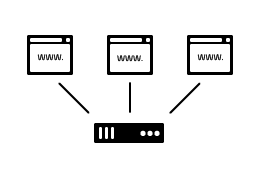
Multiple different websites on 1 hosting plan.

Added domain means a separate website with separate content.

On each added domain in cPanel, you can set up a completely independent website.

You also manage it separately from other sites on the same hosting plan.

Parked domains
What are parked domains?
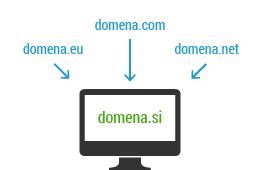
Multiple different domains pointing to 1 website.

Parked domain comes in handy when you want to direct multiple different domains to one website.

It is also ideal for cases when you want to create just a few email addresses with a domain, but you don't need a website (yet).

Subdomains
What is a subdomain?
Subtitle on your existing domain.

Do you have a website on which you would like to set up a section for almost or completely separate content?

Subdomain will be the right choice for that.

At NEOSERV you can create an unlimited number of subdomains.

File Editing

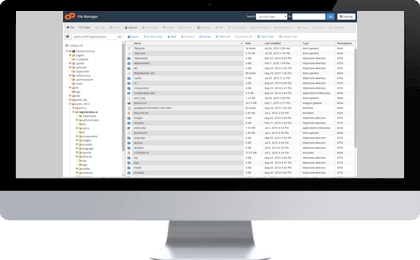
Files and folders are edited right in the browser

Is it really necessary to start the FTP program every time, when we need to fix 1 file?

With the cPanel control panel, all you need is your web browser Google Chrome, Mozilla Firefox, Internet Explorer, Safari, Opera.

That's all you need to edit files and folders on your plan.

UPLOADING FILES
cPanel allows you to upload files to your plan/website with your web browser.
EDITING FILES AND FOLDERS
cPanel already includes a code or text editor. This means that now you can make minor corrections in your code directly with cPanel.
(UN)PACKING FILES
When editing multiple files or folders at once, cPanel allows you to compress them into a .ZIP archive - or conversely, unpack an existing .ZIP.

Statistics

Website Traffic Statistics / Logs
Website traffic statistics
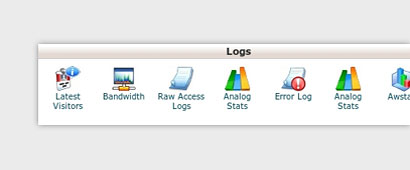
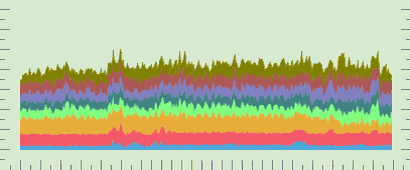
24/7 access to detailed traffic statistics for all your websites.

cPanel provides 24-hour access to your website traffic stats, available in Slovenian as well. It breaks down traffic by month, day, and hour, while also showing many other interesting metrics.

Plan Server Resources
Website traffic statistics
Full control over your plan with just one click.

Each hosting plan includes a specific amount of server resources such as CPU (processor cycles), MEM (RAM), and more. cPanel makes it easy to monitor the usage of these resources.

ORDER cPanel HOSTING

...currently with a -75% discount!

Frequently Asked Questions and Answers

  • What is cPanel?

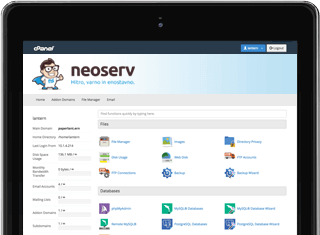
    This is a control panel that allows you to manage your domain and hosting package. With us, cPanel is available in Slovenian, so you will definitely not have any problems with editing. If you have any questions, our friendly and professional support is always available.

  • What can I do in the cPanel control panel?

    1. you control the use of space and monthly traffic.

    2. you can manage domains, parked domains, subdomains and FTP accesses.

    3. you can create, delete and change email mailboxes.

    4. you create MySQL and PostGreSQL databases.

    5. you control the visit of your websites and hosting.

    6. you install the included applications.

  • Is the cPanel control panel something different than the My NEOSERV Client Portal?

    Yes, the cPanel control panel and the My NEOSERV Client Portal My NEOSERV are two different platforms. In the cPanel control panel, you can add added or parked domains to your hosting package, access the file editor and databases, create new email mailboxes, and the like.

    In the My NEOSERV Client Portal, you have a complete overview of ordered services, invoices and proforma invoices, your data, etc. You can also change WHOIS data for individual domains in Moj NEOSERV, set them arbitrary DNS records, monitor possible commission of the affiliate program, etc.

  • Where or how do I access the cPanel control panel?

    You can access the cPanel control panel by adding /cpanel to the URL for one of your domains added to the hosting plan (example: www.yourdomain.si/cpanel). Another option is to log in to the My NEOSERV Client Portal, where you will find a link to the cPanel control panel on the home page. You will also find your username and password for logging into cPanel in your My NEOSERV Client Portal.

  • I'm worried that I won't be able to find my way around the cPanel control panel. Can you help me in case of problems?

    The cPanel control panel is very easy to use and extremely intuitive, but it can still happen that you will not be able to set or use something. For such cases, we have prepared a subpage , where you will find numerous screen images in addition to the written procedures for a better illustration.

    If the cPanel control panel still causes you problems, call us at 059 335 000 or send us an email at info@neoserv.com. We will be happy to help you.

  • I have noticed that I can create an email mailbox in the cPanel control panel. Is this true? How does the process work?

    It's true, and it's a very simple and quick way. Log in to the cPanel control panel, then in the category of Mail icons find the Mailboxes icon (ang. Email Accounts) and click on it. On this page, you can add new mailboxes, edit existing ones, and also access them through three different web clients - Horde, Roundcube, and SquirrelMail.

    More about adding and editing email mailboxes in the cPanel control panel

  • For viewing email directly in the browser, I can choose between three clients. Which one should I use?

    As mentioned in the previous answer, you have three clients available for viewing email directly in the browser - Horde, Roundcube, and SquirrelMail. Our favorite is Roundcube, but it won't hurt to try all three and choose the one that suits you best.

  • Can I monitor the statistics of visits to my website with cPanel?

    Yes. cPanel gives you 24-hour access to the statistics of visits to your pages. You have a detailed visit by months, days and hours, and it also shows a number of other interesting data.

  • How can I manage files and folders in cPanel?

    Cpanel allows you to manage files in three different ways.

    1. You can upload files and upload the content of your website or other files with your web browser.

    2. Cpanel also contains a code or text editor, which means that you can make minor corrections in your code directly with cPanel.

    3. When you want to edit multiple files or folders at once, you can unzip or compress them into a .ZIP archive with cPanel.

  • Do you perhaps have more detailed instructions for using the cPanel control panel in Slovenian?

    Of course! We invite you to visit the tab, where you will find many records about using the cPanel control panel. If you still encounter a certain problem after reading, do not hesitate and contact us quickly.