


- Your cart is currently empty.
Converting Certificates to Different Formats Using OpenSSL

X.509 digital certificates are files used to confirm an organisation’s identity and protect the integrity of data. They are a variety of digitally encoded or signed documents, including code signing certificates, SSL/TLS certificates, personal authentication certificates, S/MIME certificates, etc.
Different servers and control panels require SSL certificates in different file formats. To convert certificates from one format to another, you can use the OpenSSL solution available on most Linux devices. In the following, we will go into a bit more detail about the more important certificate formats, and then provide some SSH commands for converting to the different formats.
Users of the cPanel control panel can use the command line to help them convert certificates. If you are hosting with us, you first need to activate SSH access, upload the certificate files to your package, and then you can use the terminal to execute the commands described later in this article.
Table of contents
Certificate file formats
Certificates play a key role in ensuring the security of online communications and data transmission. Their use ranges from establishing secure connections over networks to storing and exchanging cryptographic information, contributing to the effective protection of digital identities and maintaining data integrity. Among the many standards and formats in the field of digital security, PEM, PKCS#7 and PKCS#12 stand out.
PEM
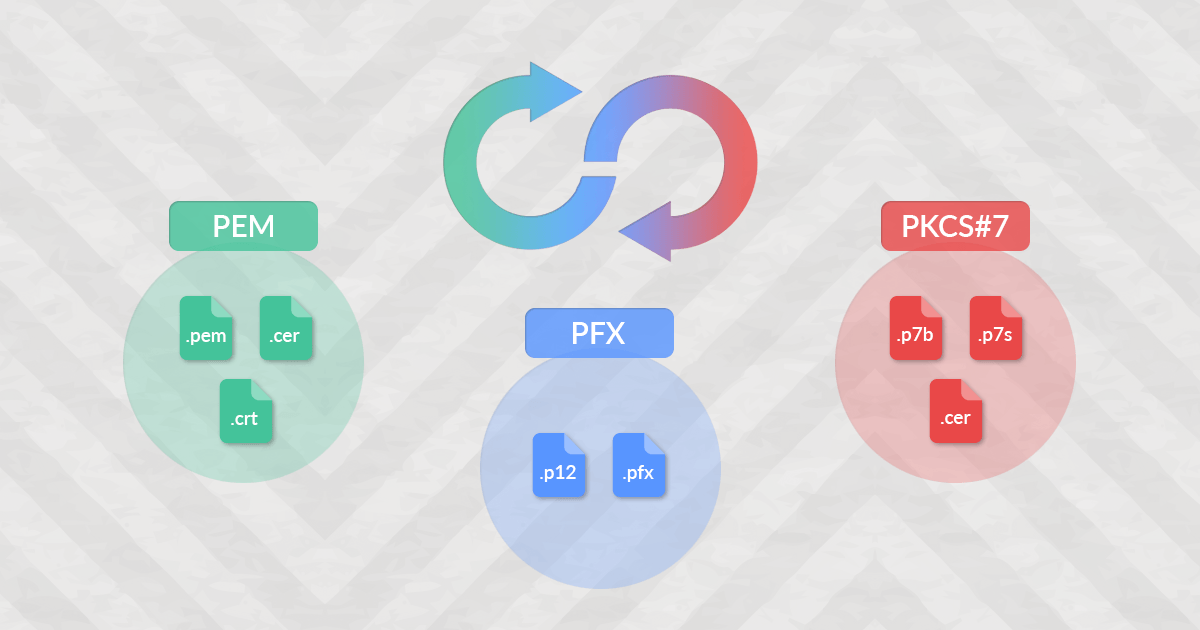
PEM is a Base64-encoded certificate placed between the headers -----BEGIN CERTIFICATE----- and -----END CERTIFICATE-----. It is the most widely used certificate format, mainly used by Linux servers such as Apache and Nginx. It is also used in most web hosting control panels such as cPanel, Plesk and DirectAdmin.
PEM certificates can have the following file extensions:
- *.pem
- *.crt
- *.cer
TheSectigo CA sends the certificate in PEM format if any server type is selected during the certificate activation, except when the “Microsoft Internet Information Server” option is selected.
PKCS#7
PKCS#7 is also a Base64 encoded certificate. It is generally used by Windows or Tomcat based servers. It can contain the certificate of the final domain entity and CA chain certificates. If you open the PKCS#7 file with a text editor, you will find the encoded text between the tags -----BEGIN PKCS7----- and -----END PKCS7-----.
PKCS#7 certificates most commonly have the following file extensions:
- *.p7b
- *.p7s
- *.cer
TheSectigo CA sends the certificate in PKCS#7 format if “Microsoft Internet Information Server” is selected as the server type during certificate activation.
PKCS#12 / PFX
PKCS#12, also known as PFX (Personal eXchange Format), is a standard format for storing and transferring private keys, certificates and CA chain certificates in a single file. This format, which may include password protection, is widely used to exchange cryptographic information between different systems. It is commonly used on Windows devices and is essential for the transfer of a certificate from one Windows server to another.
PKCS#12 certificates can have the following file extensions:
- *.p12
- *.pfx
Certificate conversion commands
As part of the OpenSSL feature set, you can use the commands below to convert certificates into different formats and adapt them accordingly.
PEM => PKCS#7
To convert PEM => PKCS#7 you will need:
- PEM certificate
- CA-bundle.crt
openssl crl2pkcs7 -nocrl -certfile your_pem_certificate.crt -out your_pkcs7_certificate.p7b -certfile CA-bundle.crtPKCS#7 => PEM
To convert PKCS#7 => PEM you will need:
- PKCS#7 certificate (extension .p7b)
openssl pkcs7 -print_certs -in your_pkcs7_certificate.p7b -out your_pem_certificates.pemNOTE: If the PKCS#7 file includes chain certificates, the new .pem file will also include them – separately.
PEM => PFX
To convert PEM => PFX you will need:
- PEM certificate
- private key
- CA-bundle.crt
openssl pkcs12 -export -out your_pfx_certificate.pfx -inkey your_private.key -in your_pem_certificate.crt -certfile CA-bundle.crtNOTE: During the conversion you will need to specify a password for the PFX file. Remember the password as you will need it when importing the PFX to another server.
PFX => PEM
To convert PFX => PEM you will need:
- PFX certificate
- the password you specified when creating the PFX
openssl pkcs12 -in your_pfx_certificate.pfx -out your_pem_certificates_and_key.pem -nodesNOTE: During the conversion, you will be prompted to enter the password you specified when creating the PFX file. The PEM file will contain the certificate, the chain certificates (ocpio) and the private key.
PKCS#7 => PFX
To convert a certificate from PKCS#7 to PFX, the conversion to PEM must be done first.
To convert PKCS#7 => PEM you will need:
- PKCS#7 certificate
openssl pkcs7 -print_certs -in your_pkcs7_certificate.p7b -out your_pem_certificates.pemNow you can convert the PEM certificate to PFX.
To convert PEM => PFX you will need:
- PEM certificate
- a private key
openssl pkcs12 -export -out your_pfx_certificate.pfx -inkey your_private.key -in your_pem_certificate.crtYou can also use online tools to help you convert certificate files from one format to another. For example, you can use the SSL Converter solution from the French company ZIWIT, which has been working in the field of cybersecurity since 2011.
COMMENT THE POST
Your comment has been successfully submitted
The comment will be visible on the page when our moderators approve it.