


- Your cart is currently empty.
How to Connect to a Hosting Package via SSH
Search results for: ""
SSH (Secure Shell) is a secure network protocol that allows you to connect to a server via the command line. It enables you to remotely access your hosting package and execute commands directly on the server.
It is an encrypted connection, meaning that all data (username, password, commands) is protected from interception. SSH is most commonly used for server administration, file management and performing advanced tasks that cannot be carried out through a graphical interface or are more difficult to perform that way.
Table Of Contents
- How To Activate SSH On A Hosting Package
- Advantages Of Using The SSH Command Line
- Who Is SSH Access Intended For
- SSH For Cleaning A Website Virus
- SSH Clients For Establishing A Connection
How To Activate SSH On A Hosting Package
You can enable SSH access in just a few steps in the My NEOSERV client portal:
- Log in to My NEOSERV.
- Click on your hosting package.
- If you do not see the package on the home page (Dashboard), select Services from the left menu and locate your hosting package in the list.
- On the hosting package page, in the SSH access section, click the Turn ON SSH button.
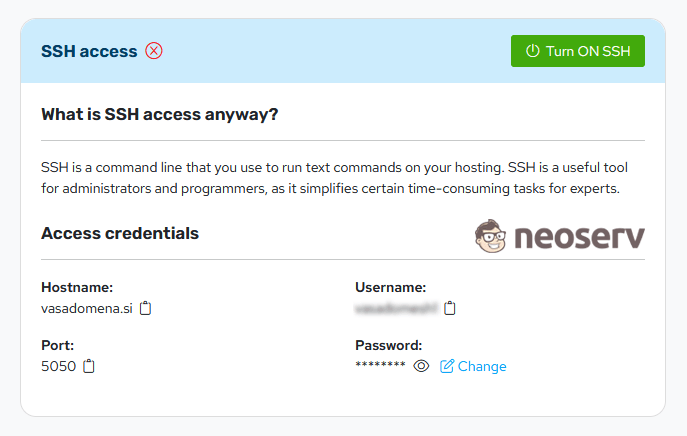
After successful activation, a notification appears in the bottom right corner: SSH access enabled.
If you are using a Reseller hosting package, you must also enable SSH access via WHM. After logging in to WHM, select the Edit a Package feature, choose your Reseller package from the list and click Edit. In the Settings section, check the Shell Access option and click Save Changes.
Access details (server address, port, username, password), which you use to connect via an SSH client after activation, are listed on the hosting package page in My NEOSERV.
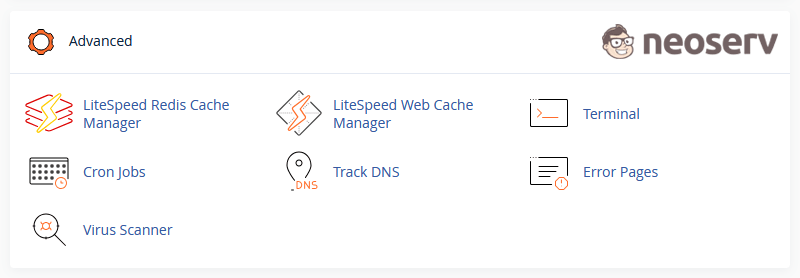
After enabling SSH access, the Terminal icon automatically appears in the Advanced section of the cPanel control panel, allowing you to access the command line of your hosting package directly from your browser.
Advantages Of Using The SSH Command Line
Working in the command line requires some technical knowledge, while providing better control over your hosting package and greater efficiency when performing tasks.
With SSH you can, for example, quickly:
- find all files modified in the last 24 hours,
- locate files larger than 100 MB,
- list all .php files containing specific text or code,
- bulk change file permissions,
- create or extract archives (ZIP, TAR),
- check disk space usage,
- run scripts or maintenance processes.
When dealing with a large number of files or more complex websites, this method is often significantly faster than searching through files via the control panel or an FTP client.
Who Is SSH Access Intended For
SSH is primarily intended for advanced users. It enables faster and more efficient execution of certain tasks using commands instead of clicking through a graphical interface.
It is most commonly used by:
- system administrators,
- programmers,
- web application developers,
- technical website administrators.
At least basic knowledge of working with commands in a terminal is recommended, as incorrect command usage may affect website functionality.
SSH For Cleaning A Website Virus
Using SSH is particularly useful in cases of security incidents, for example when a website is attacked by a virus due to outdated software or insufficient protection (you can read more about the causes of attacks and how to resolve them in this article).
In such cases, you can use a few commands to:
- quickly locate suspicious or newly created files,
- detect modified system files,
- identify malicious code in .php files,
- check unusual processes or scripts.
This provides a better overview of the situation and makes virus removal and website remediation significantly easier.
SSH Clients For Establishing A Connection
To use SSH, you need knowledge of working in the Linux command shell (e.g. Bash) and an appropriate program to establish an SSH connection to your hosting package. Not all system commands are available via SSH, only those required for performing standard operations on your hosting package.
The most commonly used programs are:
- PuTTY – one of the most widely used SSH clients for the Windows operating system
- Solar-PuTTY – a more modern interface with the ability to manage multiple sessions in a single window
- SecureCRT – a client supporting multiple protocols (SSH1, SSH2, Telnet, Rlogin etc.)
- MobaXterm – a program supporting SSH, Telnet, RDP, VNC, FTP, SFTP and other protocols
For most users, we recommend the free program PuTTY, as it is easy to use and suitable for both beginners and advanced users.
You can read more about using the PuTTY terminal emulator in our blog article.
For additional assistance, call us at +386 59 335 000 or email us at info@neoserv.com.

COMMENT THE POST
Your comment has been successfully submitted
The comment will be visible on the page when our moderators approve it.