


- Your cart is currently empty.
How to Delete Unused WPML Translations in WordPress


When we start researching how to translate a WordPress website into another language, we quickly come across the WPML plugin, which is by far the most popular plugin that makes it easy to translate WordPress graphic templates.
Although the plugin is extremely popular, its popularity is often a different matter, as many people have problems with the speed of their website. One of the main reasons for this is the automatic search for text strings that can be translated.
The WPML plugin is thus the “culprit” for the huge number of rows in the database. Most of these rows with translation text strings are unused and thus redundant. Below you will find out how you can delete redundant lines (with and without using WP-CLI) to speed up your website and reduce the chance of errors.
If the WPML plugin is causing you problems with slow website performance, we recommend you try the Polylang plugin. It’s a free alternative that also allows you to make your website multilingual, but with much less impact on site speed.
Sitemap
- Making a database backup
- Editing the wp-config.php file
- Deleting untranslated text strings from a WPML table
- Completing the cleanup of untranslated text strings
1. Preparing a backup copy of the database
Before you start cleaning the MySQL database, make a backup copy. Check the instructions in this article or use the WP-CLI command below.
wp db export before-translation-clean.sql --all-tablespaces --allow-rootBefore you can remove the untranslated WPML text strings, you need to make a few more changes to the wp-config.php file, which is located in the base folder of your WordPress website.
2. Editing the wp-config.php file
In the wp-config.php file, you need to add the lines of code below that relate to the status of the translation strings used by the WPML plugin.
define( 'ICL_STRING_TRANSLATION_PARTIAL', 2 );
define( 'ICL_STRING_TRANSLATION_COMPLETE', 10 );
define( 'ICL_STRING_TRANSLATION_NEEDS_UPDATE', 3 );
define( 'ICL_STRING_TRANSLATION_NOT_TRANSLATED', 0 );
define( 'ICL_STRING_TRANSLATION_WAITING_FOR_TRANSLATOR', 1 );
You can also edit the above settings with WP-CLI, using the wp config set command below.
wp config set ICL_STRING_TRANSLATION_PARTIAL 2 --allow-rootAfter confirming your entry, you will receive a notification that the constant has been successfully added to wp-config.php.
Success: Added the constant 'ICL_STRING_TRANSLATION_PARTIAL' to the 'wp-config.php' file with the value '2'.Repeat this process for the remaining four lines of code.
wp config set ICL_STRING_TRANSLATION_COMPLETE 10 --allow-root
wp config set ICL_STRING_TRANSLATION_NEEDS_UPDATE 3 --allow-root
wp config set ICL_STRING_TRANSLATION_NOT_TRANSLATED 0 --allow-root
wp config set ICL_STRING_TRANSLATION_WAITING_FOR_TRANSLATOR 1 --allow-root
So, now you are ready to delete untranslated text strings.
3. Deleting untranslated text strings from a WPML table
To delete untranslated strings, you will need to use a few simple SQL commands.
First, count the number of untranslated text strings.
SELECT COUNT(*) FROM wp_icl_strings WHERE status IN (3, 1, 0);Here is the WP-CLI version of the command.
wp db query "SELECT COUNT(*) FROM $(wp db prefix --allow-root)icl_strings WHERE status IN (3, 1, 0);" --allow-rootThen use the command below to delete the text strings that do not match the ” translated” criterion according to the constants predefined in the wp-config.php file.
The default prefix setting for WordPress database tables is wp_. If you use a different prefix in your database, please adjust the commands below accordingly.
DELETE FROM wp_icl_strings WHERE status IN (3, 1, 0);If you are using WP-CLI, enter the command.
wp db query "DELETE FROM $(wp db prefix --allow-root)icl_strings WHERE status IN (3, 1, 0);" --allow-rootHere is the following SQL command to find the number of untranslated text strings.
SELECT COUNT(*) FROM wp_icl_string_translations WHERE string_id NOT IN (SELECT id from wp_icl_strings);Another WP-CLI version of the above command.
wp db query "SELECT COUNT(*) FROM $(wp db query --allow-root)icl_string_translations WHERE string_id NOT IN (SELECT id from $(wp db prefix --allow-root)icl_strings);" --allow-rootNow delete these entries.
DELETE FROM wp_icl_string_translations WHERE string_id NOT IN (SELECT id from wp_icl_strings);When using WP-CLI, enter the following.
wp db query "DELETE FROM $(wp db prefix --allow-root)icl_string_translations WHERE string_id NOT IN (SELECT id from $(wp db prefix --allow-root)icl_strings);" --allow-rootNow you need to truncate the tables.
TRUNCATE wp_icl_string_packages;
TRUNCATE wp_icl_string_positions;
Another WP-CLI alternative.
wp db query "TRUNCATE $(wp db prefix --allow-root)icl_string_packages;" --allow-root
wp db query "TRUNCATE $(wp db prefix --allow-root)icl_string_positions;" --allow-root
The last step is to remove the constants from the wp-config.php file and make sure that your database tables don’t start filling up again.
4. Finish cleaning untranslated text strings
Reopen the wp-config.php file and remove the lines you have recently entered.
define( 'ICL_STRING_TRANSLATION_PARTIAL', 2 );
define( 'ICL_STRING_TRANSLATION_COMPLETE', 10 );
define( 'ICL_STRING_TRANSLATION_NEEDS_UPDATE', 3 );
define( 'ICL_STRING_TRANSLATION_NOT_TRANSLATED', 0 );
define( 'ICL_STRING_TRANSLATION_WAITING_FOR_TRANSLATOR', 1 );
You can also use WP-CLI to help you remove lines.
wp config delete ICL_STRING_TRANSLATION_PARTIAL 2 --allow-root
wp config delete ICL_STRING_TRANSLATION_COMPLETE --allow-root
wp config delete ICL_STRING_TRANSLATION_NEEDS_UPDATE --allow-root
wp config delete ICL_STRING_TRANSLATION_NOT_TRANSLATED --allow-root
wp config delete ICL_STRING_TRANSLATION_WAITING_FOR_TRANSLATOR --allow-root
Now you need to disable automatic string registration in the WordPress administration to prevent the database tables from filling up again with unnecessary entries.
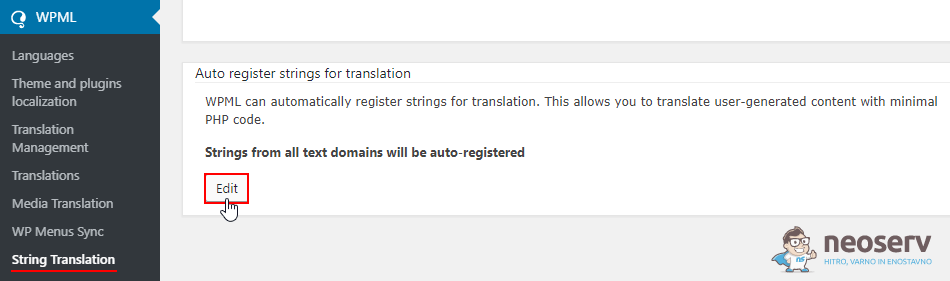
1. In the WordPress administration, navigate to WPML -> String Translation -> Auto register strings for translation and click on Edit.
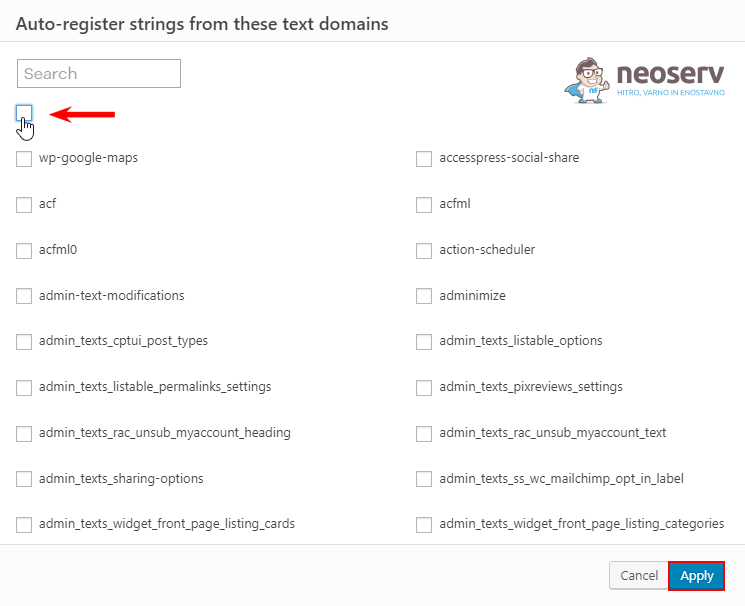
2. Uncheck the box in the top left corner to remove the checkmarks from the entire list of settings. Click on the blue Apply button.
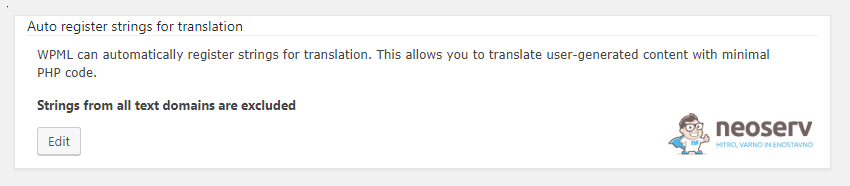
You should now see a notice on this page that Strings from all text domains are excluded.
The only thing left to do is to recreate the tables you emptied in one of the previous steps.
3. In the WordPress administration, navigate to WPML -> Support and find the following record …
‘For advanced access or to completely uninstall WPML and remove all language information, use the troubleshooting page’
… and click on the link located on the word troubleshooting.
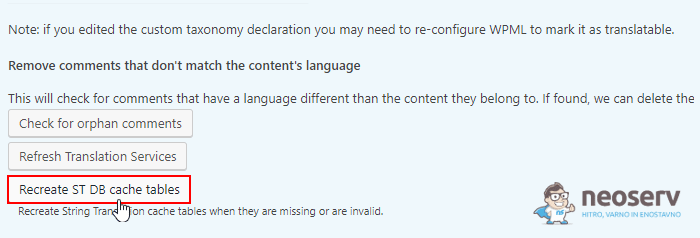
4. You will be taken to the troubleshooting page, where you can find the Recreate ST DB cache tables button and click on it.
There, you’ve reached the end! The WPML plugin should now no longer follow the automatic registration of strings for translation. Your WordPress website’s database will no longer be so cluttered with unnecessary entries, which will speed up your site’s performance and reduce the chance of errors.
COMMENT THE POST
Your comment has been successfully submitted
The comment will be visible on the page when our moderators approve it.