


- Your cart is currently empty.
First Steps in the cPanel Control Panel

In today’s post, we’ll show you what the cPanel control panel is, how and what we use it for, and how it makes everything about web hosting easier. To make it more informative and to help you quickly find the answer to any questions you may have, we’ve written this article in a short Q&A format.
If you’re going to buy web hosting, you should definitely get to know the cPanel control panel.
Table of contents
- What is cPanel?
- Why use cPanel?
- How do I log in to cPanel?
- How to use cPanel?
- What are the most common tasks in cPanel?
What is cPanel?
The cPanel is a control panel that allows you to monitor what’s happening on your server and edit your hosting package. It is by far the most popular control panel in the world.
 With cPanel, you can get the most out of your web hosting in a very simple, user-friendly and intuitive way. The control panel is useful for all types of hosting: from simple web hosting with a single domain to the largest packages with many domains.
Why use cPanel?
With cPanel, every user is his or her own “master”. You can edit all settings and functionality very easily. You can even set up online shops, blogs, forums and other forms of websites with a single click.
You can edit everything in cPanel in a very simple way, just like you would in a normal user interface, e.g. in an operating system. That’s the whole point of cPanel: to free you from dark consoles, “dos” commands and opaque lines of long text. In a clearly designed graphical environment, you’ll be able to edit everything at the click of a mouse.
Hence cPanel. So that even the most inexperienced user can easily create an email inbox, an FTP account to access web hosting, set up a domain, create MySQL databases and so on.
The cPanel control panel can be used for the following purposes:
- control of space usage and monthly traffic;
- creating, deleting and modifying e-mail boxes;
- managing FTP access;
- installing Softaculous applications;
- security control of hosting;
- Creating MySQL and PostgreSQL databases;
- controlling traffic to your websites;
- domain management, parked domains, subdomains;
- many more.
How do I log in to cPanel?
Logging in to the control panel is very simple. All you need is a web browser and a username and password.
So, open your browser and type in the URL of your website and add /cpanel at the end.
- https://www.vasadomena.si/cpanel
You will be taken to a login window where you enter your username and password, then click on the blue “Log in” button.
Do not copy the link above, as you will need to replace “vasadomena.si” with your actual domain. You can also find out more about the cPanel login process in our Help Center article.
How to use cPanel?
After you have successfully logged in to cPanel, you will see that the interface is divided into two main parts.
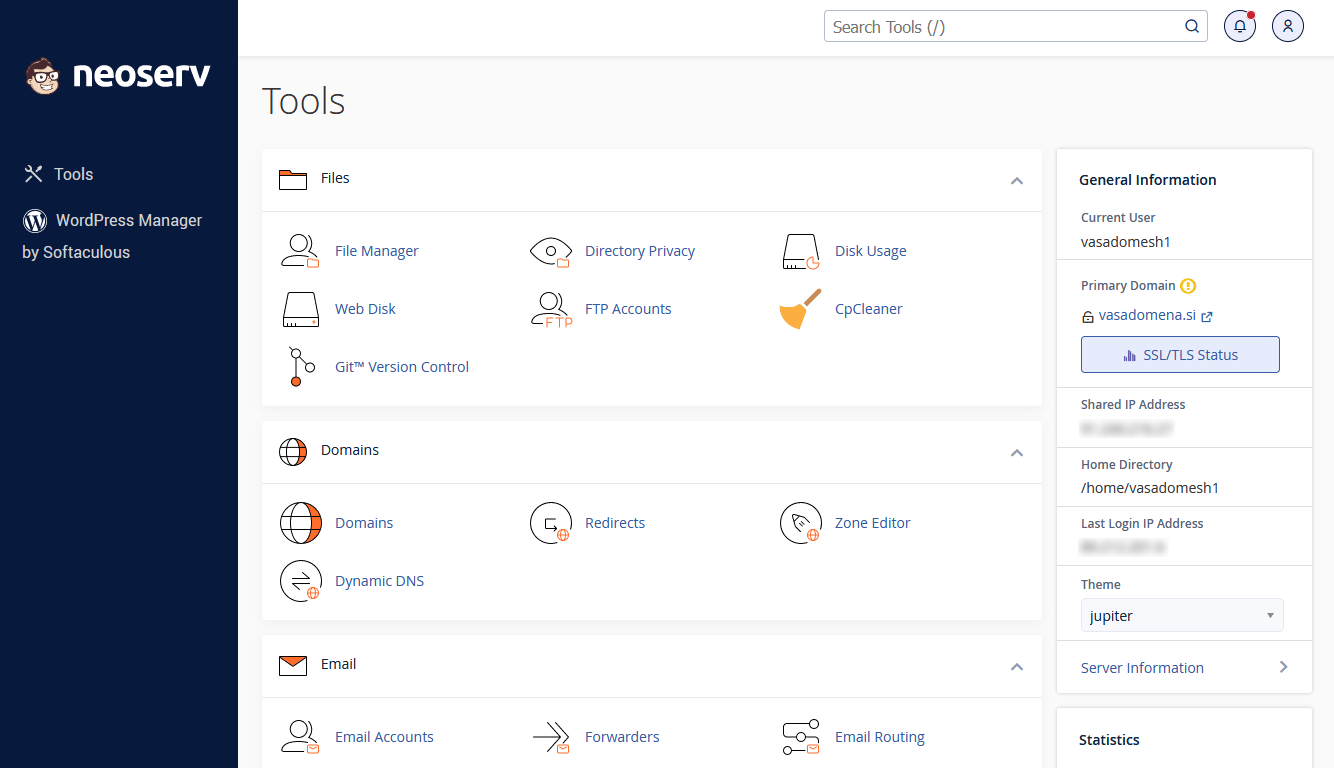
1. The right part lists basic information about the hosting package ( General Information), such as the user, the carrier domain, the IP address of the server, etc.). Below that, you will find information about the capacity of the hosting package (Statistics) – how many domains you have, how many files, how much space, how many databases … and how much of all this is already used or occupied.
2. In the central part, there are icons or links to the various functionalities provided by the cPanel control panel. They are divided into the following sections:
- Files
- Databases,
- Domains,
- Email,
- Software,
- Metrics,
- Security,
- Advanced,
- Preferences,
- Softaculous ( Softaculous Apps Installer).
So, navigate the cPanel dashboard as follows: first find the appropriate section, then find the functionality you need. Select it by clicking and then follow the next steps, which are always intuitive and simple.
In the top part of the cPanel dashboard, you will also find a general search engine at the top. Use it to start typing in your search phrase or functionality. cPanel will keep you up-to-date with your search results in the central area where the individual functionalities are displayed.
What are the most common tasks in cPanel?
The most common tasks in cPanel are related to:
- Email (adding an email account, redirecting mail from one email address to another, deleting and editing email accounts, etc.);
- files (accessing the file editor, editing files and folders, etc.);
- FTP accounts (adding/deleting/editing FTP accounts, changing FTP account quotas, etc.);
- databases (add/delete/edit MySQL and PostgreSQL databases);
- Domain settings (add/delete/edit domains and subdomains);
- usage statistics (hosting package capacity and how much you use).
You will also find many articles related to the use of cPanel in our Help Center.
If you need further assistance, we would be happy to receive a call on +386 59 335 000 or an email at info@neoserv.com.
COMMENT THE POST
Your comment has been successfully submitted
The comment will be visible on the page when our moderators approve it.