


- Your cart is currently empty.
Web Hosting vs DNS Hosting: What’s the Difference


If you have registered a domain with us, you are probably aware that you are entitled to free DNS hosting. We’ve noticed that an increasingly common question among users of our services is how DNS hosting differs from traditional web hosting. We have therefore decided to prepare a paper describing both web and DNS hosting and the differences between them.
Let us state right now that these are two completely different services. While web hosting is quite simple to explain, DNS hosting can be a bit more complicated for the average user to understand. We will do our best to describe both services in a way that is as easy to understand as possible.
What is web hosting?
Web hosting means leasing space on a server. A server is a powerful computer that is constantly connected to the internet via a high-speed internet connection. The server is most often used to store emails and web pages, which are usually made up of files and databases. It depends on the service provider and the hosting package what can be stored on the server.
There are many forms of web hosting available today: shared, VPS, dedicated, reseller, cloud hosting, etc. For the vast majority of users, shared hosting is the most suitable and the most affordable. It is characterised by the sharing of server space between several subscribers, with each user receiving access to a control panel through which they manage their package.
With NEOSERV, when you order a hosting package, you will receive access to the cPanel control panel, which is very easy to use and offers all the necessary functionalities. In the control panel you can install WordPress with just a few clicks, upload files and folders to the server, create and view your email inboxes, install a free SSL certificate on your website, view your page traffic and much more.
In addition to shared hosting, we also offer reseller hosting, also known as reseller hosting. Its main feature is that the customer can divide the leased space into smaller packages and sell them at prices he sets to his end customers. Due to the very nature of the service, reseller hosting is particularly suitable for individuals and web agencies involved in website development. This way, they can offer their clients web space in addition to building their websites, and earn extra money along the way.
What is DNS hosting?
DNS hosting is a service responsible only for hosting the DNS zone or DNS records of a domain. The actual website files are hosted on a different server: the one where the DNS records in the DNS zone of the domain point. The DNS hosting provider therefore hosts DNS servers that respond authoritatively to queries about your domain. This means that the authoritative DNS servers hold the original DNS records, not records that would, for example, be cached.
To make it easier to understand, we first need to explain what DNS is and how it works.
What is DNS?
TheDomain Name System(DNS ) is a hierarchical system whose primary function is to resolve domain names into IP addresses. It is much easier for people to remember the name of a domain (e.g. neoserv.si) than the IP address at which the domain can be reached (e.g. 193.9.21.33).
Every device connected to the World Wide Web has a unique IP address. Thus, the DNS is one of the cornerstones of the Internet, allowing a user who types a domain name into a browser to see a website. Servers, routers and other devices do not communicate with each other using domain names, but rather find each other and exchange information using IP addresses.
How does DNS work?
You have learned that the DNS system allows servers to identify which IP address a domain is resolving to. Because the system responds quickly and recursively to queries, a web browser receives the necessary information within a few milliseconds. If the domain exists and the queries are executed without errors, the web page is displayed to the user.
What exactly happens when I type the name of a website into my browser?
- Your web browser first checks if the IP address is in the browser cache. If it is a recently visited website, the browser will display it for you.
- If the page is not cached in the browser, the query is sent to the operating system. The browser checks if it has the IP address of the web page in its cache. If not, it contacts the DNS resolver.
- In most cases, the DNS resolver is your Internet Service Provider (ISP). If the ISP has the information about the end server cached in its cache, it will return a response to you and the website will be displayed.
- If the ISP cannot find the address of the final server, the DNS manager will contact the root server. The root server contains information about which addresses are accessible to the servers that manage each top-level domain (.COM, .NET, .ORG, …).
- In this step, the DNS manager obtains information about the name servers ( Nameservers) on which the IP address or the web page that you, as a web browser user, want to visit is accessed.
- The DNS Manager obtains the IP address of the website from one of the nameservers. The information is passed on to the operating system, which in turn passes it on to the browser, which ‘finally’ displays the web page you want.
An authoritative DNS server is a name server that stores the source data of DNS Zones. The DNS zone contains the DNS Records of each domain. The two most important types of DNS record are the A record, which associates a domain with an IP address, and the MX record, which associates a domain with an email server. Other more familiar types of DNS records include AAAA, CAA, CNAME, NS, PTR, SOA, SRV and TXT.
Web and DNS hosting: key findings
Web hosting and DNS hosting therefore have little in common. Web hosting is about storing files, emails and other data on a physical server. DNS hosting, on the other hand, refers to so-called DNS servers, which allow domain names to be converted into IP addresses, thereby pointing your browser to the appropriate hosting package.
A registered domain must be routed to name servers, otherwise the domain is not active. This means that the website is not accessible on the Internet, at least not via the domain name. Once you have added DNS records to the domain, you will point it to the server and thus connect it to the web hosting.
For those of you who register a domain with us and purchase web hosting, you don’t need to worry about DNS settings, as we will connect your domain to the hosting package. If you wish, you can set up any DNS servers within the My NEOSERV Subscription Centre, and you can edit DNS records in the cPanel control panel.
How and why include free DNS hosting?
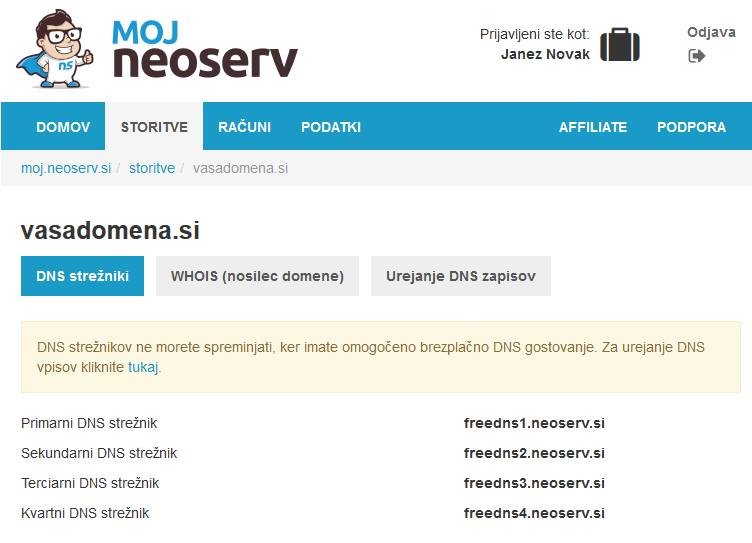
Every domain registered with NEOSERV includes the option of free DNS hosting. You can edit DNS records for your domains with us and point them to any servers or services you choose. You can therefore edit advanced records for your domains without a hosting package and without access to the cPanel control panel.
You can activate free DNS hosting with effective protection against DDoS attacks in the My NEOSERV Subscription Centre. See simple instructions on how to do this. By activating DNS hosting, you will connect your domain to DNS servers located on four continents.
As the only domain registrar in Slovenia, NEOSERV also offers you a free email forwarder as part of our free DNS hosting, from which you can forward received email messages to your email inbox (e.g. from info@vasadomena.si to john.smith@gmail.com).
Using free DNS hosting is particularly useful if you have built your website with Weebly, Wix or another free website building tool and would like to use your own domain for your website. The free packages from these providers do not include DNS hosting. In addition, free DNS hosting is ideal for anyone who wants to have DNS servers geographically dispersed.
At NEOSERV, we guarantee the lowest price in Slovenia for registering more than 1000 different domains. Take advantage of this great opportunity to register your domain at the guaranteed best price and get free DNS hosting, free email forwarding and free WHOIS protection.
For any questions or assistance, you can always(24/7) contact our customer support team.
COMMENT THE POST
Your comment has been successfully submitted
The comment will be visible on the page when our moderators approve it.