


- Your cart is currently empty.
How to Prevent Signup Form Spam

Hundreds of unsolicited comments, constant emails with suspicious links, ineffective newsletter subscriber base, registration of fake persons… Are you one of those who have not yet taken effective measures to prevent SPAM? Then it’s time to put an end to it.
We at NEOSERV have done our best to provide detailed instructions on how to prevent the problems caused by a wide variety of automated scripts. So you can read:
In today’s article we will focus on Signup Form / Registration Form.
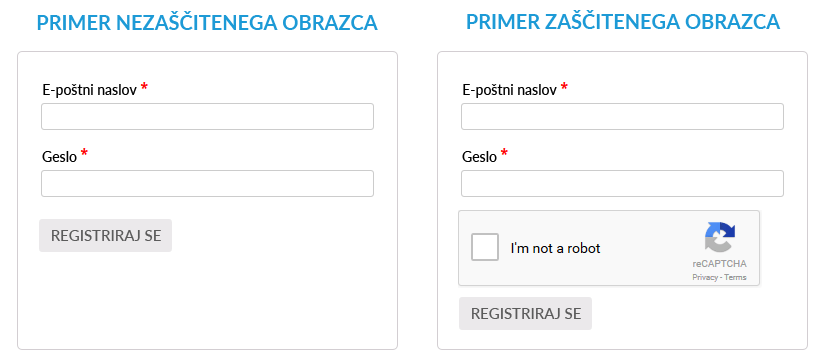
First we will look at the motive of online attackers for fake registrations, and then we will present solutions for WordPress, Joomla and phpBB.
Why do fake user registrations occur?
The vast majority of fake registrations are not done manually, but are malicious scripts that search the web for automated registration windows and fill them with fictitious information. There are various reasons for this:
- Link and visitor acquisition. If a system (e.g. WordPress) allows a registered user to post new content or comment on existing content, web viruses can take advantage of this. In this case, unwanted content starts appearing on your site, from which many links to external websites are created. This way, web attackers can increase the visibility of their pages and cause you a lot of trouble.
- Exploiting security holes. In some cases, web viruses find security holes more easily if they manage to register and log in to the system. This way, they can compromise the site with malicious code, or alternatively, they can obtain a database of email addresses of legitimate users – e.g. subscribers who have made a purchase from your online shop. They then use the obtained email addresses to send SPAM emails.
- Deliberately causing harm. Whenever a new user registers through an automated process, a registration notification is automatically sent to the website owner’s email address. Similarly, a confirmation link or simply a notification of successful registration is sent from the system email address (example: wordpress@vasadomena.si) to the email address of the fake user. Not only will the frequent sending of these e-mails quickly fill up your e-mail inbox, but it may also quickly end up on a SPAM e-mail blacklist.
What is a SPAM email list?
It is a database of domains and IP addresses that the list manager considers to be spammers. Some lists have a very high reputation (e.g. Spamhaus, Barracuda, Invaluement), while others are smaller and used only by a few. Microsoft also has a very sophisticated database.
If your email address is on one of these lists, the messages you send will end up in the SPAM folder or not be successfully delivered at all. It is therefore extremely important that you take good security precautions to avoid this problem altogether.
Microsoft is increasingly blocking email senders that can be targeted by bogus registrations. If your automated replies with a link to confirm your registration regularly arrive at the email addresses of (fake) Yahoo, Outlook, Hotmail, Live, Microsoft, OneDrive, Zoho, Yandex, ProtonMail, Mail.com, Tutanota or Elude users, your email address will very quickly end up on the SPAM email list.
So, now that you’ve seen why it’s so important to prevent bogus users from registering, here’s how to do it in practice.
Preventing fake registrations: WordPress
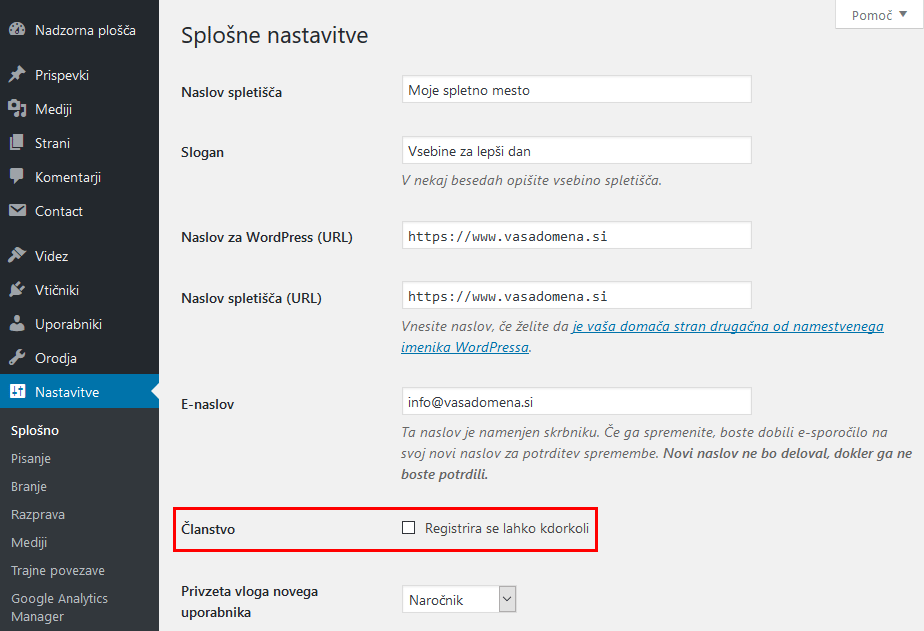
New user registration is disabled by default in WordPress. If you happen to receive notifications of new registrations in your email inbox, but otherwise don’t need the registration option, simply turn it off.
How? In the WordPress admin, hover over Settings and click on General. Look for Membership and remove the tick from the box. Then save your changes.
What if new users need to be registered? As WordPress is the most widely used system in the world, the number of fake user registrations is correspondingly high. On the other hand, because of its popularity, there are also a number of plugins available to help protect yourself.
Advanced Google reCAPTCHA
With the Advanced Google reCAPTCHA plugin, you can protect your registration form from bots and automated scripts. Before registering, the user must confirm that they are not a “bot” by clicking in the empty field. If the system detects the possibility of registration by a bot or script, a test must first be performed:
- Entering words or numbers that are not clearly displayed on the screen,
- selecting certain images (e.g. traffic signs).
Before using the plugin, reCAPTCHA must be created. To do this, log in to your Google account and visit the link https://www.google.com/recaptcha/admin. There you will specify the URL of your website and obtain the keys(Site key and Secret key) which you will then use for the WordPress plugin itself.
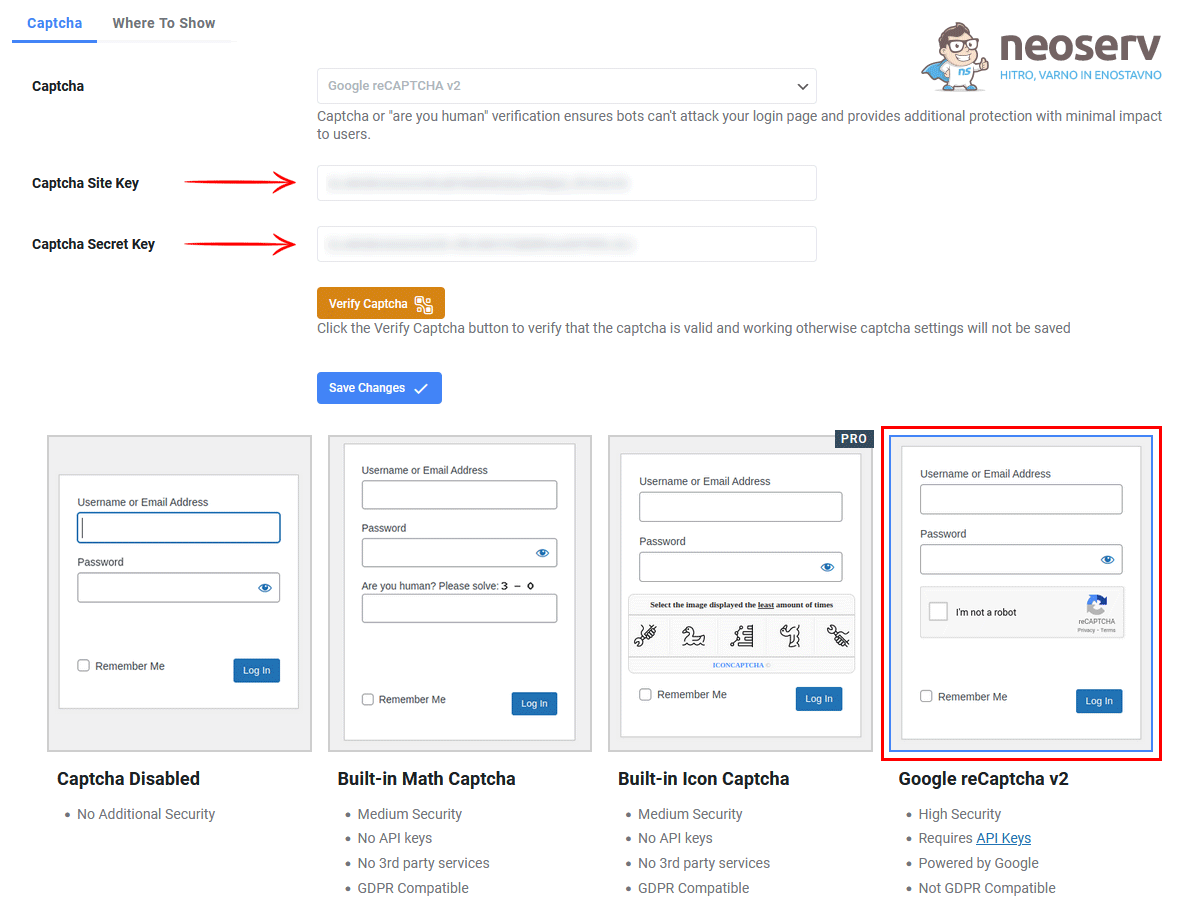
As you can see in the image above, using the Advanced Google reCAPTCHA plugin is very easy. You can use both reCAPTCHA v2 and v3. After entering and verifying the keys, all you need to do is select which forms you want to secure. These settings can be accessed via the Where To Show tab (at the very top). For example, you can secure the following forms:
- Administration login form,
- the user registration form,
- Forgot password form,
- a form to submit a comment,
- WooCommerce user registration form,
- WooCommerce form on the shopping cart page,
- BuddyPress user registration form.
Spam protection by CleanTalk
The full name of this plugin is Spam protection FireWall, AntiSpam by CleanTalk. It is an extremely sophisticated free plugin that is both easy to use and very effective. With it, you can protect your website against phishing or SPAM:
- SPAM registrations,
- comments,
- contact form messages,
- orders in the online shop,
- reservations,
- newsletter subscriptions.
After installing the plugin in WordPress, you can import the API key manually or automatically. The latter can be done by clicking on the “Get access key automatically” button. This way, you’ll be able to secure your WordPress in just a few seconds. After importing the key, the plugin will notify you that the protection is active.
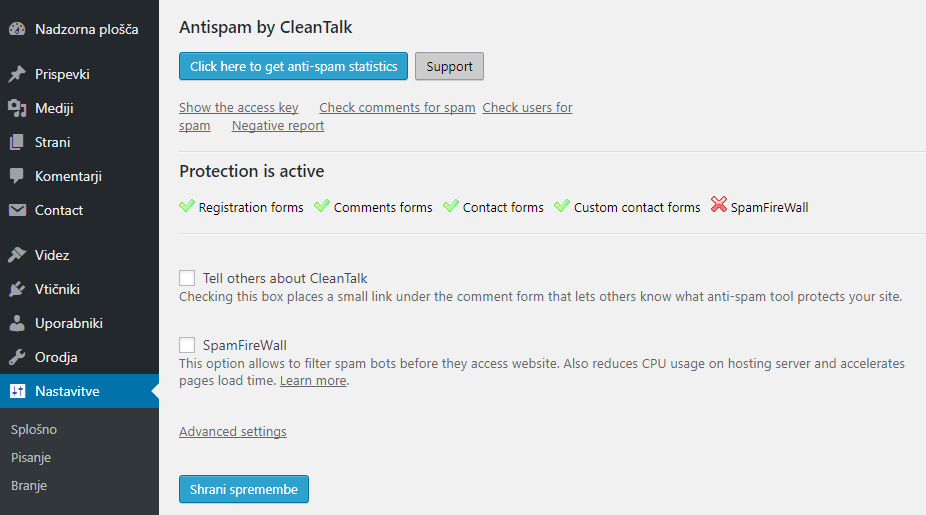
By clicking on the “Advanced settings” link, you can choose exactly what you want to protect on your website.
The Spam protection by CleanTalk plugin blocks unwanted registrations, comments and the like in the background, not via various tests as is the case with the reCAPTCHA plugin. It can also prevent fake registrations in WooCommerce, bbPress, BuddyPress and some other WordPress-related systems.
Preventing fake registrations: Joomla
Unlike WordPress, Joomla, which is the 2nd most popular CMS, has a built-in option to use the reCAPTCHA plugin by default. This is disabled, as both keys(Site Key and Secret Key) must be obtained first.
As mentioned above, you can obtain these keys by the following procedure:
1. sign in to your Google account and visit the Google reCAPTCHA page.
2. Enter your domain in the form and select the reCAPTCHA version.
3. You will then see both keys displayed on your screen.
Now log in to your Joomla administration and follow the steps below:
1. In the top menu, hover over Extensions and select Plugins.
2. In the list, find the Captcha – ReCaptcha plugin and click on it.
3. Select the plugin version 2.0, enter both keys and change the status to “Enabled” on the right side.
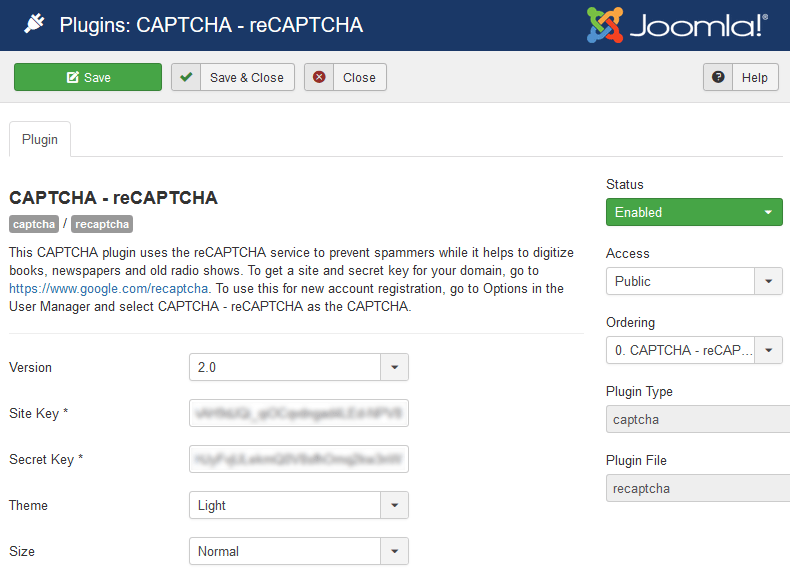
4. Click on “Save & Close” to save your changes.
5. In the top menu, hover over System and click on Global Configuration.
6. Under Site Settings, look for the “Default Captcha” line and select Captcha – ReCaptcha.
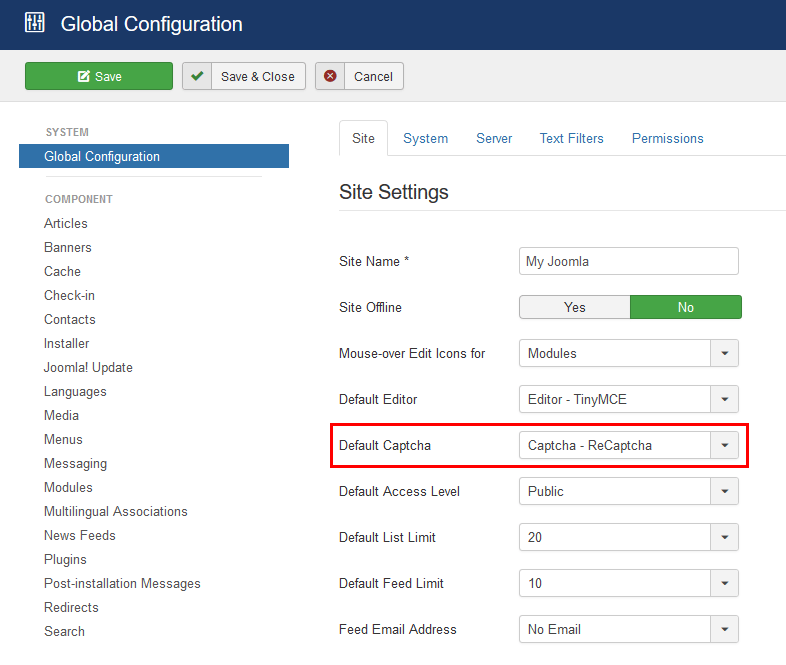
7. Click on “Save & Close” again to save your changes.
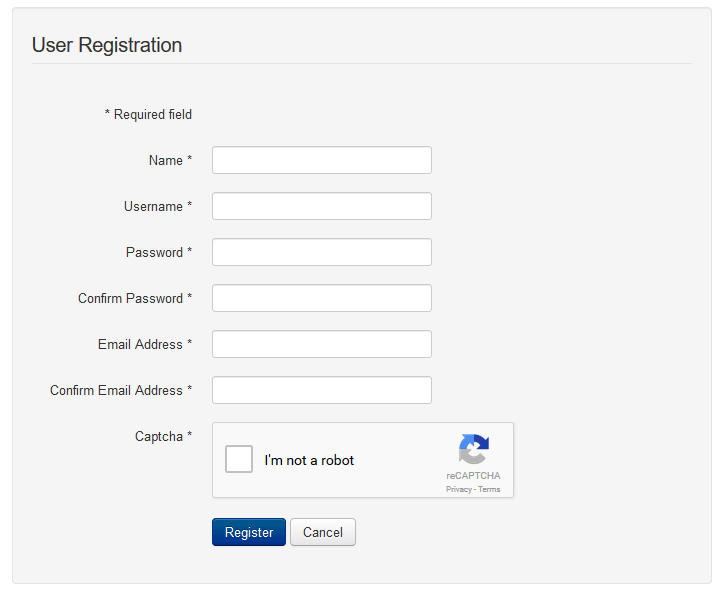
That’s all. As you can see in the image above, Google’s reCAPTCHA test is now present on the new user registration page.
Is the Google plug-in not working for you? Would you prefer to eliminate unwanted registrations without any test? You can also use the popular Antispam by CleanTalk extension to protect Joomla, which is also suitable for preventing SPAM on the Kunena forum.
Preventing fake registrations: phpBB
The phpBB open source system is an online forum written in the PHP programming language, derived from the PHP Bulletin Board. The forum, which was developed in the late 2000s and has now been translated into more than 50 languages, is free to use.
If you have read everything we have written so far, you will probably have noticed that we have already mentioned two forums: bbPress, which is a plugin for WordPress, and Kunena, which is an extension for Joomla. Then you also know that you can use the CleanTalk solution to protect both of them.
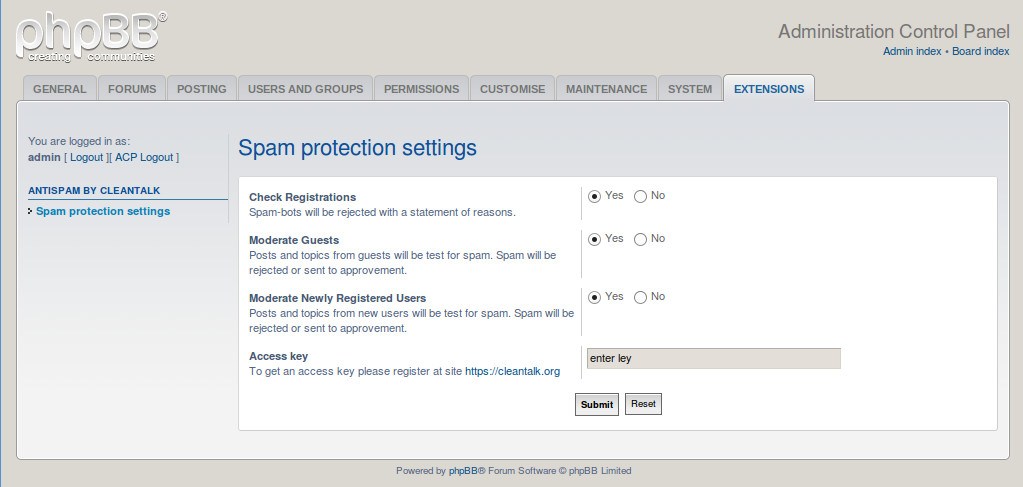
The same is true for the phpBB forum. For complete spam protection, use the Anti-Spam extension by CleanTalk. Follow the link to see how to install the extension and how to keep yourself safe from fake registrations and unwanted posts.
Would you prefer to stop SPAM registrations and posts with Google reCAPTCHA? Of course, that is possible too, but the process is a bit more complicated. You can find out exactly how it works here.
By default, phpBB has added the functionality to use CAPTCHA when registering a new user. Unfortunately, malicious scripts are now so sophisticated that they can pass the CAPTCHA test without any major problems. It is therefore important that you choose one of the above solutions instead of the default one.
COMMENT THE POST
Your comment has been successfully submitted
The comment will be visible on the page when our moderators approve it.