


- Your cart is currently empty.
How to Recover After a Google Rankings Drop

You have been actively working on improving the website for several years, adding new content regularly, advertising the site and getting backlinks. It all looked very promising. Your site was ranked higher and higher in Google, the number of visitors grew month by month, and then came the shock.
As you were looking at the traffic graphs in Google Analytics over your morning coffee, you realised that traffic had dropped dramatically. Unable to believe your eyes, and believing with a glimmer of hope that it was a bug in the analytics, you checked the keyword positions in the search engine. Nightmare again. The keywords you used to get to the top of Google were now lost somewhere in the depths of the search engine…
Don’t panic! It’s not the end of the world, and in all likelihood your website will soon be fine too. There are many possible causes for this situation, so get to work quickly to find the “responsible” one. Here are 13 of the most common ones, with a solution for each.
Causes of the decline in positions and possible solutions
Before you make any revolutionary changes, double check that your website is actually ranked lower than it used to be. You can do this with a tool that looks like it’s from the last millennium, but does a solid job: SERP Checker.
Enter your domain name in the “Domain Name” box, select Slovenia (www.google.si) in the “Region” box, add a few keywords in the boxes below and click the green arrows. Wait a moment and the results will be displayed on the right.
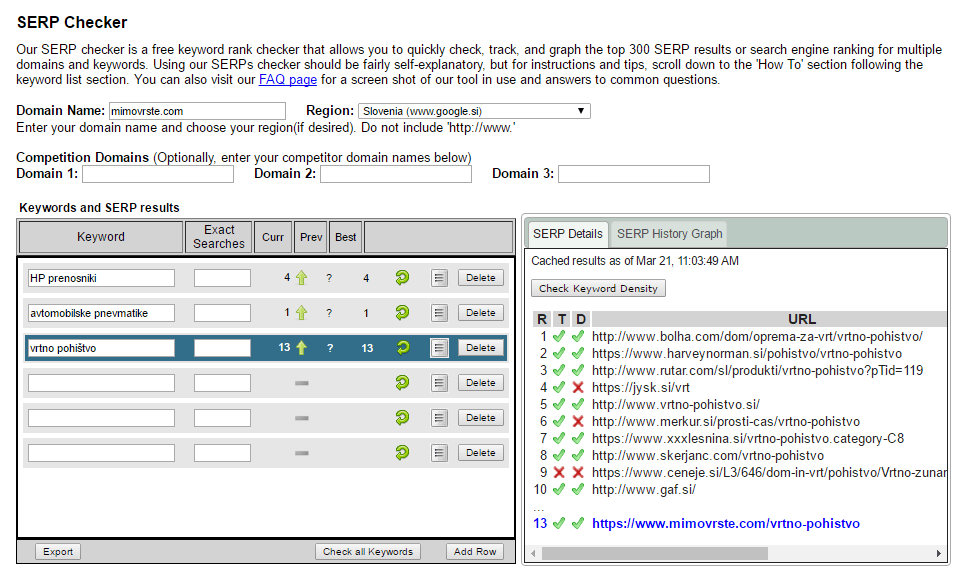
Are you one of the lucky ones who found that the website is still ranked in its usual places? If so, check the positions on another device or ask your friends to check theirs.
Has SERP Checker further confirmed the drop in positions? If so, read on.
Problem #1: Duplicate content
If you’ve recently edited your website, it’s possible that duplicate content has appeared on your website. You may have created new categories or added tags to posts. It is also possible that your site is accessible from both a www address and a non-www address.
Solution. You can help yourself by using Screaming Frog – SEO Spider Tool. You may also find it useful to type the following query into Google and check which subpages of your website are indexed.
site:vasa-domain.si
Eliminate duplicate content and ensure permanent (301) redirects. Alternatively, you can add the meta tag “noindex” to duplicate pages generated by, for example, tags.
Problem #2: Website intrusion
There is a possibility that you have been the victim of a web attack. This is especially likely if you use a simple username and password to administer your site, or if you have not updated your content management system (e.g. WordPress), plugins or graphic templates.
The consequences of an intrusion are varied, but the most likely is that your website has been spammed with a number of outbound links. This can have a very negative impact on your Google search rankings.
Solution: You will need to remove the malicious code and restore your website to the state it was in before the web virus appeared. Preferably as quickly as possible, before Google’s robots find all the spam. As we at NEOSERV provide SSH access to our clients, you will benefit from a support contribution to clean up web viruses. Of course, you can also contact our technical team for help at any time.
Problem #3: Keyword overload on the page
The English term “keyword stuffing”is often used to refer to this problem. The technique of using keyword density worked perfectly well a few years ago, but today it’s a completely different story. Many websites that used to rank high in search engines are now invisible because of keyword stuffing.
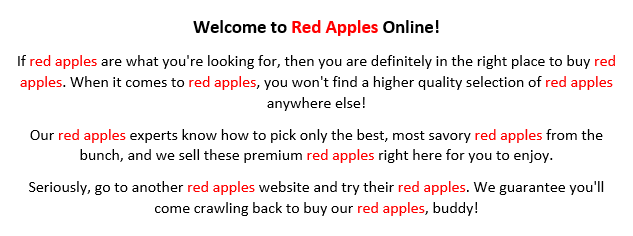
You are probably wondering what is an appropriate percentage of keyword density. There is no general optimal figure, as the limit for penalising a site is related to its authority. Authoritative websites can afford a higher percentage, while smaller and especially new websites need to be very careful.
Solution: Check the content and reduce the keyword density for those that have become over-saturated with keywords. Make it your basic guideline that content should be written as naturally as possible. That is, in a way that would be written by an expert who is very knowledgeable about the subject matter, but who is unaware of the possibility of exploiting a keyword-dense system. If you prepare your content in this way, the density percentage will certainly be appropriate.
Problem #4: The website has remained the same for a long time
The freshness factor is more important than you might think. If you haven’t added new content to your website for a long time, and your competitors are active in this area, a drop in positions is to be expected.
The solution: refresh your content. First, review your existing content and make sure it is up-to-date. If there is somewhere where it would make sense to add a sentence, do so. Then add more content to the website. The best way to do this is to start a blog, where you regularly post interesting and useful articles for your readers.
By publishing regular blog posts, you will not only get fresh content that Google will love, but you will also be found by search engines for more and more search queries.
Problem #5: Changed URLs
One of the most common problems associated with losing the vast majority of visitors is changing URL links. Have you changed the URL of your most read article? Maybe you got rid of the .html or .php extension? Have you removed the “/category/” entry with a WordPress plugin? Maybe you’ve completely changed the URL structure of your website?
Solution. If you don’t have a really good reason to change URLs, don’t do it, because the URL serves as a unique address for each page or subpage.
And if you have already changed the web links, be sure to make the appropriate redirects. If you are using WordPress, you can use a plugin such as Simple 301 Redirects, but otherwise add the redirects to your .htaccess file. A basic 301 redirect is added as follows:
Redirect 301 /old-page-address /new-page-address
The redirect shown here will automatically redirect visitors (and web spiders!) from the old subpage to the new one. This way you let Google know that it is the same subpage, now accessible at a different URL.
Problem #6: A website that is inaccessible for a long time
There are many reasons why a web page, or just parts of a page, is inaccessible. In most cases, it is the fault of the webmasters (e.g. after a change in the software code, an error occurs which is not easily noticeable from the outside), but sometimes the problem occurs on the hosting provider’s side.
The longer a website is inaccessible, the greater the drop in positions and the harder it is to return to the previous positions.
Solution. Do you know how long it has been like this and what the reason is? Check whether your website’s subpages are still indexed by typing site:vasa-domena.si into Google. If they are, the error probably occurred only recently.
To get started, make sure your website is up and running again. If you have problems, contact your website builder, who knows your system best and will be able to fix the error as quickly as possible.
To get your website back into the top search engine positions, do the following. Add new content (e.g. to your blog) to remind Google that your site is live. It’s also a good idea to make some links from the new content to more relevant subpages. Some quality backlinks from other websites to yours will also be useful.
Check the Google Search Console, a tool for webmasters, and “clean up” any errors and resubmit your sitemap. You can also use the “Download as Googlebot” option for faster indexing.
Problem #7: Lost backlinks
Backlinks are those that are directed from other websites to yours. The more quality backlinks you have, the more authoritative your site is, and therefore the higher it ranks in search engines. Just one high quality link can have a significant impact on positions. It is therefore possible that the administrator of an authoritative website has removed the link to your page.
Solution. Visit them and see if you have lost any of the backlinks. Contact the site administrator and ask them to recreate it.
Do you know which are the websites that linked to you? Use online tools to help you. One free tool that shows you a fairly realistic status of backlinks is Backlink Watch. As the data is not updated very often, the tool will also list among the results the pages that may no longer link to your site.
For a more detailed analysis of backlinks, we recommend Ahrefs.com.
Problem #8: A large amount of low-quality links are obtained
Just as backlinks can help improve your search engine rankings, they can also harm them. If you’ve recently been using so-called “black hat SEO” techniques, your site may be penalized.
Penalties can therefore occur when you acquire a large number of low-quality links, e.g. hundreds or thousands of links from various online directories. Such link acquisition is usually automated, which makes it possible to acquire a huge amount of links in a very short time. This strategy used to work, but today the opposite is true – it is detrimental.
The situation described above can arise in three cases:
- The backlinks that caused the damage were accumulated by you.
- You were targeted by a competitor with a negative SEO campaign.
- Your site has been compromised. New subpages have been added to your website and many links have been directed to these subpages.
Solution: Log in to Google Search Console, select your brand or website, select “Search traffic” in the left column and click on “Manual actions”. Check if you are about to receive a notification about unnatural or low-quality backlinks. If the notification is there, the matter is crystal clear, if it is not, investigate further.
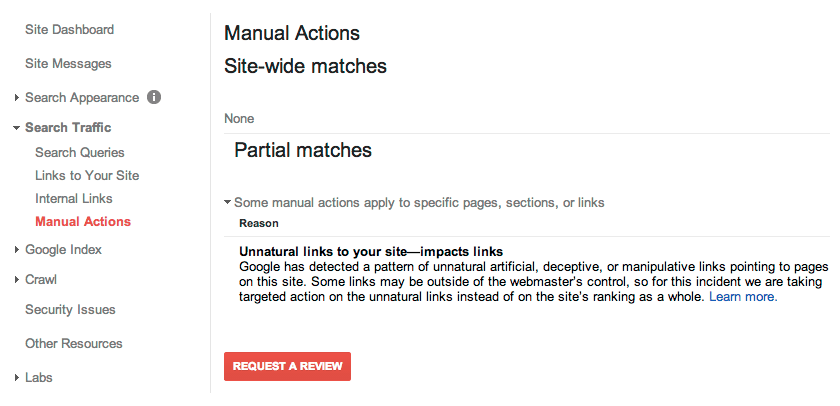
Within that category, click on “Links to your website”. There you can see a list of websites that have links pointing to yours. Are you sure that there are a large number of low-quality sites in the list that you definitely don’t want to deal with? If so, compile a list of domains and import them into Google’s link devaluation tool. Read more about the tool and how to use it at “Disavow backlinks“.
Problem #9: Changed or lost internal links
Although backlinks have a greater impact, internal links can also contribute to a drop in search engine rankings. Consider whether you have changed primary or secondary navigation elements in the recent past, removed links from your footer or sidebar, or perhaps from blog posts.
Solution: Try to restore the situation as it was before the internal links were changed. If you have completely redesigned the site, this will of course not be an option. In this case, think about the structure of the navigation and add links to the most important subpages. This way the Google spiders will know that it is important content.
You know you’ve changed or removed internal links recently, but have no idea where exactly you’ve done it? There’s a solution for that too. Go to the Internet Archive – Wayback Machine and enter your website address in the box. Click on one of the blue dots on the calendar and see what your website looked like on the date you selected.
Problem #10: Deteriorating user experience
The quality of user experience factor is also a very important part of Google’s algorithm for ranking search results.
Have you added a pop-up to your website that “greets” the visitor as soon as they arrive on the page? Does this appear a little later, or perhaps when the visitor wants to leave the site? Have you experimented with different colour combinations, added adverts or completely redesigned the site?
Almost everything has an impact on the user experience. Often underestimated is the impact of server speed, which is directly linked to website responsiveness. So if you’ve switched hosting providers, this could also be a reason for lower search engine rankings.
At NEOSERV, we use modern server equipment to ensure that websites run as fast as possible. In addition to fast SSD RAID-10 disk arrays, our servers feature powerful Intel XEON processors and a large amount of working memory. Read more about lightning-fast hosting on the Optimised Hosting page.
The solution: go to Google Analytics and use the data to check for changes in visitor behaviour. Compare the period before and after the change on the page. Focus on average visit duration, number of pages viewed and bounce rate.
Are the results worse than they were before the change? If visitors leave your website quickly, Google sees this as a negative signal. It’s best to remove display windows, ads and other newly added elements. Instead, add more images and video content to grab visitors’ attention and keep them on the site longer.
Problem #11: Google algorithm change
Google’s algorithm for ranking search results changes regularly. According to John Mueller, it changes its algorithm several thousand times a year. The vast majority of changes are minor, but every now and then there are major updates that are felt by webmasters around the world.
The most well-known algorithm updates are called Google Panda and Google Penguin. The former is related to the content on a website, the latter to backlinks. Other more well-known updates are Google Hummingbird, Google Mobile Friendly Update and Google RankBrain.
If your website is lost in the depths of a search engine, it’s possible that an algorithm update is to blame.
The solution: first, make sure that the drop in rankings is definitely due to a change in Google’s algorithm. Check out some of the websites that are tracking developments in this area, e.g. Moz.com, MozCast.com, RankRanger.com and SearchEngineLand.com.
Find out what the websites that have been shaken up by the algorithm change have in common. Edit your website in line with the findings.
Problem #12: Drop in positions after SSL certificate installation
It has been known since August 2014 that installing an SSL certificate has a positive impact on the visibility of a website in Google search. However, many website owners have had bad experiences with SSL certificates, as their website is lost in search engines after installation.
But the problem is not the SSL certificate itself. The problem is that the switch to HTTPS is not done correctly. This leads to duplicate content or to parts of the page still loading over an insecure HTTP connection. The first problem in particular, duplicate content, can lead to a website being ranked lower by Google.

Solution: once you’ve installed an SSL certificate on your domain, make sure you’ve properly migrated to an HTTPS connection. We won’t write about the details of the correct gateway today, as we’ve already covered the process in this article. Even if you don’t have a WordPress website, the instructions will come in handy.
Once you’ve finished installing your SSL certificate and switching to an HTTPS connection, double check that everything is working as it should. Visit several subpages of your website via Google search and make sure that the system automatically redirects you to new, secure links. Also look out for the security lock icon next to the web address, which should not be crossed out, and any browser security warnings.
Problem #13: Competitors investing in website optimisation
Competitors who are actively investing in web optimisation may also be responsible for your website being harder to find on Google than it used to be.
If you haven’t changed anything on your website for a long time, added new content, gained quality backlinks, etc., it doesn’t necessarily mean that your competitors are also asleep. In such a case, you simply cannot count on keeping the top positions in search engines forever.
Solution. First, draw up a tentative plan for how you will go about optimising. Start with “on-site” optimisation, i.e. changes that can be made directly on the website.
Review your existing pages and add text, images and video content. Optimise elements that could contribute to a better user experience. Don’t forget to check headings, meta descriptions and any other HTML tags.
Once you’ve gone through the whole site refresh, move on to creating new content. You can add it as a standalone sub-page or as news, announcements, blog posts. Glossaries of terms are also useful in some activities and will come in handy for many visitors.
If you have not yet installed an SSL certificate on your site, please make sure you do so.
After all these changes you can expect to see an improvement in the search engine, but don’t get your hopes up too quickly at this point. Backlinks are also very important. Think about where you can get them, or contact an agency that can help you.
Have you figured out what the problem is?
Do you know where you went wrong? Did duplicate content appear on your site, did you change the URL link structure, or did you forget about redirects after installing the SSL certificate? Could it be “just” a major change in Google’s algorithm? There are many reasons for a drop in positions and it is usually anything but easy to figure out what caused the situation.
For problems related to Google in one way or another, it is very important to check the Google Search Console first.
If you don’t happen to use the webmaster tool, start immediately. Add your website to it and use one of the verification methods offered to confirm ownership. Add all versions of your website – with and without www, and if you use an SSL certificate, both HTTPS versions. Select the primary version and enter the site map.
When you experience problems with the indexing or search engine positions of your website, check the following in Google Search Console:
- Messages,
- Search Network Traffic -> Manual Actions,
- Google Index -> Index Status,
- Google Index -> Blocked Sources,
- Content search -> Content search errors,
- Content Search -> Robots.txt File Test Tool,
- Content Search -> Site Maps,
- Security issues.
Once you have fixed the problem and your website is back in the search engine in a prominent position, don’t forget to say a toast and comment below the post which of the 13 causes was responsible for the situation.
COMMENT THE POST
Your comment has been successfully submitted
The comment will be visible on the page when our moderators approve it.