


- Your cart is currently empty.
DNS Records – A, AAAA, CAA, CNAME, MX, NS, SRV, TXT
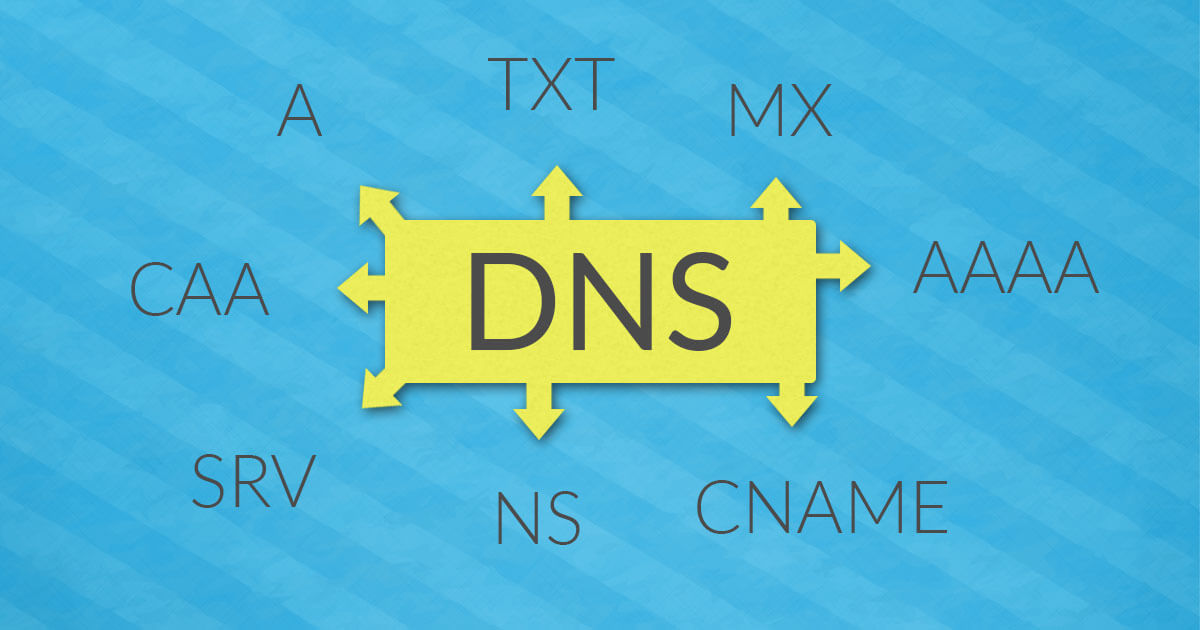

Have you ever explored how the World Wide Web works? What happens behind the scenes when you visit a website in your web browser? If you’ve done any research, you’ve probably come across terms like DNS server, DNS zone, DNS records, name server, etc. The terminology is anything but straightforward, so we’ve prepared this article to introduce the terms in a way you can understand.
We will pay special attention to DNS records. We will look at what they are for and what are the types of records that are worth getting to know in more detail. But before we get into DNS records, you need to know the basics of how the DNS system works.
DNS – Domain Name Server System
The Domain Name System (DNS ) is a system of domain name servers. It is best thought of as a directory of Internet sites. Its primary task is to translate user-friendly domain names (e.g. neoserv.si) into computer-understandable IP addresses (e.g. 193.9.21.33). If the DNS system did not exist, every time you wanted to visit a website, you would have to know the IP address of the server hosting the site and type it into your browser.
A DNS server, which is also referred to as a nameserver, is actually a server on which DNS software is installed. This allows the transfer of data from DNS records and thus communication between devices connected to the World Wide Web. You can read more about how the DNS system works in the post on the difference between web hosting and DNS hosting (check the section “How does DNS work?”).
For beginners who want to get to grips with how the DNS system works, one of the difficulties in understanding it can be the distinction between DNS records, a DNS zone and a DNS zone file.
DNS records
DNS records are individual data entries (in text or numeric form) that instruct a server how to handle requests it receives. You could say that they are domain settings, because DNS records are used to specify which servers host different web services (e.g. a website or email) for a particular domain.
DNS zone
A DNS zone is a part of the DNS namespace that is delegated to a legal entity – an organisation, company or individual – responsible for maintaining a particular DNS zone. All zones, organised in a hierarchical tree order, therefore form a DNS namespace.
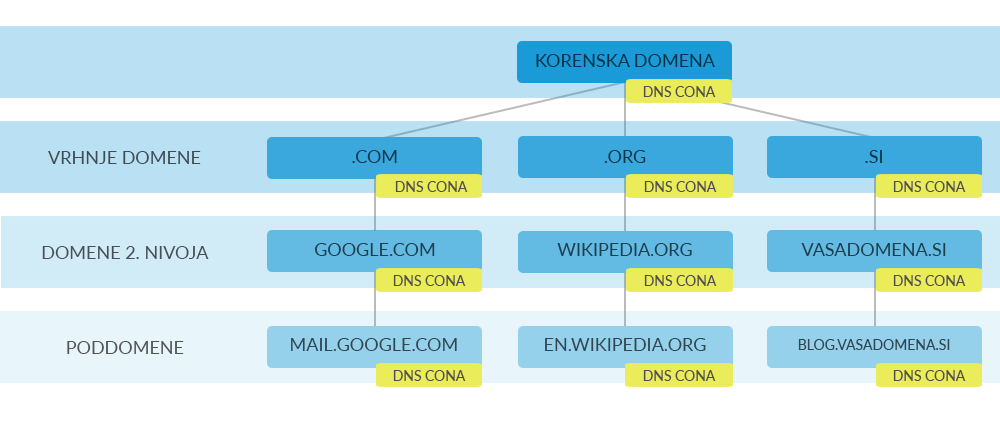
As you can see in the figure above, the Root Domain is at the top of the hierarchical system, followed by the Top-Level Domains (TLDs), often referred to by the acronym Top-Level Domain (TLD), followed by the Second-Level Domains (SLDs), and then the Subdomains(subdomains) are the lowest in the hierarchy.
DNS zone file
A DNS zone is defined in a zone file, which is a simple text file containing all the DNS records for a particular domain. In this file, each line can contain only one record. It must begin with an indication of how long the records should be stored in the DNS server’s cache, which is denoted by the abbreviation TTL ( Time to Live). In addition, a mandatory part of every DNS file is the Start of Authority( SOA ) record, which specifies the primary name server in the DNS zone.
Types of DNS records
Within each DNS zone there are DNS records containing different information about the domain. These include which servers host the website and email for a particular domain. Here are some of the most common types of DNS records. We have also provided an example for each of these records.
A
A record (Address) is used to point a domain or subdomain to a specific IP address. It allows a web user to land on the desired web page when entering a domain in a web browser.
vasadomena.si. AND A 195.206.228.46AAAA
The AAAA notation (IPv6 Address) is very similar to the A notation, the only difference is that this notation directs the domain to an IPv6 address rather than a traditional IPv4 address.
vasadomena.si. IN AAAA 2001:0db8:85a3:0000:0000:8a2e:0370:7334CAA
The CAA notation (Certificate Authority Authorisation) is used to authorise a digital certificate authority to issue an SSL/TLS certificate. As of 8 September 2017, every Certification Authority must verify this record before issuing a certificate. In the event that there is no CAA record in the DNS zone, any Certification Authority may issue a certificate.
vasadomena.si. IN CAA issue "comodo.com"CNAME
A CNAME (Canonical Name)record defines a mapping or alias of another domain. Thus, it must always point to a domain, not to an IP address. Usually, this DNS record is used to make sure that a web page accessible at vasadomena.si appears on the subdomain www.vasadomena.si.
www.vasadomena.si. IN CNAME vasadomena.siMX
The MX record (Mail eXchange) specifies the email delivery destination for the selected domain. It contains information about the server to receive the e-mail and a priority which, if multiple e-mail servers are added, tells where to try to deliver the messages first. A lower number means a higher priority.
vasadomena.si. IN MX 0 mail.vasadomena.siIf you wanted to route emails to an external email provider’s server, you would need to use other MX records (see the example MX records for G Suite).
NS
The NS (Name Server)record specifies the name servers used in this DNS zone. One of the reasons for defining name servers in a zone file is so that said file can be served from a cached copy on another name server.
IN NS ns1.neoserv.si.
IN NS ns2.neoserv.si.
It is important to have at least two NS records in each zone file, because if there is a problem with one of the DNS servers, the domain will still work. Some providers’ systems do not even allow only one NS record to be entered.
SRV
The SRV record ( Service) allows a connection to be established between a specific service and a server name. It contains the values of priority, weight, port and target.
_autodiscover._tcp.vasadomena.si. AND SRV 0 0 43 cpanelemaildiscovery.cpanel.netTXT
A TXT record (Text) is a textual DNS record used for a variety of purposes. Typically, it contains domain information intended for other web resources. It is most commonly used to create SPF, DKIM and DMARC records to enable authentication of e-mail messages and thus increase their deliverability. You can read more about this in Why and how to set up SPF, DKIM and DMARC.
Editing DNS records in cPanel
If you subscribe to a web hosting package with NEOSERV, you will have received access to the cPanel control panel when you subscribed, where you can also edit DNS records. Don’t worry, in most cases when you add a new domain to your package, everything will be taken care of automatically. This is because adding new DNS records and editing existing DNS records is designed for advanced users with specific requirements.
How do I edit DNS records? Follow the procedure below:
- Log in to the cPanel control panel(login instructions).
- In the DOMAINS section, look for the Zone Editor icon and click on it.
- In the list of domains, find the one you want and select Manage.
- You will see a list of the DNS records you have added.
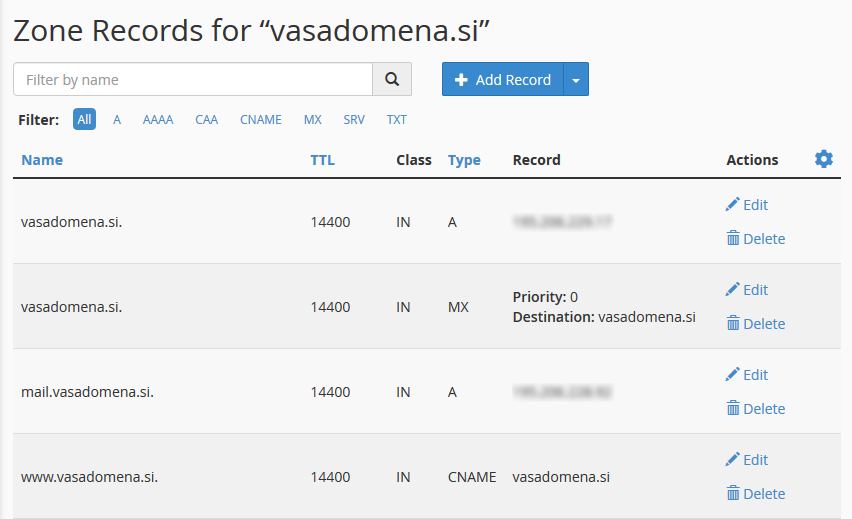
- If you want to:
- edit a DNS record: click Edit on the right side
- delete a DNS record: click on Delete on the right-hand side
- add a new DNS record: click on the blue + Add Record button above the list
Have you read everything we’ve written in today’s post? Even though you may not be an expert in this field, we hope we have given you an easy-to-understand introduction to the technical terms associated with the operation of the domain name system. If you are unclear, please do not hesitate to contact us via email info@neoserv.si or ask your question in the comments section below this article.
COMMENT THE POST
Your comment has been successfully submitted
The comment will be visible on the page when our moderators approve it.