


- Your cart is currently empty.
Magento Performance Tips: Speed Up Your Online Store


Magento is one of the most popular CMS systems for building online stores. Its greatest strengths are its security, stability and numerous extensions that allow you to customise your store to suit your needs. However, Magento has one major drawback – slow performance. A slow webshop can have a very negative impact on your business, as we’ve written in our post Why slow webshops sell less. In this post, we’ve put together an eight-step guide on how to speed up your Magento store.
How fast is your Magento store?
The pre-configured Magento store is not optimised for fast performance. In the worst case scenario, the store will take 10 seconds or even longer to load! Did you know that if your store takes more than 4 seconds to load, you lose 25% of your visitors, who are actually your potential customers?
Even Google expects a website or shop to respond in 200 milliseconds and to load fully in less than two seconds. To ensure the best possible results, Google therefore ranks slower pages lower in search results than those that load faster.
To find out how fast your store is currently loading, use one of Google’s dedicated Page Speed tools, GT Metrix or Pingdom.
Speed up Magento in nine steps
Follow the steps below and finally check again how much faster your store will get. You can let us know your results using the comment form at the bottom of this post.
1. Include cache
When a visitor visits your online store, the Magento system checks a large number of files, settings, scripts, more than ten system files and database queries. All this takes a lot of time. An additional disadvantage is that Magento repeats this process every time, even if the user has visited your online store before.
To shorten this process, turn on a request that saves every page that has already been processed by the system. This is called “Var/Cache“, which means that on the second and each subsequent visit, the user will be able to load the web page significantly faster via the cache.
To turn on caching, log in to the Magento Dashboard and select:
System > Cache Management > Select All > Actions (Enable). Confirm your selection by clicking the Submit button.

2. Combine CSS and JS
Each page in Magento consists of a large number of code blocks containing separate CSS and JS files. Every time someone refreshes the page, these code blocks are reloaded, which has a significant impact on performance. It is possible to reduce the loading time by more than 50% if you combine JS and CSS files.
Follow these steps in the control panel:
System > Configuration > Advanced > Developer and enable Merge files, as shown in the image below:
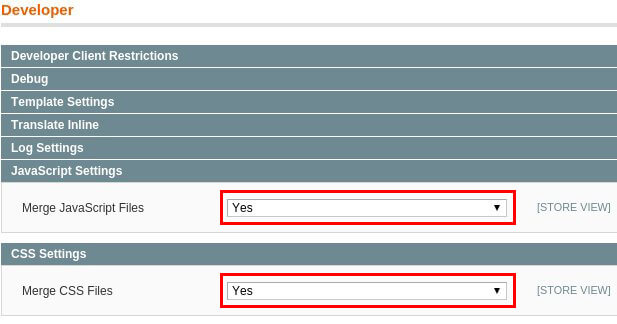
If your website contains custom programming code, then combining CSS and JS may cause the webshop to become inoperable. If you are unsure whether your store contains such code, please contact your Magento store builder.
3. Optimise your database settings
Every time you upgrade Magento or add a new extension, the database queries change. Additionally, the number of queries is influenced by the traffic to your store. This means that the database load changes all the time, and at the same time, the database becomes more and more complex over time. If the database is not optimised to process these changes and activities correctly, your site will exceed the memory and processing power allocated to you on your hosting package.
It is important to monitor the database, especially data such as query latency, memory usage, slow queries, etc. If the database has not been optimised for a long time, it is time to carry out this process to speed up the performance of your store.
You can optimise your database in two steps using the cleanup.php file. Detailed instructions on how to perform this step can be found on fastcomet.com.
4. Update your PHP version and enable opcache
Many online shop owners use preconfigured Magento settings, including the PHP version. It often happens that the old version 5.6 is set instead of the newer version.
Did you know that the latest version is significantly faster compared to version 5.6? Read more about this in the blog post Comparing PHP 5.6 and PHP 7. So to successfully speed up your Magento store on your hosting package , set PHP to the latest version.
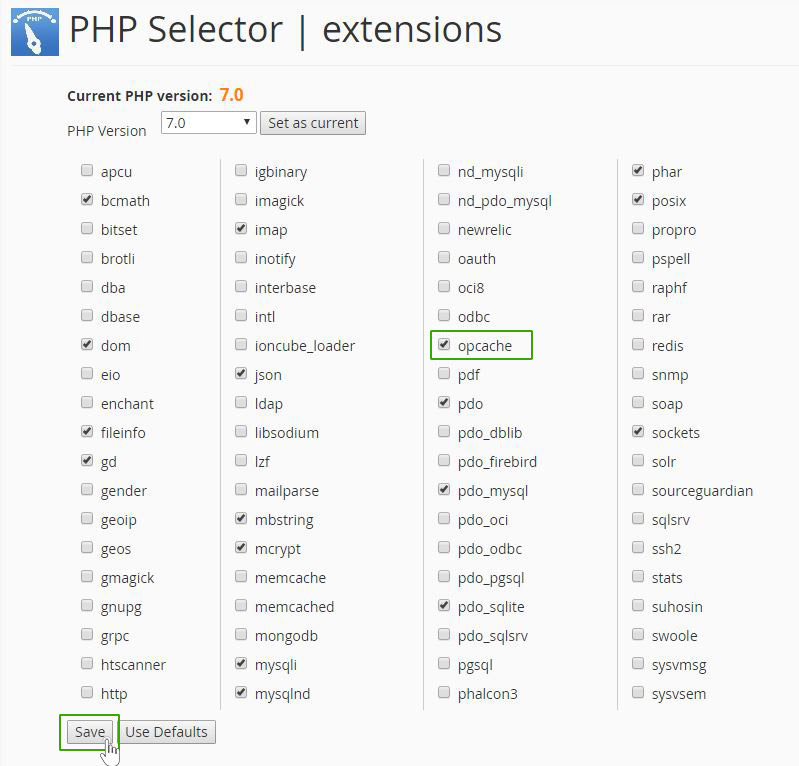
You should also enable the OPcache add-on, which saves uploaded scripts in shared memory to make PHP run even faster. To activate OPcache, click on the Select PHP Version icon in the Software section of the cPanel dashboard. In the newly opened window, tick the opcache option and click on the Save button.
5. Optimise your images
Images are one of the main selling points of an online shop. On the other hand, images are one of the biggest consumers of data width, often accounting for more than 50% of the store’s loading time.
You can reduce the latency caused by images by up to 25% if you optimise the size of images in product descriptions, categories and galleries. You can successfully reduce images with tools such as kraken.io and tinyurl.com.
6. Delete unusable extensions and modules
The Magento marketplace offers hundreds of different extensions and modules. But it quickly happens that you download ones that your store doesn’t even need. However, all unused extensions are loaded and processed when the store is used, slowing down the store.
Check which extensions you have installed and uninstall the ones you don’t need. Follow these steps:
System > Configuration > Advanced > Advanced and select Disable.
Some extensions are required to keep the store running smoothly. Also, if you use a cache, it must be disabled and emptied before you uninstall the desired extensions. If you do this incorrectly, your Magento store may not work. You need an advanced level of Magento knowledge to perform this step.
7. Update Magento
As with all website and store building systems, Magento offers regular updates. Not only does a new version of Magento give you more add-ons, bug fixes and improved security, each update makes your store run faster.
Combined with the above points, you’ll significantly speed up your store if you always have the latest version of Magento in use.
8. Using SSDs and HTTP/2 protocol
The last point is mainly related to the hosting provider where your webshop is hosted. Check whether your current provider allows you to host your store on SSD arrays instead of traditional HDDs. SSDs allow you to run your site 2 to 5 times faster.
You can further reduce page load times by using HTTP/2 instead of HTTP 1.1, which is often the default on web servers. HTTP/2 saves time by using binary data transfer (instead of the older text format), using a single link, compressing page header content and prioritising the download of important files. If you want your webshop to work over HTTP/2, then it must have an SSL certificate installed.
At NEOSERV we offer a variety of hosting packages, all of which run on SSD servers that support the HTTP/2 protocol. For those of you who have arranged hosting with us, we have also provided easy-to-follow instructions on how to choose the latest PHP version. Our expert support team is also available to help you with any further questions.
Have you followed all the steps in this post? Recheck the speed of your Magento store with the tools we mentioned in the first part of this post. After making the changes, your Magento store should be running faster.
COMMENT THE POST
Your comment has been successfully submitted
The comment will be visible on the page when our moderators approve it.