


- Your cart is currently empty.
Vue or React Frontend with a Python (FastAPI) Backend on a Single Hosting Plan
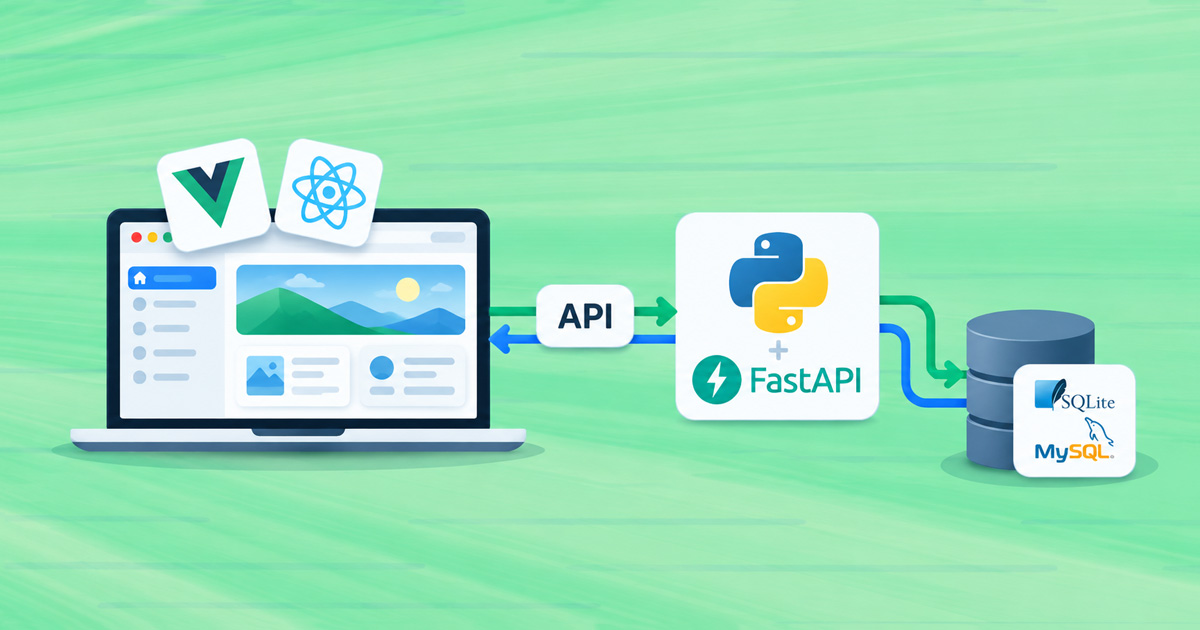

Modern web applications are often split into two parts: the frontend (the user interface built with Vue, React or Svelte using Vite) and the backend (a Python API, for example FastAPI or Flask). AI assistants often suggest this architecture as well.
You can host both parts on the same hosting plan (starting with the Green plan). This article shows you how. We tested the process with a Vue 3 + TypeScript + Vite application and a FastAPI backend using SQLAlchemy.
Contents
- How the Application Is Set Up on the Server
- Step 1: Build the Frontend on Your Computer
- Step 2: Configure Router Rewrite Rules
- Step 3: Deploy the API
- Frontend and API on Different Domains
- Pre-Launch Checklist
- Next.js, Nuxt and Other Server-Side Rendering Frameworks
How the Application Is Set Up on the Server
| Component | Where It Is Located | How It Runs |
|---|---|---|
| Frontend | public_html/app/ (static files) |
LiteSpeed serves the files directly, without Python |
| API | Python application at yourdomain.com/app-api |
Setup Python App |
| Database | SQLite file in the API directory or a MySQL database | SQLite locally, MySQL on the server |
Because the frontend and API are on the same domain, the browser does not require CORS configuration, avoiding one of the most common deployment issues.
Step 1: Build the Frontend on Your Computer
Do not build the frontend on the server. The node_modules directory contains tens of thousands of files and uses a lot of memory. On the Green plan, a Vite build cannot complete because of the process limit (the command hangs). Upload only the files generated by the build to the server.
Before building, set the path where your application will be available in vite.config.ts (or vite.config.js):
export default defineConfig({
  plugins: [vue()],      // or react()
  base: '/app/',         // folder name in public_html; use '/' for the domain root
})
If you use a router (Vue Router or React Router), configure it to use the same base path:
// Vue Router
createRouter({ history: createWebHistory(import.meta.env.BASE_URL), routes })

// React Router
<BrowserRouter basename={import.meta.env.BASE_URL}>
The frontend should call the API using a relative path, not http://localhost:8000:
const res = await fetch('/app-api/players')Then build the application:
npm run buildUpload the contents of the dist/ directory (not the directory itself) to public_html/app/.
Step 2: Configure Router Rewrite Rules
When a user refreshes a page such as yourdomain.com/app/players, the server must return index.html. Otherwise, the user gets a 404 error. Add an .htaccess file to public_html/app/:
RewriteEngine On
RewriteBase /app/
RewriteRule ^index\.html$ - [L]
RewriteCond %{REQUEST_FILENAME} !-f
RewriteCond %{REQUEST_FILENAME} !-d
RewriteRule . /app/index.html [L]
If the application is in the domain root, replace /app/ with /.
Step 3: Deploy the API
Deploy the API as a Python application using Setup Python App, as described in our article Python Application on Web Hosting:
- Application root: e.g.
app-api - Application URL:
yourdomain.com/app-api
For FastAPI, use the passenger_wsgi.py file with the a2wsgi adapter described in that article.
FastAPI routes must match the requests made by the frontend. If the frontend calls /app-api/players, define the /players route in FastAPI because the /app-api prefix is already part of the application URL.
Database
SQLite is suitable for smaller applications. Keep the database file in the API directory (not in public_html) and use an absolute path:
import os
DB_PATH = os.path.join(os.path.dirname(__file__), "app.sqlite3")
engine = create_engine(f"sqlite:///{DB_PATH}", connect_args={"timeout": 15})
We recommend MySQL/MariaDB for applications with more users. You can find instructions in our article Python Applications and MySQL.
Because FastAPI startup and lifespan events are not executed on this web hosting setup, create the tables on import (Base.metadata.create_all(engine)).
Frontend and API on Different Domains
If the frontend is at yourdomain.com and the API is at api.yourdomain.com, you must enable CORS in FastAPI:
from fastapi.middleware.cors import CORSMiddleware
app.add_middleware(
    CORSMiddleware,
    allow_origins=["https://yourdomain.com"],
    allow_methods=["*"],
    allow_headers=["*"],
)
Pre-Launch Checklist
Before publishing your application, check that you have configured all the necessary settings correctly.
- The
basesetting invite.configmatches the directory inpublic_html. - The frontend calls the API using a relative path, not
localhost. - The
public_html/app/directory contains an.htaccessfile for the router. - You uploaded only the contents of
dist/, withoutnode_modulesor the source code. - Passwords and keys are stored in a
.envfile in the API directory, not in the frontend code (anything in the frontend can be viewed by visitors). - An SSL certificate is enabled for the domain (
https).
Next.js, Nuxt and Other Server-Side Rendering Frameworks
The process above applies to applications that build into static files (Vite, Create React App, Vue CLI and static Next.js exports). Frameworks that require their own Node.js server (Next.js with SSR and Nuxt) should be deployed as a Node.js application.
If you need help with deployment, our team is here for you. If your application needs more resources than Web Hosting provides, explore our VPS Servers. For more demanding projects, also consider Turbo Hosting or Reseller Hosting.
COMMENT THE POST
Your comment has been successfully submitted
The comment will be visible on the page when our moderators approve it.