


- Your cart is currently empty.
How to Transfer a Domain to a New Registrar
Search results for: ""
Before you can start the domain transfer process, you must provide the new registrar (us) with an authentication code, also known as an EPP code or Auth-Code. This code is like a password that you use to further protect your domain from unauthorised transfers. You will receive the code from your current registrar, who will also check whether the domain is locked( unlocked).
There are also some domain extensions that are exceptions and do not require an authentication code (e.g. .hr, .hu, .uk). If your domain requires an EPP code, we will notify you before initiating the transfer to your contact email address.
Once you have provided us with the EPP code (and if the domain is unlocked for transfer), the prospective registrar (us) will initiate the domain transfer process.
Once the domain transfer has been initiated, you will receive a notification (example in the picture below) to your contact email address that you have registered as the domain holder, which contains a confirmation link to confirm the transfer.
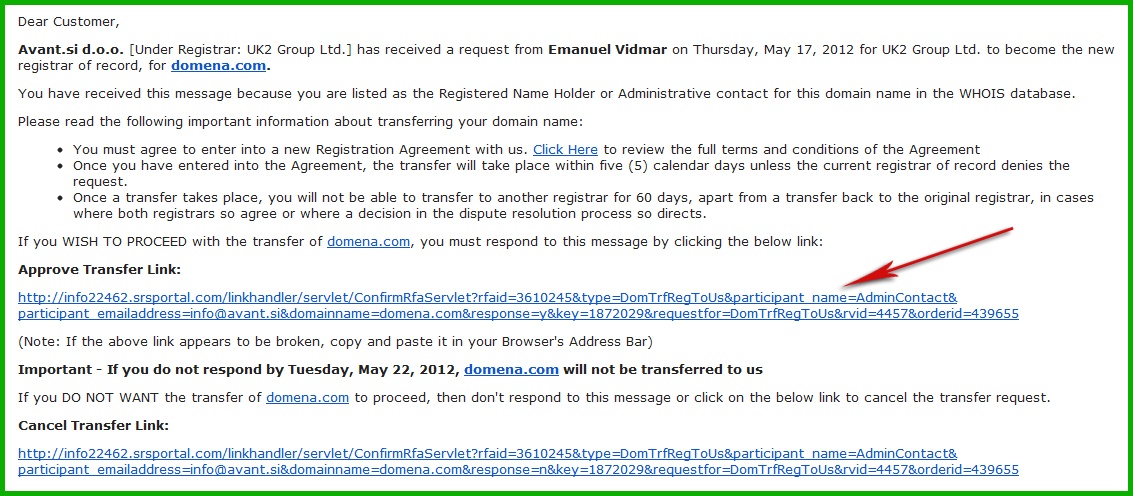
After your confirmation, the domain is transferred within a few minutes – provided that the transfer is also confirmed by your current/old registrar. If he/she does not confirm the transfer or does not have this option, the domain is automatically transferred within 6 days.
Frequently Asked Questions
I no longer have access to the email address where I should have received the confirmation link. What now?
If you don’t have access to your email address, you can change it to a new one by contacting your current/old registrar (change of contact details of the domain holder). Once you have changed your email address, we will initiate the domain transfer process and you will receive a confirmation link notification to your new email address.
I would like to transfer my domain to you. How can I start the domain transfer process?
You can place an order for a domain transfer using the order form on our website. If you will only be transferring a domain (without ordering a hosting package), please select that you do not need hosting in the second step or skip this step.
If you are already a user of our services, you can also send us the name of the domain you would like to transfer to us by sending us an email (info@neoserv.si) and we will make the necessary arrangements for the transfer.
For further information, please call us on 059 335 000 or email us at info@neoserv.si.

COMMENT THE POST
Your comment has been successfully submitted
The comment will be visible on the page when our moderators approve it.