


- Your cart is currently empty.
Why Your Website Might Stop Working Without Changes


Have you typed the address of your website into your browser and unhappily found that it doesn’t work? Or were you able to access it without any problems just a few days ago, but haven’t made any changes since? The best place to start is to ask your website builder if you need to edit your website. If they tell you that no changes have been made to the site recently, the reason for the inactivity is probably somewhere else.
What happened? Why is the site no longer working if nobody has made any changes and the site was fine until recently? There are several possible reasons for this situation. Here are some of the most common ones.
1. Incorrect file and folder permissions or an error in .htaccess
One of the reasons why your site is not working is because of incorrect file and folder permissions. This error can occur when using certain FTP clients. It is therefore possible that when you transfer files and folders to an FTP server, the rights are automatically changed.
The correct rights settings are as follows:
- 755 for folders,
- 644 for files.
The rights and permissions of files and folders can also be changed in case of automatic updates of the application or plugins, when running certain cron jobs, etc.
It is also possible that your website is not working due to an error in the .htaccess file. Various plug-ins, especially security plug-ins and plug-ins that provide efficient caching, may add their own code to .htaccess. Sometimes it happens that the code is not correctly placed in the file and the website stops working.
2. Failure to automatically update the website
If you use WordPress or one of the other popular CMS systems, you may have automatic updates enabled. This is definitely recommended, as regular updates not only improve the functionality of your website, but also its security.
Unupdated websites are the most common target of online attackers, who are constantly on the lookout for potential security holes. Make sure your website is always up-to-date and properly secured. In the case of WordPress, regularly update the core system, plugins and graphical template.
Although the ability to update automatically is more than excellent, in rare cases it can lead to problems. The following can happen:
- The updated plugin is not compatible with the WordPress core.
- An updated graphical template is not compatible with the WordPress core.
- The updated WordPress core is not compatible with any of the installed plugins.
- The updated WordPress core is not compatible with the graphical template.
- The updated WordPress core is not compatible with the server (e.g. due to using an outdated version of PHP).
- An error occurred while updating the core, a plugin or the graphical template.
- The website is down due to caching issues.
The “culprit” for a broken website is most often related to the incompatibility of the kernel with one (or more) of the plugins. How to find out which one is causing the problem?
The easiest way to do this is to go to the cPanel control panel, open the File Manager and find the directory of your WordPress site where the plugins are located. You will find these within the “plugins” folder, which is located in the “wp-content” folder.
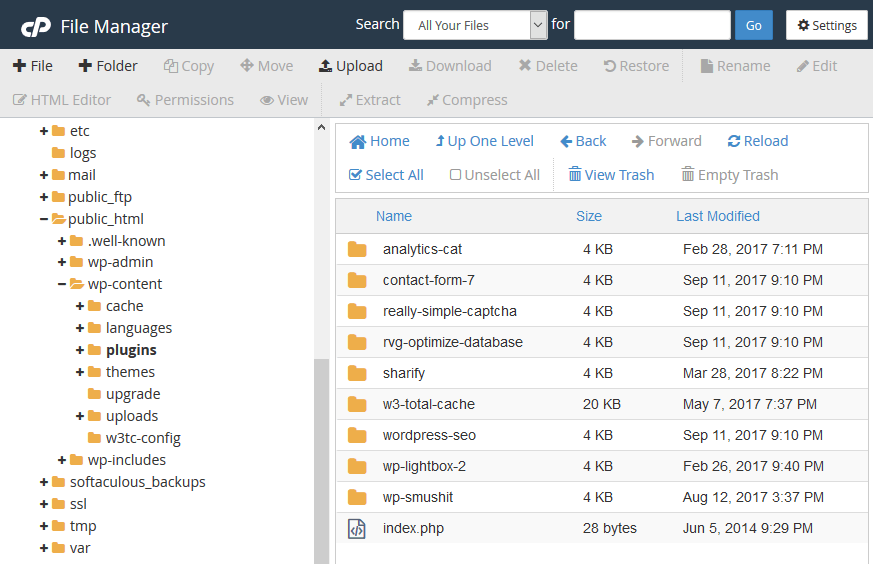
Since renaming the directories of individual plugins excludes them, you can quickly find the one that is causing the problem. Rename folder after folder, and always refresh the website in between to see if it’s working. Once you’ve found an incompatible plugin, don’t forget to rename the remaining plugins to their original names and reactivate them in the WordPress admin.
3. Your domain has recently expired
First, make sure your domain is still active. Visit the Verify.si domain checker, enter your domain in the box and click on the “CHECK” button. You will see a number of details, including the expiry date of your domain.
Forgot to renew your domain on time? Don’t worry, if it hasn’t been long since the expiry date, you will be able to get your domain back – most likely at no extra cost. Read more about what to do in this case in our blog post: When does a domain go into quarantine and what does it mean?
4. You haven’t verified your domain
In January 2014, ICANN, the organisation that regulates internet names, introduced the verification of domain owners’ contact details (not applicable to .SI). When you register a new domain, transfer it elsewhere, change the holder details or change the contact email address, you can expect an email from the registrar-in-chief to verify your contact details.
If you do not verify your contact details within 15 days, your website will cease to function. You will see the warning message shown in the picture below.

What to do in this case?
- You have access to a contact email address. In the email address you provided when registering the domain, look for the verification message in your email inbox and click on the link to verify the ownership of the domain. Wait up to 48 hours for the DNS servers to refresh and your site will be up and running again.
- Can’t access your contact email address: Are you no longer using the email address you provided when you registered your domain and therefore can’t access the verification link message? If you have registered your domain with us, please contact our support(info@neoserv.si).
5. Your hosting package has expired
The problem with your website not working may not be related to your domain, but to your web hosting. Please make sure that your hosting package is still active.
If you are hosting with us, you probably haven’t forgotten about renewing your package, as we send you several notifications about the expiry of the services you have subscribed to before the expiry date to your contact email address. To be sure, log in to the My NEOSERV Subscription Centre and check how long your hosting package is valid for.
6. A virus has been installed on the website
Have you thought about your website being compromised by a web virus? If you haven’t taken the necessary precautions to keep it secure, this is a very possible scenario. The problem is most often caused by a weak password, stolen login credentials or an un-updated site full of security holes.
A virus on a website is often already detected by web browsers (e.g. Chrome). When a visitor wants to visit such a site, he or she will receive a virus notification, but the website is not accessible. A web virus can also be detected by the hosting provider, who will immediately disable the site for security reasons.
We have written a number of articles on website security on our blog. Read the following posts for lots of useful information on how to secure your website and avoid online attacks and viruses:
- Secure username and password in WordPress
- The 3 most common website attacks and how to protect against them
- How to protect your website from “Brute Force” attacks?
If you are hosted with us, an inaccessible site due to a virus is unlikely, as we have provided effective NEOSERV anti-virus protection on all servers. This automatically finds and patches security holes in websites, and also cleans up any files that have already been compromised.
7. Update the server software
Just as website owners need to update their websites regularly for security reasons and improved performance, hosting providers need to upgrade their server software. This way, security holes are eliminated and often updates also mean faster website performance.
7.1 Incompatibility of an outdated platform with the server software
In rare cases, a software update may lead to a website not working. This is particularly the case with outdated websites that have not been updated for several years.
- Example 1: Older versions of Joomla (1.5.x, 1.6.x and 1.7.x) work seamlessly with the older MySQL 5.5, but no longer work on the newer 5.6 and 5.7.
- Example 2: An outdated version of PrestaShop (1.5) is causing problems on an older version of Apache (2.4.18). While the webshop is available online, not all functionality is working properly – e.g. some plugins may be problematic.
7.2 Problems when updating server software
An error during a server update can lead to websites not working. In practice, such complications are very rare, as most providers guarantee at least 99% server reliability.
At NEOSERV, we guarantee our clients 99.9% server reliability because we make sure that the servers are working properly before every software update. We perform updates at night and always have backups ready so that if there are any problems, the server can be restored to its previous state immediately.
GOOD TO KNOW: If you have several websites set up on your hosting package and only one of them is not working, the problem is definitely not with your hosting provider.
Have you checked all of the above and the site still doesn’t work?
Have you found that your domain and hosting package are still active? You have not received a message from the registrar to verify your ownership details? That all updates to your website have been successful, that there is no virus on the site and that everything is fine with the server you are hosting on?
There are many other reasons why your website has stopped working unexpectedly. If you are not able to fix the problem yourself, we recommend that you first contact your website builder or the programmer who develops and maintains your website. Of course, our team can help you too!
COMMENT THE POST
Your comment has been successfully submitted
The comment will be visible on the page when our moderators approve it.