


- Your cart is currently empty.
How to Connect a Domain to Wix
Search results for: ""
In this article, we’ll take a look at how you can link and point a domain registered with NEOSERV to the Wix platform.
Wix is a very popular platform that allows you to create a simple website or shop without any intermediate programming knowledge. The platform itself is free, but if you want to publish your website on a domain you own, you have to pay for it. You can choose from different packages depending on your requirements.
Before you get started, make sure you have purchased the appropriate Wix package that allows you to link your domain to the Wix platform. The“Most Basic” package is already sufficient.
How do I add a domain to my Wix account?
1. Click on your profile and select “Domains“.
2. Click on Add an Existing Domain and select Connect a domain you already own. 
3. Select the page you want to link the domain to and then click Next.
4. Enter the name of your domain and click Next. 
5. Click Start and follow the instructions from the Wix platform.
How do I point my domain to the Wix DNS server package?
You have added the domain to your Wix account, now you need to point it to your Wix package.
You can do this by registering the domain with the DNS servers below.
- ns12.wixdns.net
- ns13.wixdns.net
You can find out how to set up the DNS servers at the link below:
If you want to use email related to your domain, you will need to purchase the appropriate hosting package and then route the domain using DNS records.
This can be easily done in your cPanel control panel – by clicking on the “Zone Editor” icon. Then do the following:
- Click on “Manage” for the selected domain.
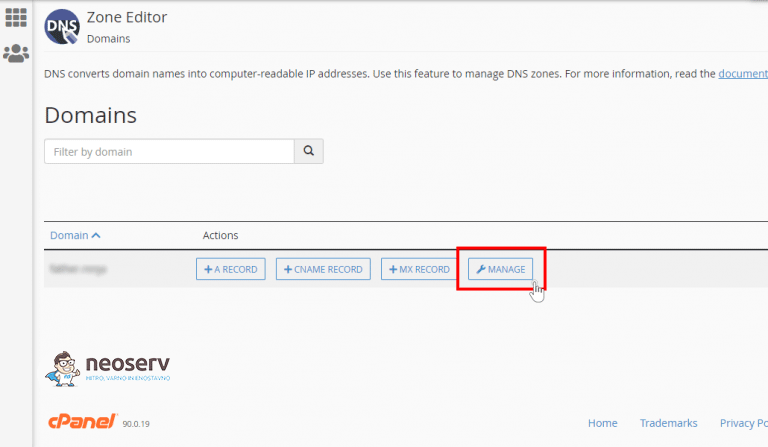
- Under yourdomain.com, click “Edit” for the “Type” MX record and under “Destionation” write: mail.yourdomain.com (instead of yourdomain.com, enter your actual domain).
- For the “Type” CNAME for mail.yourdomain.com click “Edit” and change the “Type” from CNAME to A and then in the “IPv4 address” field enter the IP of our server (you can find the IP in the My NEOSERV Subscription Center under YOUR DOMAIN / HOSTING -> then click on your hosting package).
- For yourdomain.com under “Type” A click “Edit” and instead of the existing IP address enter 185.230.63.107 and save your changes by clicking “Save Record“.
- For www.yourdomain.com under “Type” CNAME click “Edit” and in the last field instead of yourdomain.com type **pointing.wixdns.net and save the changes.
- Click on the “+ Add Record” button and in the “Valid zone name” field type m.yourdomain.com, under “Type” select CNAME and in the “IPv4 address” field type **pointing.wixdns.net and save your changes.
The **DNS record may be different for each user, so you will need to be logged into your Wix account to get the correct DNS records.
Your domain is now pointed to the Wix package, and your email works through the hosting package you purchased from us.
The changes will be active within 4-24 hours. This is the time it takes to refresh all Slovenian and global DNS servers at Internet providers (Telekom Slovenije, Amis, T-2, etc.).
For further assistance, please call us on 059 335 000 or email us at info@neoserv.si.

COMMENT THE POST
Your comment has been successfully submitted
The comment will be visible on the page when our moderators approve it.