


- Your cart is currently empty.
Outlook Error 503 Valid RCPT command must precede DATA
Search results for: ""
Did you get the message“503 Valid RCPT command must precede DATA” when sending an e-mail? The most common reason for this situation is that your SMTP connection (outgoing mail) was not properly authenticated by your email server.
Troubleshooting error 503 in Outlook
Follow the steps below to fix the error in Outlook.
- From the menu, select File > Account Settings> Account Settings.
- In the newly opened window, select the email account you want to edit and select the Change tab.
- Click the More Settings button.
- In the Outgoing Server tab, tick the My outgoing server (SMTP) requires authentication option.
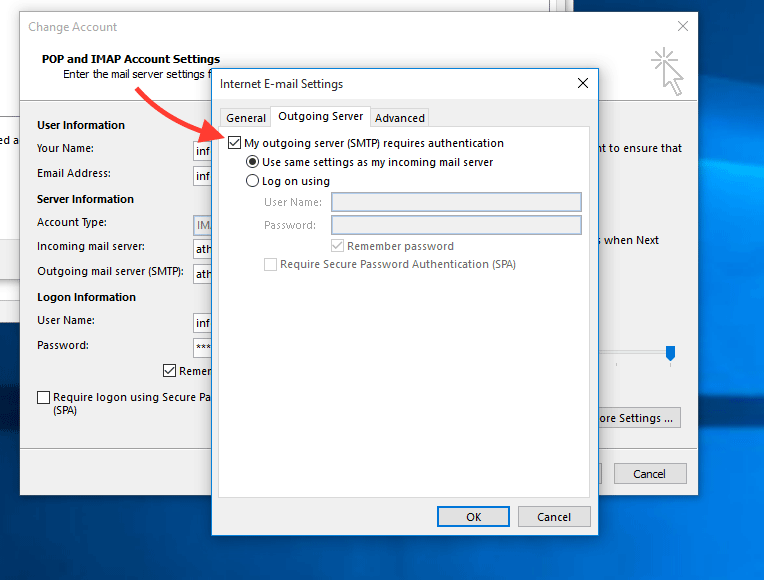
- Select Use same settings as my incoming mail server.
- Open the Advanced tab.
- Enter 465 in the box next to Outgoing server (SMTP).
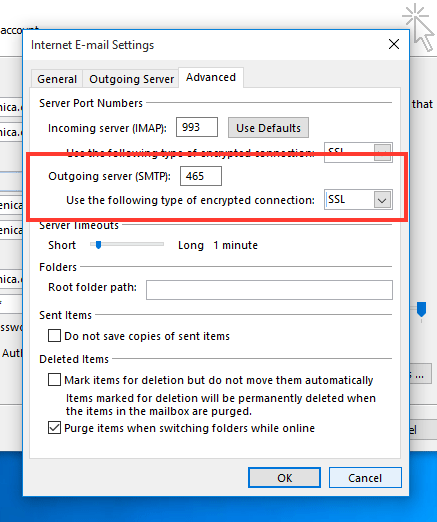
- In the Use the following type of encrypted connection drop-down menu, select“SSL“.
- Save your changes by clicking OK.
Error 503 still occurs
If you have set up your email sending software correctly and the above error still occurs, please check the following possible reasons for the error.
1. Full email inbox
Check whether your email inbox may be full. If it is full, free up some space and try sending the email again.
2. VPN connection
If your system tries to connect via a VPN while sending an email, you may experience the above error. Before sending/receiving mail , turn off the VPN.
3. Corrupt .PST file
Sometimes the error occurs if you are sending a corrupt Outlook .pst file. For help on how to repair the said file, please visit the Outlook official site.
4. Antivirus or firewall
Rarely, the error is also caused by the setting of an antivirus or firewall program that checks your outgoing email connections. Temporarily turn off the antivirus and firewall on your computer and try sending the email again.
If sending email now works normally, change your antivirus or firewall settings.
For further assistance, please call us on 059 335 000 or email us at info@neoserv.si.

COMMENT THE POST
Your comment has been successfully submitted
The comment will be visible on the page when our moderators approve it.