


- Your cart is currently empty.
How to Reset Your Forgotten WordPress Admin Password
Search results for: ""
Have you ever forgotten your username and password to access the administration of your WordPress website? You can access the administration with a few clicks and set a new password via the cPanel control panel.
Accessing the WordPress administration in three steps
1. Log in to your cPanel via My NEOSERV.
2. Under Softaculous Apps Installer, click on the WordPress icon.  3. Click on the Admin icon.
Change your password in three steps.
After you have successfully logged in to the WordPress site administration, you will need to reset your password. The change can be made in three easy steps.
- Select Users-> Your Profile from the menu. Your profile name is the username you use to access the WordPress administration.
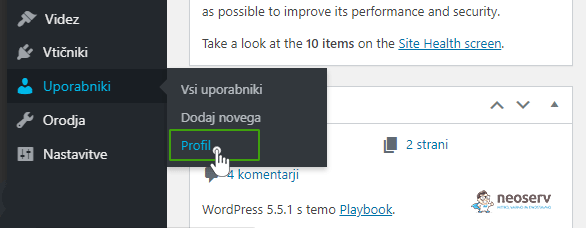
- Under Account Management -> New Password-> Generate Password, create the password you want.
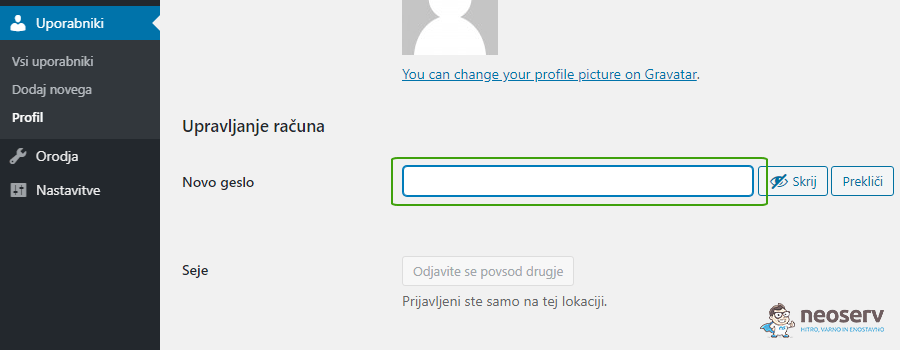
- Click on the Update Profile button.
How do I check which is the administrator’s email address?
Forgot which is the email address you use to log in to the WordPress administration? You can find it in the database via phpMyAdmin in the cPanel control panel.
1. Log in to the cPanel control panel (login instructions).
2. In the DATABASES section, locate the phpMyAdmin icon and click on it. Once clicked, a tool will open in a new tab that you can use to view and edit your databases.

3. On the left-hand side, select the database of your WordPress website. Then click on the _users table in the drop-down menu and check the user_email column. There you will find the administrator email address.

You will find information about which database your WordPress website uses in the wp-config.php file. This file is located in the folder where you installed WordPress. Open the file and look for the DB_NAME record. The name of the database will be displayed next to it.

COMMENT THE POST
Your comment has been successfully submitted
The comment will be visible on the page when our moderators approve it.