


- Your cart is currently empty.
My IP Address is Blocked – How to Unblock It
Search results for: ""
If you receive a block notification when accessing cPanel, the FTP server, your email account or a website, or if you simply cannot connect to the server, your IP address may be temporarily blocked. This is part of a server security mechanism that automatically detects suspicious or repeated failed login attempts and restricts access to protect services from abuse and attacks.
How To Unblock An IP Address In My NEOSERV?
In the My NEOSERV client portal, you can quickly check whether your IP address is temporarily blocked by the firewall and unblock it if necessary.
- Log in to My NEOSERV.
- On the main page of the client portal, locate the section:
Are you unable to access your server?
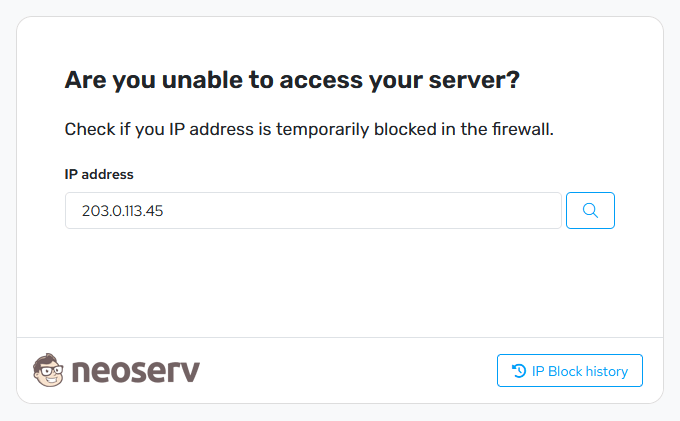
- In the
IP addressfield, enter the IP address you want to unblock (your current IP address is already automatically filled in). - Click the magnifying glass icon to check whether the IP address is blocked.
- If the IP address is blocked, click the Unblock button to remove the block.
By clicking the IP Block history button, you can also review records of previous IP blocks.
Example: IP Address Blocked
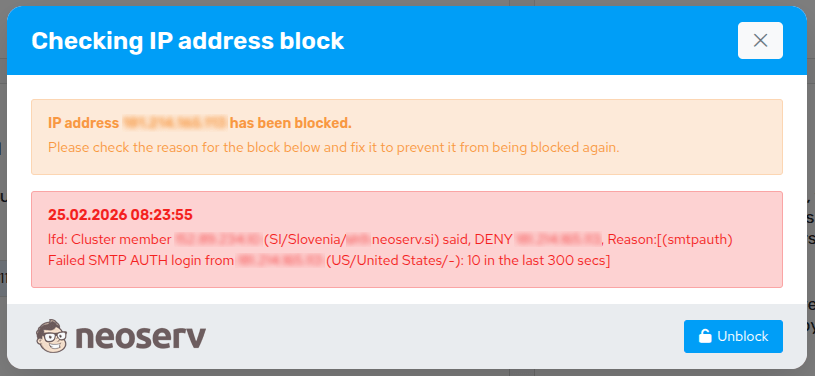
If the IP address is blocked, a notification will be displayed showing the reason for the block and the time it was triggered.
Example: IP Address Not Blocked

Access to the server from this IP address is not restricted, therefore the issue is not caused by an IP address block.
Why Does An IP Address Get Blocked?
An IP address block is an automatic security mechanism that prevents abuse and attacks on the server.
The most common reasons for an IP address block are:
- multiple consecutive failed login attempts to cPanel, FTP, an email account or Webmail,
- an incorrectly saved password in an email client (Outlook, Thunderbird, Apple Mail, etc.),
- too many simultaneous connections to the FTP server,
- a script or application using incorrect login credentials,
- automated login attempts, also known as brute-force attacks.
How To Prevent A Repeated Block?
If you unblock your IP address but the underlying cause is not resolved, the block may occur again.
We recommend checking:
- whether correct server access credentials are saved on all your devices,
- whether the correct password is saved in all email clients,
- whether your website or application sends email using the correct login credentials,
- whether you updated the password on all devices after changing it,
If blocks occur frequently, we recommend reviewing all active devices and applications used to access your services.
For additional assistance, you can call us at +386 59 335 000 or email us at info@neoserv.com.

COMMENT THE POST
Your comment has been successfully submitted
The comment will be visible on the page when our moderators approve it.