


- Your cart is currently empty.
Outlook Error – We Couldn’t Create the Outlook Data File
Search results for: ""
If you try to add a Gmail account in Outlook, you may get an error message in some cases:
“Something went wrong. We couldn’t create the Outlook data file. Make sure the disk you’re saving to isn’t full and isn’t write-protected and that the file isn’t being used.” 
The most common reasons for the error are:
- a full disk on which the user has Outlook loaded,
- an error in Outlook,
- an error in Outlook’s Simplified Account Creation Wizard and the resulting corruption of system files or records,
- Gmail security settings do not allow adding a Gmail account to Outlook.
The problem is therefore not related to the email server itself, but directly to the Outlook client. This is evident from the fact that all other email inboxes work without problems. If the problem was with the server, all email accounts would have experienced the error.
How to resolve the error We couldn’t create the Outlook data file
Follow these steps to fix the We couldn’t create the Outlook data file error. After each step, check that the error is resolved.
- Check that the disk on which you have Outlook loaded is not full.
- Restart Outlook.
- Run the REPAIR operation on the Office software package. You can find the procedure to perform this step on the official Microsoft website.
- Disable the Simplified Account Creation Wizard:
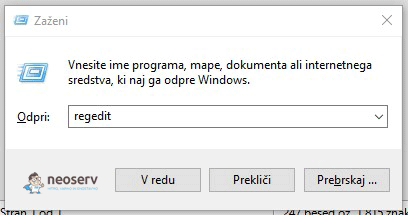
- In Windows, press the Windows key + R.
- In the newly opened window, type: regedit.
- In the menu, look for HKEY_CURRENT_USER\SOFTWARE\Microsoft\Office\16.0\Outlook\setup.
- Move to the selected folder and right-click on it.
- Select New > DWORD (32-bit) Value.
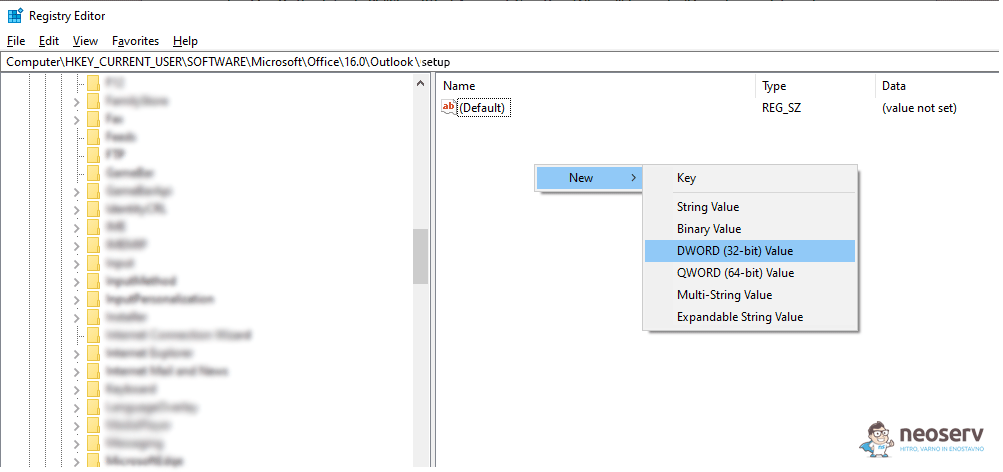
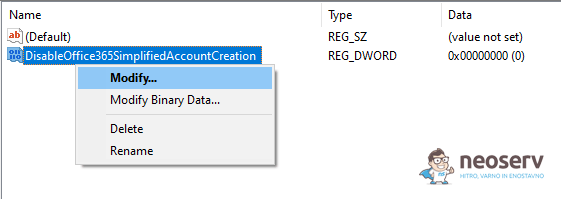
- Type DisableOffice365SimplifiedAccountCreation and press Enter.
- Right-click on the newly created item and select Modify.
- In the newly opened window, set the value to 1 and click OK.
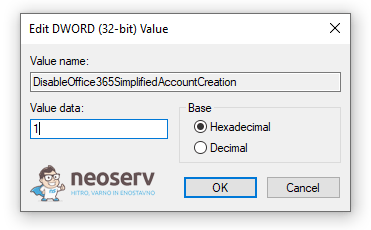
You have now disabled the Simplified Account Creation Wizard. In case the error still occurs, then the PST file may be corrupted. To help you fix this error you will find the Outlook Error Fix: 0x80040600 post.
For further assistance, you can call us on 059 335 000 or email us at info@neoserv.si.

COMMENT THE POST
Your comment has been successfully submitted
The comment will be visible on the page when our moderators approve it.